
Downloaded the beta, definitely going to give it a try  .
.
.

 Topic: Why is it so hard to find a decent image organizer? (Read 288,972 times)


 .
.


 .
. .
.

Daminion took a LONG time to import my pictures folder (about 34 GB in just over 8 hours) but it's been smooth since.
- No configuration at all.
- For my 200MB cliparts folder it created 90MB hidden directory full of thumbnails.
That seems excessive, here it took about an hour to do 115GB, (555 directories, 43515 photos).
No warning before any changes or edits buffering. I had wanted to test it on my photos folder and I am lucky I did not. It would mess up my existing tags completely.
 .
.
Btw, is Daminion non-destructive, as in, can I safely let it catalog my image folder without it writing EXIF data to all images or something sinister like that?
Interface is very slow while importing -- image properties takes 3-4 seconds to update on a quad-core
Import from camera would be nice, but I gather from the forums it is in the works
The catalog generated is small (only 55MB vs 5GB for exifPro) but is taking a very long time to load after updating to the latest beta - just finished after perhaps 2 or 3 minutes.
Build 494 crashed when changing views to DetailsWithPreviewTop, though it's something I can't reproduce. This was after creating, importing small catalog.
I had tried Daminion few days ago and didn't like three things:This is something that can implement in the future, but at the moment we would like to polish the default UI, like any web-service.
- No configuration at all.
- For my 200MB cliparts folder it created 90MB hidden directory full of thumbnails.
No warning before any changes or edits buffering. I had wanted to test it on my photos folder and I am lucky I did not. It would mess up my existing tags completely.
The catalogue is 58.6MB but the ~Thumb directory is 2.29GB.
Some way to minimise the program while it's cataloguing would be nice.
Taking a peek at one of the data files in the thumbnail folder, it looks as if they contain the image in jpeg format at sizes 100, 200, and 400, encoded with a quality setting around 90. This probably explains why you are seeing such massive thumbnail folders for clipart.
Some settings to control what sizes are stored and at what quality might be nice.

Btw, anyone else ended up with the thumbnail view starting to flicker some images randomly, or even showing empty rectangles for some, after a while of scrolling and scaling?
The speed of importing depends from what image formats you are importing. 100 JPEG (8-12 MP) files on my CoreDuo E6750 2.66 Ghz were imported for ~1 min.
Some background processes might affect to the performance. Import speed of video files is slower.
QuoteNo warning before any changes or edits buffering. I had wanted to test it on my photos folder and I am lucky I did not. It would mess up my existing tags completely.
May be "Auto-Sync Tags with Metadata" feature should be turned off by default?
May be we can optimize it later. At the moment we focused on the performance. A few extra GBs might not a big deal on these days for a large media archive library, isn't it?
QuoteBtw, anyone else ended up with the thumbnail view starting to flicker some images randomly, or even showing empty rectangles for some, after a while of scrolling and scaling?
Empty rectangles means that Daminion is not yet loaded the thumbnails for this images yet (from cache). Switching off the "Metadata Syncing" might help to improve the performance..
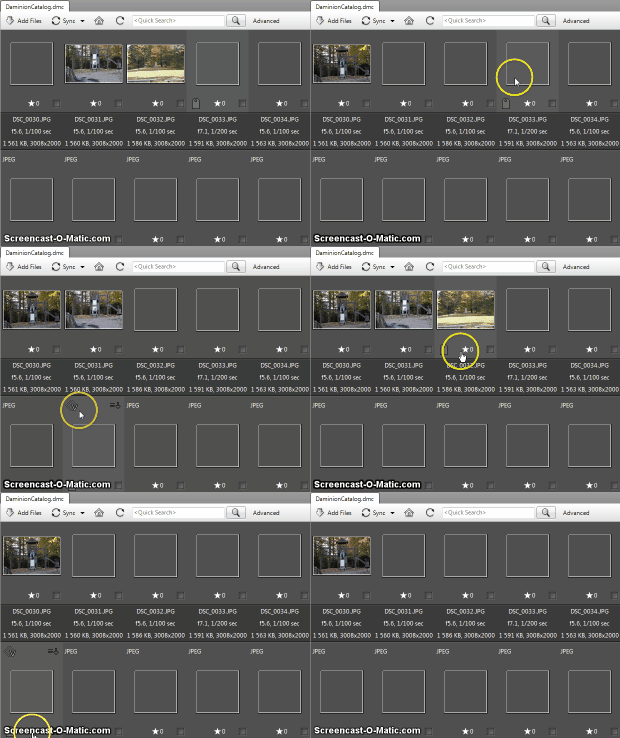 .
.I have sync turned off, and I believe it is a glitch of some sort. I just tricked it into doing it again and recorded this short example:
[screenshot]
Basically, I am looking at a window where the first three images are constantly flickering between an empty white rectangle and the actual landscape image (this flickering is not that obvious in the screen recording), the rest of the images are empty. When I move the mouse around, the empty squares randomly light up with the image as in the video.
Hmm... Does the problem 100% reproduced on your side? Could you please provide me with steps to reproduce the issue?
When adding tags like People or Keywords in the Properties pane, pressing return adds the tag and lets you write another -- could you
please make pressing Esc close the edit box? (as in workflow: Ctrl-D -> edit tags -> Esc)
When adding tags from the Properties pane, there is a button to undo all changes at the bottom. If you make changes using keyboard shortcuts (like change label or rating), there doesn't seem to be a way to undo them. Is this by design? I can understand the keyboard shortcuts need to write the tags right away to work fast, but a Ctrl-Z undo could be handy if you make a mistakeYes, you are right - this could be handy feature. And this is something that could be implemented. I can't to say when until we'll release 3-4 core features (Rescan Folders, Camera Importer, User Roles,...). We have our internal vote system for product features based on the user feedback. So each suggestion adds a vote to a certain feature.
Some better tag management and assignment tools would be nice -- from the grayed out options in the menus I assume it will become possible to assign tags from the Catalog Tags pane at some point?
Given the comments about how adding new images makes the program slow to use, maybe add an option to pause the process? As far as I can tell you can only cancel it from the progress indicator
Thank you.After repeating those steps 3-4 times it usually goes wrong while scaling down to min size.
When adding tags like People or Keywords in the Properties pane, pressing return adds the tag and lets you write another -- could you please make pressing Esc close the edit box? (as in workflow: Ctrl-D -> edit tags -> Esc)
Why you need to close the EditBox? If you need to clear the EditBox you can press Ctrl + Z.
.QuoteSome better tag management and assignment tools would be nice -- from the grayed out options in the menus I assume it will become possible to assign tags from the Catalog Tags pane at some point?
Do you mean dragging tags to the selected images?
We had the Pause option sometimes ago, but then it was removed to simplify the UI. As a workaround I can suggest you to cancel the import process, and then do some actions, then import the last folder again. All the previously imported files will be missed and import will be continued from the moment when you stopped it.
QuoteIf adding files to the catalog didn't slow down the program, I might have liked a feature to automatically monitor a folder and add any new images to the catalog
We'll implement it partially: currently we are working on "Rescan Folders" feature that is the same as "Watched Folder" but launched manually (from the Context menu of Folders). After that it could be added an option to make it automatic.
.2. You can select to backup your catalog with or without thumbnails. Because thumbnails are something that could be regenerated later, from actual files;
Original address: https://www.donationcoder.com/forum/index.php?topic=7513.0