


Hi,
I'm having a bit of a problem in C#. I have an MDI Form that contains a Treeview (directly on the form, docked left). The remaining space contains some MDI child windows.
When I programmatically add a treenode to the treeview at runtime, I want the user to be able to edit the default label text of the new node immediately. This saves the trouble of either a dialog to prompt for the name of the new element, or having the user click the node to change the name manually. The code I have so far:
The string id is the unique key and the Find function theoretically always returns one node. The code works fine, the node gets selected, is visible and the label of the node is in edit mode so the user can start typing a name.
The problem is, when I start typing a name, the label accepts one character and then the last active MDI child window is activated and the rest of what I type is put in the MDI child window:
If there are no MDI child windows then it works fine. I tried tvwProjects.Focus() before calling BeginEdit() but that makes no difference.
Any one got an idea?
I'm having a bit of a problem in C#. I have an MDI Form that contains a Treeview (directly on the form, docked left). The remaining space contains some MDI child windows.
When I programmatically add a treenode to the treeview at runtime, I want the user to be able to edit the default label text of the new node immediately. This saves the trouble of either a dialog to prompt for the name of the new element, or having the user click the node to change the name manually. The code I have so far:
Code
        private void SelectAndEditNode(string id)
        {
            TreeNode[] temp = tvwProjects.Nodes.Find(id, true);
            if (temp != null && temp.Length > 0)
            {
                tvwProjects.SelectedNode = temp[0];
                tvwProjects.SelectedNode.EnsureVisible();
                tvwProjects.SelectedNode.BeginEdit();
            }
        }
The string id is the unique key and the Find function theoretically always returns one node. The code works fine, the node gets selected, is visible and the label of the node is in edit mode so the user can start typing a name.
The problem is, when I start typing a name, the label accepts one character and then the last active MDI child window is activated and the rest of what I type is put in the MDI child window:
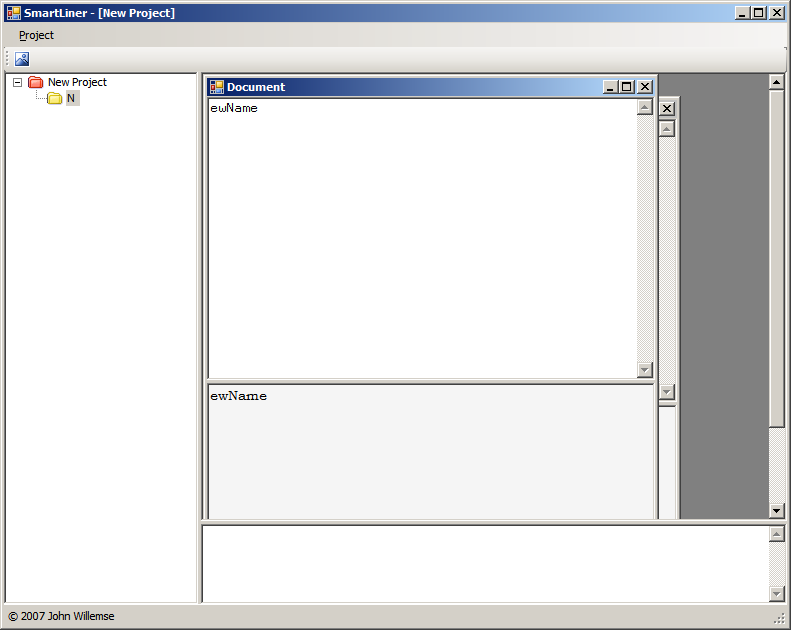
If there are no MDI child windows then it works fine. I tried tvwProjects.Focus() before calling BeginEdit() but that makes no difference.
Any one got an idea?
 I might work I think!