DonationCoder.com forum
 
Read-only archive. This is a static copy of the DonationCoder.com forum. Reading and searching work as before; logging in, posting and private messages do not.
Archive of 2026-10-21 · About this archive · Main site

Author Topic: Need Program- I need a program to automatically generate notes and reports  (Read 14,533 times)

Vicki2222

  • Participant
  • Joined in 2007
  • *
  • Posts: 11
Hello, I'm a social worker with almost no computer skills.  So,  I need something super simple- regardless of cost.
I have to write case notes- there are about 100 topics that I write over and over again- same exact thing. 

I want a program to write my notes for me.  This is what I'm looking for.

Name - I type in name

INTRODUCTION (drop down box)
- home visit
- face to face visit
- etc.

REason for contact
- med check
- problem
- etc. (various other topics in this list)

-----------

That's basically what I want to see.  Then I want to check off the topics I need to create the summary.  Then it automatically creates the report for me.  I'd like to take this one step further and be able to edit my final note and be able to add extra information.

Does anyone know of a program that I can create this with?  I hate writing notes and it takes up all my time.  THe program would similar to mouser's clip box and form generator programs. 

Mouser's clip box program almost worked for me, but it deleted the information I wrote after a few days, automatically!!  I could not install his form generator program for some reason and it's probably not sophisitcated enough for my needs.  HELP!!!

Vicki

Vicki2222

  • Participant
  • Joined in 2007
  • *
  • Posts: 11
I think I might have a solution to my own problem.  I found a program called Paraphrase
http://www.lifesystemssoftware.com/tv/13/
is their site, where you can get it.

But, if anyone has anything eaiser, i'm still open for options

mouser

  • First Author
  • Administrator
  • Joined in 2005
  • *****
  • Posts: 40,931
    • Gathering Badge
    • Plugin Coding Medal
    • Participated in NANY Challenge Seventeen Times
    • Cody Award
    • Coding Snacks
    • Volunteers/Staff
id be interested in hearing about what you finally like best and more about what features you might want - it may be something i could extend my program "The Form Letter Machine" to do.

Vicki2222

  • Participant
  • Joined in 2007
  • *
  • Posts: 11
Mouser, your form letter machine is acutally very close to what I'm looking for.  Unfortuantaly, my computer will not let me run it. I wrote to you before about the problem, and we were not able to fix it.

If I were able to use your form letter machine, here are the things that would make it PERFECT
1.  Drop Down Boxes on catagories- Since i have so many topics, the list could get a little overwhelming. 
So I would need to be able to click on a topic, and then click on the subjects needed in my report.
2.  Ability to edit the document once it is created by your form letter machine.  I'd need to be able to add my own text to add details that are not "standard responses" 
3. For my computer to let me run it.  I could try it on another computer, I do have a laptop I havn't tried it on yet. 

I think there really is a market for your ForM letter machine- if you could advance it a little-
Social workers, support coordinators, teachers, lawyers, or anyone else that had to keep tedious case notes would love it.  ;D

Darwin

  • Charter Member
  • Joined in 2005
  • ***
  • Posts: 6,985
    • Gathering Badge
Just out of morbid curiosity, why won't the Form Letter Machine run on your machine, Vicki? Or is this one of those questions that warrants a "Duh, if I knew why it won't run on my machine, I'd be running it!" response?
"Some people have a way with words, other people,... oh... have not way" - Steve Martin
« Last Edit: February 09, 2007, 10:29 PM by Darwin »

Vicki2222

  • Participant
  • Joined in 2007
  • *
  • Posts: 11
It's one of those "um, du, did I forget to mention I am a blonde" questions.

I have tried to run the form letter machine about 10 times. 
I am able to complete the wizzard, but when I try to open, I get-
" Form letter machine exe. has encountered a problem and needs to close"
Not sure how to tell why!!

mouser

  • First Author
  • Administrator
  • Joined in 2005
  • *****
  • Posts: 40,931
    • Gathering Badge
    • Plugin Coding Medal
    • Participated in NANY Challenge Seventeen Times
    • Cody Award
    • Coding Snacks
    • Volunteers/Staff
that's really odd..
what operating system are you using?
can you use the default test project -- is it only when you try to create your own project that it goes crazy?

Vicki2222

  • Participant
  • Joined in 2007
  • *
  • Posts: 11
Microsoft Windows Xp
Media Center Edition
2002

Vicki2222

  • Participant
  • Joined in 2007
  • *
  • Posts: 11
I'm not sure if I'm answering your question, but
It won't even run.  Wizzard completed, but it wont run.

cranioscopical

  • Friend of the Site
  • Supporting Member
  • Joined in 2006
  • **
  • Posts: 4,776
    • Cody Award
    • Official Forum Clown
    • rotten turkey sandwich - Rotten Turkey Sandwich
Vicki222
Quote
" Form letter machine exe. has encountered a problem and needs to close"
Not sure how to tell why!!

I'm all too familiar with this message :)
FWIW
Do you have any non-standard context-menu items?
One of mine caused all kinds of things to fall over.
Chris

Darwin

  • Charter Member
  • Joined in 2005
  • ***
  • Posts: 6,985
    • Gathering Badge
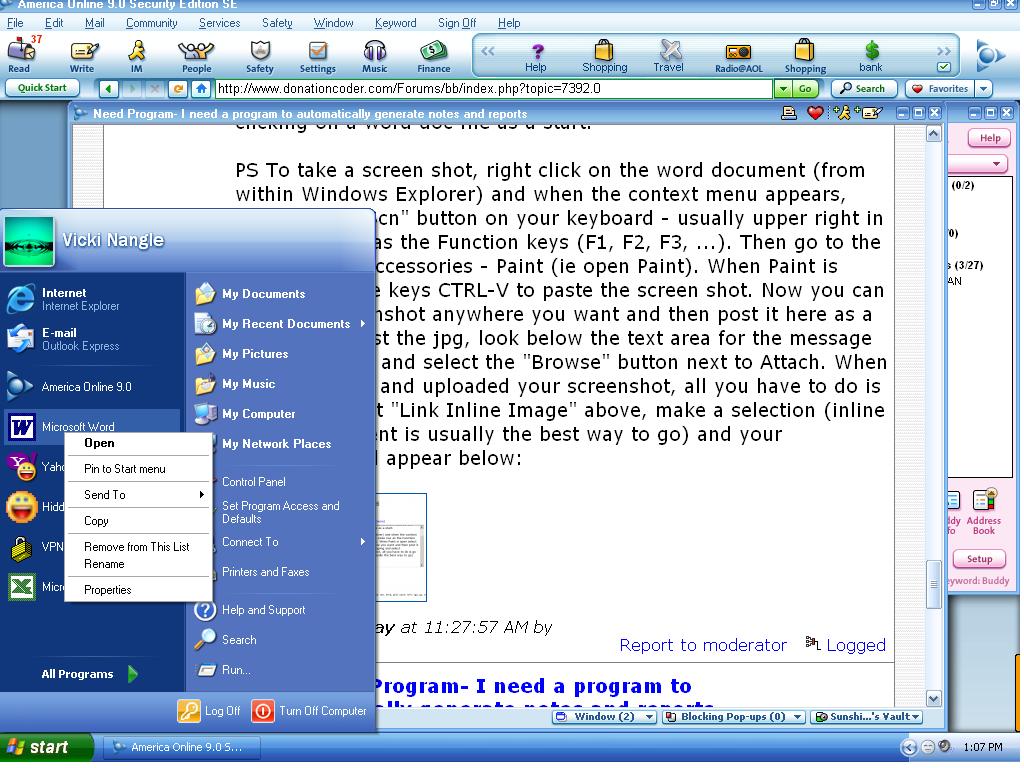
Vicki - context-menu items are those that appear when you select a file or a folder (anywhere on your computer - start menu, desktop, Windows Explorer, Word, Internet Explorer, etc.) and then click the right mouse button. When you do that, what sort of options are you presented with? If you are able to, a screenshot would be the easiest way to convey this information and I'd suggest right clicking on a word doc file as a start.

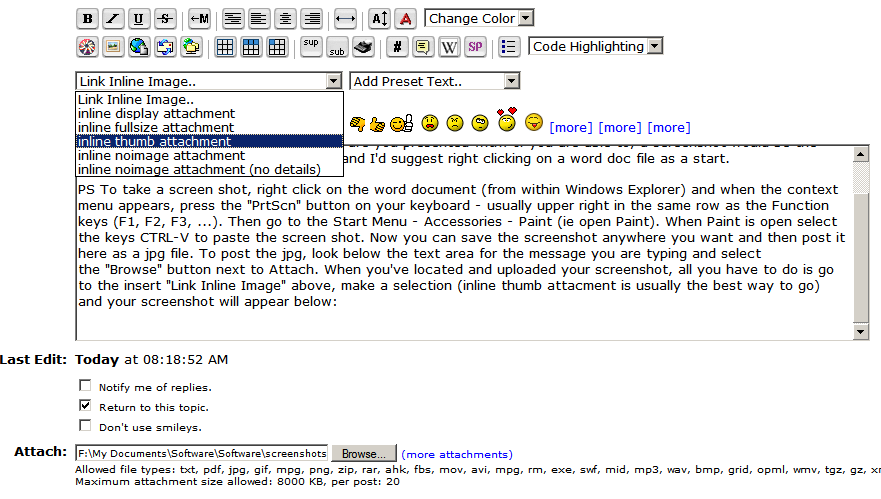
PS To take a screen shot, right click on the word document (from within Windows Explorer) and when the context menu appears, press the "PrtScn" button on your keyboard - usually upper right in the same row as the Function keys (F1, F2, F3, ...). Then go to the Start Menu - Accessories - Paint (ie open Paint). When Paint is open select the keys CTRL-V to paste the screen shot. Now you can save the screenshot anywhere you want and then post it here as a jpg file. To post the jpg, look below the text area for the message you are typing and select the "Browse" button next to Attach. When you've located and uploaded your screenshot, all you have to do is go to the insert "Link Inline Image" above, make a selection (inline thumb attacment is usually the best way to go) and your screenshot will appear below:

[attachthumb=#]
"Some people have a way with words, other people,... oh... have not way" - Steve Martin
« Last Edit: February 10, 2007, 05:27 PM by Darwin »

mouser

  • First Author
  • Administrator
  • Joined in 2005
  • *****
  • Posts: 40,931
    • Gathering Badge
    • Plugin Coding Medal
    • Participated in NANY Challenge Seventeen Times
    • Cody Award
    • Coding Snacks
    • Volunteers/Staff
Quote
I'm all too familiar with this message
Chris, you're not saying you get that on The Form Letter Machine are you??

Vicki2222

  • Participant
  • Joined in 2007
  • *
  • Posts: 11
Wow Darwin.  You should write computer manuals-awesome directions.  I was able to save a screenshop- to my utter amazement- with your directions.  However, I don't have all the commands that you show on your screenshot- no link button.  I am so excited that I now know how to save screenshots!!

Anyways- I wrote down what happens when I write click word

-Open
-Pin to start menu
- send to
- copy
- remove from this list
- rename
- properties.

Vicki2222

  • Participant
  • Joined in 2007
  • *
  • Posts: 11
lets see if this works
[attachthumb=#]

Darwin

  • Charter Member
  • Joined in 2005
  • ***
  • Posts: 6,985
    • Gathering Badge
Sorry, Vicki, my fault. You only get the option for uploading attachments when you use the "reply" button at the bottom of a post, rather than the "quick reply" option at the bottom of the discussion.

I'll defer to mouser and others here in troubleshooting your problem with The Form Letter as I've never used it. Looks like cranialscopical (love that name!) has a similar problem. I suspect that if this does have anything to do with your context menu, you'll need to try a few files/folders before you see the culprit. As the name suggests, the context menu is context specific so the offending add-in (if there is one) will only reveal itself when the context is right. You could install Nirsoft's ShellExView as a way of looking at all of your context menu add-ins in one shot. If you did that, and then were able to post a screenshot of what it reveals, it might help mouser determine if there is indeed a shell extension conflict issue to be resolved.

Good luck!
"Some people have a way with words, other people,... oh... have not way" - Steve Martin
« Last Edit: February 10, 2007, 08:48 PM by Darwin »

cranioscopical

  • Friend of the Site
  • Supporting Member
  • Joined in 2006
  • **
  • Posts: 4,776
    • Cody Award
    • Official Forum Clown
    • rotten turkey sandwich - Rotten Turkey Sandwich
Quote
I'm all too familiar with this message
Chris, you're not saying you get that on The Form Letter Machine are you??
No, no, relax.  Well... I'd hope not but I don't use it, haven't tried it (might if you paid me enough). :)
XYplorer, however, fell over whenever I tried to use it.
After some trial and error I found that a context-menu item (Align Icons, as it happens) was in conflict with XYplorer.  I disabled Align Icons and that was the end of the issue.  (Now I simply enable Align Icons when I want to use it and then disable it afterwards.)
Most of us have had this sort of trouble at some time, so I thought it might be an area to investigate regarding Vicki2222's problem.  Of course that may be magical thinking of the kind "The last time this worked properly I'd just fallen down three flights of stairs, so I'd better do so this time..."

And, Darwin, thanks for clarifying what I should have taken the time to explain. You, of course, communicate far more lucidly than I.
Chris

Vicki2222

  • Participant
  • Joined in 2007
  • *
  • Posts: 11
is there a way to take a screenshot from a web page?  If I right click, I don't get the "print screen" button"

Darwin

  • Charter Member
  • Joined in 2005
  • ***
  • Posts: 6,985
    • Gathering Badge
You should be able to use the "Print screen" button (PrtScn) anywhere - if you want to take a screenshot of what you're viewing in your web browser, just tap the PrtScn button and then follow the steps above to paste into Paint and save it.
"Some people have a way with words, other people,... oh... have not way" - Steve Martin

Vicki2222

  • Participant
  • Joined in 2007
  • *
  • Posts: 11
Oh, your right, (du) 
I was thinking you clicked "print screen" when you right clicked. 

Vicki2222

  • Participant
  • Joined in 2007
  • *
  • Posts: 11
Well, it looks like my obsessive compusive disorder has helped me out again.  I found a program that seems to be working for free
http://www.phraseexpress.com/docs/09/shop.php

It's not exactly what I wanted, but I think i can get used to it, and it is going to save me a lot of time.  Now I can put my mind on auto pilot when I write my notes.  Thanks for all your help

mouser

  • First Author
  • Administrator
  • Joined in 2005
  • *****
  • Posts: 40,931
    • Gathering Badge
    • Plugin Coding Medal
    • Participated in NANY Challenge Seventeen Times
    • Cody Award
    • Coding Snacks
    • Volunteers/Staff
I think you've ended up finding some nice programs vicki - i suspect your searching has found some programs that others will find useful as well.

Original address: https://www.donationcoder.com/forum/index.php?topic=7392.0