DonationCoder.com forum
 
Read-only archive. This is a static copy of the DonationCoder.com forum. Reading and searching work as before; logging in, posting and private messages do not.
Archive of 2026-10-21 · About this archive · Main site

Author Topic: QuickSoundSwitch  (Read 5,309 times)

lanux128

  • Global Moderator
  • Joined in 2005
  • *****
  • Posts: 6,277
    • Coding Snacks
    • Volunteers/Staff
    • Gathering Badge
    • Participated in NANY Challenge Once
    • Linux User
QuickSoundSwitch
« on: January 31, 2007, 07:10 AM »
introducing QuickSoundSwitch... a nice freeware with command-line support, no need to install.. :)

Quote from: web-site
QuickSoundSwitch is a small System Tray tool, which allows you to switch the default sound device with only one click.
It is useful for PCs with more than one soundcard (or for example soundcard + usb headset..)! A lot of windows programs like games, media players etc. are using the default windows sound device.
So, since I got two soundcards in my computer, I really got pissed about changeing the output device in the Control Panel all the time.

I was searching the web, but could not find a program to get rid of this..

SysTray menu
[attach=#]

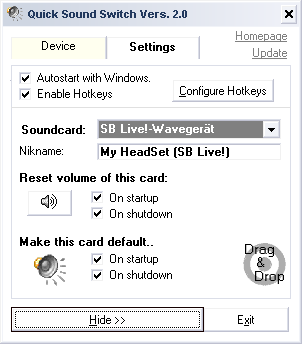
Settings
[attach=#]
brotherS

  • Master of Good Ideas
  • Honorary Member
  • Joined in 2005
  • **
  • Posts: 2,261
Re: QuickSoundSwitch
« Reply #1 on: January 31, 2007, 08:20 AM »
Ah, looks good! I'm uxing the kX project driver for my SoundBlaster Live! soundcard and use AutoHotkey to switch between different kX settings. QuickSoundSwitch would be a good alternative if it doesn't use too many resources.
Thank you.

Original address: https://www.donationcoder.com/forum/index.php?topic=7275.0