I think of a tool to select and copy/paste text from image files.
IDEA: OCR & paste
« on: August 15, 2005, 07:43 PM »


 Topic: IDEA: OCR & paste (Read 76,484 times)


Problem is Kleptomania (and every other software I saw to do this type of thing) cannot OCR a picture displayed on screen.
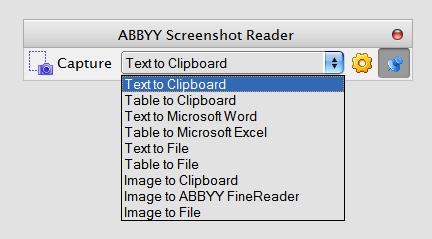
Recognizes text in any type of document (HTML, Word, Notepad, PDF, BMP or JPG image) or in any part of the screen and saves it to clipboard.
Grabs texts that cannot be saved or printed
Recognizes texts in any language that cannot be saved or printed
Works with all American and European character sets, including the Central-European and Cyrillic
Captures "hidden" text ignoring blocking scripts on Internet pages

ABBYY screenshot reader can capture everything.
I've tried Screen Desktop OCR... it seems like a Kleptomania clone to me. There are about 3-4 programs that claim to do the same thing and do it almost exactly the same way! (Even down to the program icon...
I like ABBYY's claim to be able to use a digital camera as a scanner, that's awesome... but the price tag is, needless to say, pricey!

Digital Camera OCR
Can your camera or smartphone replace a scanner for document capture with OCR? The answer is a resounding YES! TopSoft, Ltd, a leading developer of OCR and image processing software has created an application specifically for OCR data capture with digital cameras and smartphones called TopOCR.



would just pop-up a transparent, non-intrusive inputbox, allow you to type into it and when you hit enter it disappears and copies the text to the clipboard.
Problem is Kleptomania (and every other software I saw to do this type of thing) cannot OCR a picture displayed on screen. This would be an awesome feature... though no doubt harder.
AIR-search in images: Search photos and graphics stored in your notes to find embedded typed or handwritten text. Use it for snapshots of whiteboards, product labels, in-store packaging and pricing, business cards, trade show badges, and more.
Unless I'm missing something, this doesn't look like OCR...
#singleinstance force
;Run the script, then enter Win+C and type your text. Hitting the enter key, will hide the window and copy what you wrote to the clipboard. Ready to be pasted elsewhere.
coordmode, mouse, screen
;The codeline Enter:: means that hitting enter will close the program and copy the text. This makes it very quick to close, but it disables your enter key when elsewhere when the program is running. What is the workaround for this? I want the code in the Enter:: section to be executed only if the gui
#z::
gosub, BuildGui
return
Enter::
GuiControlGet, MyEdit
if ErrorLevel = 0
{
clipboard = %ControlText%
Gui, destroy
SetTimer, UpdateGUI, Off
}
return
#q::ExitApp
BuildGui:
CustomColor = EEAA99 ; Can be any RGB color (it will be made transparent below).
Gui, +AlwaysOnTop +LastFound +Owner ; +Owner prevents a taskbar button from appearing.
Gui, Color, %CustomColor%
Gui, Font, s20
Gui, Add, Text, w500 vMyText c800080, XXXXX YYYYY ; XX & YY serve to auto-size the window.
Gui, Add, Edit, vMyEdit
GuiControl, Move, MyEdit, x10000 y10000
;GuiControl, hide, MyEdit
; Make all pixels of this color transparent and make the text itself translucent (150):
WinSet, TransColor, %CustomColor% 200
Gui, -Caption ; Remove the title bar and window borders.
SetTimer, UpdateGUI, 50
Gosub, UpdateGUI ; Make the first update immediate rather than waiting for the timer.
return
return
UpdateGUI:
MouseGetPos, MouseX, MouseY
msgWidth = 570
msgHeight = 120
SysGet, MonitorWorkArea, MonitorWorkArea, %A_Index%
maxRight := (MonitorWorkAreaRight - msgWidth)
maxBottom := (MonitorWorkAreaBottom - msgHeight)
;msgbox, msgWidth:%msgWidth%`nmsgHeight: %msgHeight%`n`nMouseX: %MouseX%`nMouseY: %MouseY%`n`nMonRight: %MonitorWorkAreaRight%`nMonBot: %MonitorWorkAreaBottom%`n`nMaxRight: %maxRight%`nMaxBot: %maxBottom%
if(MouseX > maxRight)
{
MouseX = %maxRight%
}
if(MouseY > maxBottom)
{
MouseY = %maxBottom%
}
Gui, Show, x%MouseX% y%MouseY%
;GuiControl,, MyText, x%MouseX% y%MouseY%
GuiControlGet, ControlText, , MyEdit, Text
GuiControl,, MyText, %ControlText%
return
one could -stupidly- argue that it's OCR performed by the user as opposed to the computer

I would love to have a program which would allow me to select part of my screen, perform OCR on it and copy the recognized text to the clipboard.
I'd like to conjure up a tiny application which allows you to "write directly to the clipboard" in the easiest, fastest most intuitive and least intrusive way. I'd call it ClipWrite.

one could -stupidly- argue that it's OCR performed by the user as opposed to the computer
I thought that was traditionally known as "reading"QuoteI would love to have a program which would allow me to select part of my screen, perform OCR on it and copy the recognized text to the clipboard.
That's exactly what Kleptomania does.QuoteI'd like to conjure up a tiny application which allows you to "write directly to the clipboard" in the easiest, fastest most intuitive and least intrusive way. I'd call it ClipWrite.
Good luck with that, but, you could always keep a small fast editor like TED Notepad running in the background?

I would love to have a program which would allow me to select part of my screen, perform OCR on it and copy the recognized text to the clipboard.
QuoteI would love to have a program which would allow me to select part of my screen, perform OCR on it and copy the recognized text to the clipboard.
I'm using for this purpose JOCR. Not very new, not always 100 % reliable, but free, simple and does what it's supposed to.
It looks like JOCR requires Msoffice to be installed? I do nto have it and it gives me error.
JOCR requires Microsoft Office 2003 or higher version.
kleptomania`s success rate is not very high.I have tried it in xyplorer and gave me gibberish for example.
Original address: https://www.donationcoder.com/forum/index.php?topic=710.0