DonationCoder.com forum
 
Read-only archive. This is a static copy of the DonationCoder.com forum. Reading and searching work as before; logging in, posting and private messages do not.
Archive of 2026-10-21 · About this archive · Main site

Last post Author Topic: Best Archive Manager Review: Suggestions  (Read 117,600 times)

tinjaw

  • I'm so glad breakbeat techno isn't an illegal drug
  • Supporting Member
  • Joined in 2006
  • **
  • Posts: 1,927
    • Participated in NANY Challenge Twice
    • Coding Snacks
    • Military Service Badge - US Army
    • Linux User
Re: Best Archive Manager Review: Suggestions
« Reply #50 on: October 30, 2007, 01:39 AM »
I've been searching (weeks)for:
a explorer-like GUI of Self Package (SFX) where you can drag n' drop files into the archive.(or prompt for password).. the idea is to make it a self-container (the files and the application) for easy distribution of files.. similar to "fSekrit" notes.. making it portable..

That sparks an idea. Well, this may be exactly what you are looking for, but I have never seen fSekrit, so I don't know if it is what you are looking for but...

An EXE that you can just copy/drag&drop where you wanted. For example from USB to desktop and back. If you double-click on the application (run it) it opens up, as it is a SFX and displays the files so you can extract them via double-click or drag&drop. You then close the program. With the you can then just drag&drop files on to the icon and it adds or updates the file into the SFX. You could even have options for it to automatically rename files in the archive with a datetime stamp to create versions of a file instead of overwriting it.

This is one of those ideas that is either 1) a hundred people have already written such an application or B) a hundred people are slapping their foreheads going "Why didn't I think of that? That is such a simple idea."

giorgiotani

  • Honorary Member
  • Joined in 2007
  • **
  • Posts: 2
Re: Best Archive Manager Review: Suggestions
« Reply #51 on: November 02, 2007, 05:34 PM »
Hi iphigenie, as for creation of self extracting archives with PeaZip (btw: today it was updated to 1.9.3 release) the quickest way is using "+ Add to self-extracting archive" entry in SendTo menu.
It can directly send multiple files and directories to a single sfx archive, the number of files which can be passed in that way depends on the host Operating System. The resulting executable is authomatically named as the first selected object.

If you prefer to have more fine grained options you should instead use "+ Add to archive" entry in SendTo, select 7z format (which is the default one) and flag "Create self-extracting archive" checkbox in Options tab; in this way you can add multiple files/dirs at once and you can add/remove items from PeaZip's GUI too.
Another way just a bit different is using "+ Add to separate archive(s)" from context menu, which send each input to a separate archive; that entry is meant to allow users to process in parallel many objects, i.e. a directory of files which I want to be individually compressed, but not consolidated in a single archive (the same, sending multiple objects to be processed in parallel, is possible for extraction too).

mouser

  • First Author
  • Administrator
  • Joined in 2005
  • *****
  • Posts: 40,931
    • Gathering Badge
    • Plugin Coding Medal
    • Participated in NANY Challenge Seventeen Times
    • Cody Award
    • Coding Snacks
    • Volunteers/Staff
Re: Best Archive Manager Review: Suggestions
« Reply #52 on: November 03, 2007, 05:28 AM »
Welcome to the site giorgio! Glad to have you stop by  :up:

iphigenie

  • curiosity FTW!
  • Supporting Member
  • Joined in 2006
  • **
  • Posts: 1,170
Re: Best Archive Manager Review: Suggestions
« Reply #53 on: November 05, 2007, 12:32 PM »
Thanks giorgio  :Thmbsup:

I thought you could do it with peazip but when I tried it it named the file with the name of the first one and I mistakenly thought "hmm, maybe it only does one file at a time". Glad to know my first instinct was right.

Peazip is my compression tool of choice, I have mentioned it here a few times. Clean, simple, powerful enough for everything I can think of but with no unnecessary clutter... just lovely. The name is great too :D
« Last Edit: November 05, 2007, 12:34 PM by iphigenie »

psionics

  • Participant
  • Joined in 2007
  • *
  • Posts: 119
Re: Best Archive Manager Review: Suggestions
« Reply #54 on: November 10, 2007, 07:58 PM »
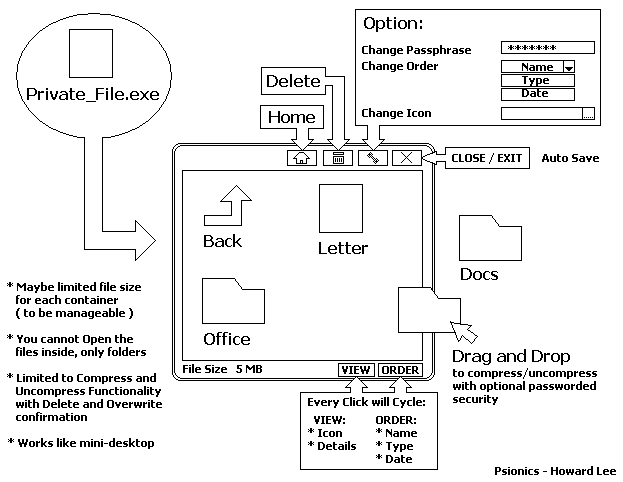
Ok, to clear the info:
im looking for someone who can code this apps. or similar

"a Self Package (SFX) ~ .exe with explorer-like GUI"

* Drag n Drop files inside that box (there is only two way)
* updates(overwrites) the file when there's duplicate
* able to delete the file inside by pressing del key or rightclick delete
* independent, which mean, the extracting and compressing feature in built-in.. like a shell, a single file, self-contained, portable
* wish list: encryption function and password (or else, will just act like the default XP zip folders)

that would be great..


re: tinjaw
somthing like this, fSekrit(link below) try it also - but files are involved
http://www.donationcoder.com/Software/Other/fSekrit/

Welcome to the site giorgio!

thanks for the replies..
« Last Edit: November 10, 2007, 08:03 PM by psionics »

Armando

  • Charter Member
  • Joined in 2005
  • ***
  • Posts: 2,727
    • Coding Snacks
Re: Best Archive Manager Review: Suggestions
« Reply #55 on: November 10, 2007, 10:13 PM »
So I guess peazip can't do that... right?
"I suppose it can be said that I'm an absent-minded driver. It's true that I've driven through a number of red lights on occasion, but on the other hand, I've stopped at a lot of green ones but never gotten credit for it."
Glenn Gould

psionics

  • Participant
  • Joined in 2007
  • *
  • Posts: 119
Re: Best Archive Manager Review: Suggestions
« Reply #56 on: November 13, 2007, 05:46 PM »
nope.. peazip uses right-click.. and has to be, somehow to register in windows registry even if there's a portable version.

i hope someone can develop something like this: (Click ~ to Open)
« Last Edit: November 13, 2007, 08:32 PM by psionics »

kartal

  • Supporting Member
  • Joined in 2008
  • **
  • Posts: 1,529
Re: Best Archive Manager Review: Suggestions
« Reply #57 on: November 09, 2008, 01:59 AM »
I am looking for a compression utility that does not install itself. I am sooo frigging tired of installers. Even portable versions of compression apps are coming in installer form which is beyond me.

ajp

  • Participant
  • Joined in 2006
  • *
  • Posts: 22
Re: Best Archive Manager Review: Suggestions
« Reply #58 on: February 10, 2009, 05:55 PM »
I have been a faithful user of Filzip for ages. www.filzip.com. It hasn't been updated for a while, but it does the trick pretty well. It's free, lightweight, and the interface resembles the classic Winzip one, but it includes a tree view at the left, which is quite convenient (I know, Winzip has it too, but back in the day, it didn't). It even has a (limited) cmd line interface. The only glitches I have found are:
1. Mouser points out that Winzip and Winrar can uncompress many files at once, each in its own subdir. I have found no other program to do this, and sometimes it is so necessary.
2. Sometimes I have problems decompressing RAR archives with "nonstandard" characters on the contents' file names. I resort to command-line unrar.exe in these cases.
3. Some newer programs can read and extract files from ISO CD images. Filzip can't. This is not compression pre se, but it can be useful.

Every now and then I look around for something newer and better, but I keep coming back. I am reading the other suggestions and see if there is anything new under the sun. Right now I'm trying QuickZip and looks good. I'll let you know; I just wanted to add my 2 cents on good ol' Filzip.

Original address: https://www.donationcoder.com/forum/index.php?topic=695.0