DonationCoder.com forum
 
Read-only archive. This is a static copy of the DonationCoder.com forum. Reading and searching work as before; logging in, posting and private messages do not.
Archive of 2026-10-21 · About this archive · Main site

Author Topic: IDEA: First Draft Maker  (Read 9,791 times)

JennyB

  • Test all things - hold fast to what is good
  • Supporting Member
  • Joined in 2006
  • **
  • Posts: 212
IDEA: First Draft Maker
« on: December 30, 2006, 10:16 PM »
Like many people, I tend to waste an awful lot of time re-editing what I've just written rather than just putting more words down and polishing it later.

I'm looking for a little program that only lets me type and nothing  else. No opening and closing files, no cut and paste, no fancy formatting and above all no going back, except to delete the last word, rather like an electric typewriter.  Like that, too the text scrolls up from the status line, which shows the time elapsed since I opened it and the number of words complete, together with the totals for that day.  Naturally, it gets saved in a text file that I can open with a normal editor for revision, and the time spent and number of words output is saved to a log file, but I never see past work in the draft maker - all I see are the words I typed in since I last opened it and how long it took me to write them.

If you don't see how it can fail -
you haven't understood it properly.

nudone

  • Cody's Creator
  • Columnist
  • Joined in 2005
  • ***
  • Posts: 4,119
    • Cody Award
Re: IDEA: First Draft Maker
« Reply #1 on: December 31, 2006, 07:21 AM »
that's an interesting idea.

mouser

  • First Author
  • Administrator
  • Joined in 2005
  • *****
  • Posts: 40,931
    • Gathering Badge
    • Plugin Coding Medal
    • Participated in NANY Challenge Seventeen Times
    • Cody Award
    • Coding Snacks
    • Volunteers/Staff
Re: IDEA: First Draft Maker
« Reply #2 on: December 31, 2006, 09:55 AM »
yeah, that might actually be useful for those of us who want to practice writing and not get hung up on always trying to correct and perfect 1 sentence.

think of it like a typewriter simulator.

nudone

  • Cody's Creator
  • Columnist
  • Joined in 2005
  • ***
  • Posts: 4,119
    • Cody Award
Re: IDEA: First Draft Maker
« Reply #3 on: December 31, 2006, 11:04 AM »
think of it like a typewriter simulator.

ha, that would be even better. something that worked just like typewriter - with the tap, tap and ding noises - well, maybe that would become annoying pretty quick.

i'd like to see the program created though.

lanux128

  • Global Moderator
  • Joined in 2005
  • *****
  • Posts: 6,277
    • Coding Snacks
    • Volunteers/Staff
    • Gathering Badge
    • Participated in NANY Challenge Once
    • Linux User
Re: IDEA: First Draft Maker
« Reply #4 on: January 08, 2007, 03:00 AM »
i'm not a writer but i've read somewhere about Blockwriter & WriteRoom for a distraction-free writing environment but both are for MacOS..

JennyB

  • Test all things - hold fast to what is good
  • Supporting Member
  • Joined in 2006
  • **
  • Posts: 212
Re: IDEA: First Draft Maker
« Reply #5 on: January 08, 2007, 03:29 PM »
Blockwriter looks pretty close to what I have in mind.

Even an input box for the line currently being typed would be acceptable, with a read-only box for previous lines.  The most important requirement is that the input accepts only what I actually type (no paste) and keeps account of the number of words written and the time taken, both for that session and for the day.
If you don't see how it can fail -
you haven't understood it properly.

Arjen

  • Charter Member
  • Joined in 2005
  • ***
  • Posts: 93
    • Participated in NANY Challenge Once
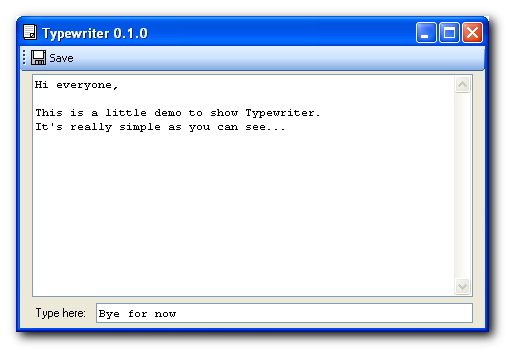
Typewriter 0.1.0
« Reply #6 on: January 08, 2007, 06:04 PM »
Here is something really simple.

You can type in the editbox at the bottom. Press enter to add it to the file. You can edit the whole line you are typing, but of course, once you've added it you can't.

Pressing Save... well uhm, saves the file.

You can paste in the editbox right now and there is no word counting or session timing (yet). Also, the program does not warn you when you exit and haven't saved the file.

The program requires the Microsoft .NET Framework 2.0.

Screenshot - 8-1-2007 , 19_01_07.png

Download: Typewriter.exe (24.0 KB)
« Last Edit: January 08, 2007, 06:17 PM by Arjen »

JennyB

  • Test all things - hold fast to what is good
  • Supporting Member
  • Joined in 2006
  • **
  • Posts: 212
Re: IDEA: First Draft Maker
« Reply #7 on: January 08, 2007, 09:07 PM »
23 Mb download for a 24k app!  :(

Well, I'm going to need .Net sooner or later.  :-\

Re. save: I'm thinking of a modal form, so you can't do anything but type until you close it, when it saves automatically. When I need it again, I'll launch it from FaRR, and it should show just the last few lines of what typed the last time.

If you don't see how it can fail -
you haven't understood it properly.

lanux128

  • Global Moderator
  • Joined in 2005
  • *****
  • Posts: 6,277
    • Coding Snacks
    • Volunteers/Staff
    • Gathering Badge
    • Participated in NANY Challenge Once
    • Linux User
Re: IDEA: First Draft Maker
« Reply #8 on: January 09, 2007, 01:38 AM »
Quote
Well, I'm going to need .Net sooner or later.
yeah, i think it's built-in from WinXp SP2 onwards..

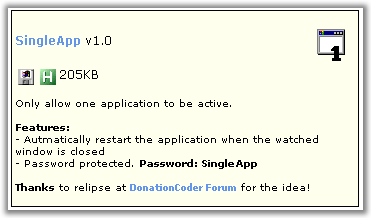
also, why don't you try Skrommel's SingleApp?
[attach=#]

JennyB

  • Test all things - hold fast to what is good
  • Supporting Member
  • Joined in 2006
  • **
  • Posts: 212
Re: IDEA: First Draft Maker
« Reply #9 on: January 18, 2007, 09:36 PM »
I'm having a look at doing this myself in VB6, and I hit on the idea of using an auto-sizing label for the 'typewriter paper' and holding its bottom edge constant on each carriage return, at the same time saving the previous line to file.

Backspace deletes the last word and decreases the word count, space following a non-space increases the word count... and that's about it.

The main plroblem still to solve is how to save and restore the correct values for the times, count, and label capion each time it is closed and opened. 
If you don't see how it can fail -
you haven't understood it properly.

Original address: https://www.donationcoder.com/forum/index.php?topic=6795.0