DonationCoder.com forum
 
Read-only archive. This is a static copy of the DonationCoder.com forum. Reading and searching work as before; logging in, posting and private messages do not.
Archive of 2026-10-21 · About this archive · Main site

Author Topic: DONE: Drive space monitor  (Read 16,212 times)

deano

  • Charter Member
  • Joined in 2006
  • ***
  • Posts: 33
DONE: Drive space monitor
« on: December 29, 2006, 02:16 PM »
I went around to my friends house last weekend to fix his computer.  One of the problems was that he had about 4mb of free space on C.  After deleting a temp CD image file he nearly had 1gb free and things had improved.

I do alot of tech support for friends and family.  I think it would be useful to have a little program that I could give out (a single small exe) that can sit in the startup folder. 

To configure the program I state how much disk space I would ideally like to be free or state a percentage.

On bootup of Windows it does a little check to see if this amount of space is indeed free.  If not a message pops up (we should be able to insert whatever we want) with a warning.  e.g "Hey Dan, Windows is running low on diskspace. Give me a call and we will sort it out - Deano".
« Last Edit: January 02, 2008, 07:01 PM by mouser »

Edvard

  • Coding Snacks Author
  • Charter Honorary Member
  • Joined in 2005
  • ***
  • Posts: 3,027
    • Participated in NANY Challenge Once
    • Coding Snacks
    • Linux User
Re: IDEA: C drive space monitor
« Reply #1 on: December 29, 2006, 05:54 PM »
Yet again, Autohotkey comes to the rescue:
Code
DriveSpaceFree, FreeSpace, C:\
If FreeSpace < 999
	MsgBox, 48, Low Disk Warning!, Hey Dan, Windows is running low on diskspace. `nGive me a call and we will sort it out - Deano
ExitApp

Replace the 'If FreeSpace' value and the message with your own preference. Autohotkey also sports a command DriveGet which can get all kinds of diagnostic info about any disk.

Let me chew on this one a little more, I'd like something like your idea for myself...
All children left unattended will be given a mocha and a puppy.
« Last Edit: January 11, 2007, 06:03 PM by Edvard »

Edvard

  • Coding Snacks Author
  • Charter Honorary Member
  • Joined in 2005
  • ***
  • Posts: 3,027
    • Participated in NANY Challenge Once
    • Coding Snacks
    • Linux User
Re: IDEA: C drive space monitor
« Reply #2 on: December 29, 2006, 09:27 PM »
Okay here's another Quick n Dirty one for checking percentages rather than freespace:
Code
DriveSpaceFree, FreeSpace, C:\
DriveGet, DriveCap, capacity, C:\
Perc:=Round(FreeSpace/DriveCap*100)
If Perc < 10
	MsgBox, 48, Low Disk Warning!, Hey Dan, Windows is running low on diskspace. `nGive me a call and we will sort it out - Deano
ExitApp
Just modify the target percentage and you're good.

and here's a whole enchilada version that reads a .ini file you can edit for different situations:
Code
;First we'll check for the DriveAlarm.ini file, and if it's not there, make one with some sane values.
IfNotExist DriveAlarm.ini
	FileAppend, [Drive]`nDrv=C:\`n[Type]`n;1=free percentage `n;2=free Megabytes`nTyp=2`n[Target]`n;If type is set to 1 this is a percentage value minus the percent sign`n;if type is set to 2 this is a value in megabytes rounded up.`nTarg=999`n[Message]`n;And a customisable message to tag at the end`n;like 'empty your Recycle Bin' or something`nMsg=, %A_WorkingDir%\DriveAlarm.ini
;Now we'll read the values into variables...
IniRead, Drv, DriveAlarm.ini, Drive, Drv
IniRead, Typ, DriveAlarm.ini, Type, Typ
IniRead, Targ, DriveAlarm.ini, Target, Targ
IniRead, Msg, DriveAlarm.ini, Message, Msg
;...and get the disk capacity and free space
DriveSpaceFree, FrSpc, %Drv%
DriveGet, DrvCap, Capacity, %Drv%
Perc:=Round(FrSpc/DrvCap*100)
;Figure out what type of space detection you want and run the alarm tests accordingly
If Typ=1
	Gosub, Percent	
If Typ=2
	Gosub, FreeMB
;and exit gracefully if all is good...	
ExitApp

Percent:
If Perc <= %Targ%
MsgBox, 48, Low Disk Warning!, Your %Drv% drive is down to %Perc%`% capacity.`n%Msg%
Return

FreeMB:
If FrSpc < %Targ%
MsgBox, 48, Low Disk Warning!, Your %Drv% drive is down to %FrSpc% Megabytes...`n%Msg%
Return

Note: If you want to run this at startup, I would recommend you put it someplace safe and put a shortcut in startup instead.
All children left unattended will be given a mocha and a puppy.
« Last Edit: December 29, 2006, 10:41 PM by Edvard »

mouser

  • First Author
  • Administrator
  • Joined in 2005
  • *****
  • Posts: 40,931
    • Gathering Badge
    • Plugin Coding Medal
    • Participated in NANY Challenge Seventeen Times
    • Cody Award
    • Coding Snacks
    • Volunteers/Staff
Re: IDEA: C drive space monitor
« Reply #3 on: December 29, 2006, 09:50 PM »
edvard might be nice to build an exe and pack it along with ahk in a zip and attach it to a post :)
then i can add it to http://codingsnacks.donationcoder.com

Edvard

  • Coding Snacks Author
  • Charter Honorary Member
  • Joined in 2005
  • ***
  • Posts: 3,027
    • Participated in NANY Challenge Once
    • Coding Snacks
    • Linux User
Re: IDEA: C drive space monitor
« Reply #4 on: December 29, 2006, 10:22 PM »
Oops... here go

I've changed my above post and the files to reflect the addition of a custom tag message that can be customised in the ini file.

Not everybody has a "Deano" they can call ;D
All children left unattended will be given a mocha and a puppy.
« Last Edit: December 29, 2006, 10:43 PM by Edvard »

deano

  • Charter Member
  • Joined in 2006
  • ***
  • Posts: 33
Re: IDEA: C drive space monitor
« Reply #5 on: December 29, 2006, 10:49 PM »
Thanks Edvard that works absolutely brilliantly.  I noticed there was an option to convert the ahk file into an exe so i did that and then placed a shortcut in the startup folder.  Worked first time!  I also tested successfully on a laptop.  I think this will be a useful way of preventing C drives getting filled up with rubbish.  Because if they want to get rid of the message they have to do something about it.

Thanks again!  :Thmbsup:

Edvard

  • Coding Snacks Author
  • Charter Honorary Member
  • Joined in 2005
  • ***
  • Posts: 3,027
    • Participated in NANY Challenge Once
    • Coding Snacks
    • Linux User
Re: IDEA: C drive space monitor
« Reply #6 on: December 29, 2006, 10:56 PM »
No problem, glad to help. I have this on my own system now as well.
Just curious, did you use the snippet version or the whole enchilada version with the ini file and all?
All children left unattended will be given a mocha and a puppy.

deano

  • Charter Member
  • Joined in 2006
  • ***
  • Posts: 33
Re: IDEA: C drive space monitor
« Reply #7 on: December 29, 2006, 11:20 PM »
The whole enchilada with the ini. 

Edvard

  • Coding Snacks Author
  • Charter Honorary Member
  • Joined in 2005
  • ***
  • Posts: 3,027
    • Participated in NANY Challenge Once
    • Coding Snacks
    • Linux User
Re: IDEA: C drive space monitor
« Reply #8 on: January 02, 2008, 06:57 PM »
OK, it's been ages and I just remembered that mouser (again, ages ago...) asked me to make an "Official" release of this.
Here it is:
Quote
DriveAlarm v.0.3

Description:
------------
A small program intended to run at startup/logon or any time, really.
Pops up a warning when free drive space goes below a certain percentage or
capacity in Megabytes.

Usage:
------
First, extract DriveAlarm to it's own folder in Program Files, and put a shortcut to it on the desktop for easy drive checking any time or in the Startup folder to activate it at Startup and Logon.

The first time it runs, it will make a DriveAlarm.ini file in the folder where it resides.
This will have some first-time run options in it that you can change.

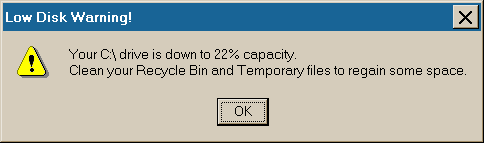
A screenshot of the pop-up message:

dascreen.png
All children left unattended will be given a mocha and a puppy.

deano

  • Charter Member
  • Joined in 2006
  • ***
  • Posts: 33
Re: DONE: Drive space monitor
« Reply #9 on: January 02, 2008, 07:05 PM »
Nice, good to get a "final" version.  I'm going to rebuild my friend's pc soon so this is on the list of things to install.

DJMusic

  • Participant
  • Joined in 2007
  • *
  • Posts: 5
Re: DONE: Drive space monitor
« Reply #10 on: January 02, 2008, 08:46 PM »
Or you could use i.Disk: http://www.memecode.com/idisk.php

deano

  • Charter Member
  • Joined in 2006
  • ***
  • Posts: 33
Re: DONE: Drive space monitor
« Reply #11 on: January 02, 2008, 09:27 PM »
Looks lovely but way too complicated for the original remit, which is to alert someone who has only very basic computing skills.

Original address: https://www.donationcoder.com/forum/index.php?topic=6772.0