DonationCoder.com forum
 
Read-only archive. This is a static copy of the DonationCoder.com forum. Reading and searching work as before; logging in, posting and private messages do not.
Archive of 2026-10-21 · About this archive · Main site

Author Topic: Comments on v2.25.03 through 2.26.01  (Read 10,463 times)

Miles

  • Charter Member
  • Joined in 2005
  • ***
  • Posts: 41
Comments on v2.25.03 through 2.26.01
« on: October 09, 2006, 06:45 PM »
Well, I just wanted to say how much I appreciate this program :)

Just realised I haven't updated it for a few weeks, and am missing out on some useful stuff ;D

Thanks Mouser.

Regards to all,

Miles

mouser

  • First Author
  • Administrator
  • Joined in 2005
  • *****
  • Posts: 40,931
    • Gathering Badge
    • Plugin Coding Medal
    • Participated in NANY Challenge Seventeen Times
    • Cody Award
    • Coding Snacks
    • Volunteers/Staff
Comments on v2.25.03 through 2.26.01
« Reply #1 on: November 08, 2006, 02:05 AM »
Latest version is up.  Note this is a real BETA because i want it to get some testing to make sure i haven't broken anything in latest build.

lanux128

  • Global Moderator
  • Joined in 2005
  • *****
  • Posts: 6,277
    • Coding Snacks
    • Volunteers/Staff
    • Gathering Badge
    • Participated in NANY Challenge Once
    • Linux User
Comments on v2.25.03 through 2.26.01
« Reply #2 on: November 08, 2006, 03:53 AM »
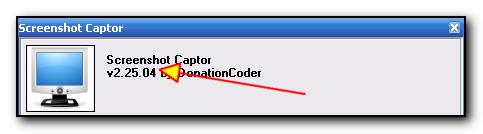
mouser, the new beta version shows as v2.25.04
dl link: hxxp://www.donationcoder.com/Software/Mouser/screenshotcaptor/downloads/beta/ScreenshotCaptor.exe

[attach=#]

mouser

  • First Author
  • Administrator
  • Joined in 2005
  • *****
  • Posts: 40,931
    • Gathering Badge
    • Plugin Coding Medal
    • Participated in NANY Challenge Seventeen Times
    • Cody Award
    • Coding Snacks
    • Volunteers/Staff
Comments on v2.25.03 through 2.26.01
« Reply #3 on: November 08, 2006, 04:26 AM »
darn it!
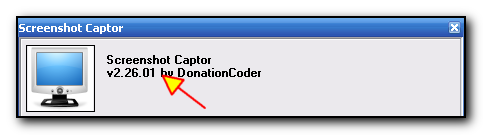
thank you lanux! i uploaded older verion.

new beta now uploaded.  :up:

thank you for catching this so early.

lanux128

  • Global Moderator
  • Joined in 2005
  • *****
  • Posts: 6,277
    • Coding Snacks
    • Volunteers/Staff
    • Gathering Badge
    • Participated in NANY Challenge Once
    • Linux User
Comments on v2.25.03 through 2.26.01
« Reply #4 on: November 08, 2006, 04:58 AM »
sure, glad to be of help! :)

[attach=#]

russell.williams

  • Charter Member
  • Joined in 2006
  • ***
  • Posts: 10
Comments on v2.25.03 through 2.26.01
« Reply #5 on: November 09, 2006, 03:58 PM »
I downloaded this week's beta.
I notice in the Preferences, the On Capture frame and the Don't save are in red?
And the alignment of Don't Save is too high compared to the rest of the column.
Also, even though I have Don't Auto Save Captures it still does, when I have Pop Up Choice and choose Copy Image to clipboard.
On this beta, when I select a region and paste it into an email message, it is extremely small for some reason. Previously it retained the same aspect as what I was capturing on screen.

mouser

  • First Author
  • Administrator
  • Joined in 2005
  • *****
  • Posts: 40,931
    • Gathering Badge
    • Plugin Coding Medal
    • Participated in NANY Challenge Seventeen Times
    • Cody Award
    • Coding Snacks
    • Volunteers/Staff
Comments on v2.25.03 through 2.26.01
« Reply #6 on: November 09, 2006, 05:20 PM »
i probably should not make those red - i did so to draw attention to them since they are new and very important to the different ways the program could be used.

i'll look into the copy to clipboard thing autosaving; it shouldnt have to so thats a bug.

can you describe the email paste issue so i can try to reproduce it?

russell.williams

  • Charter Member
  • Joined in 2006
  • ***
  • Posts: 10
Comments on v2.25.03 through 2.26.01
« Reply #7 on: November 09, 2006, 05:59 PM »
On the current version, if I take say a region grab of your ICON, then paste into a new email message, the picture of Snowball looks like the exact same size as seen on the web page.
But on the beta version, the region grab then paste makes the pasted square look about half-size. It still looks normal in the main window view in SC, but pasting it reduces the size.

Cavalcader

  • Live Long & Prosper
  • Charter Member
  • Joined in 2006
  • ***
  • Posts: 194
Comments on v2.25.03 through 2.26.01
« Reply #8 on: November 09, 2006, 06:36 PM »
i probably should not make those red - i did so to draw attention to them since they are new and very important
How about bold instead? Of course, that makes the text bulkier, so it might have to be reformatted a bit.
My Linguistic Profile:
  40% General American English
  30% Yankee
  20% Dixie

What Kind of American English Do You Speak?

Miles

  • Charter Member
  • Joined in 2005
  • ***
  • Posts: 41
Comments on v2.25.03 through 2.26.01
« Reply #9 on: November 12, 2006, 08:14 AM »
Hi Mouser,

Would it be possible to tweak the JPG compression scale? I'm getting visible artifacting on any setting greater than minimum, so that's where I leave it. It would be great if you could, somehow, "spread" the minimum end of the scale and "compact" the maximum end. What would be ideal, for me, would be to have a non-discrete scale.

Kind regards,

Miles

Original address: https://www.donationcoder.com/forum/index.php?topic=6284.0