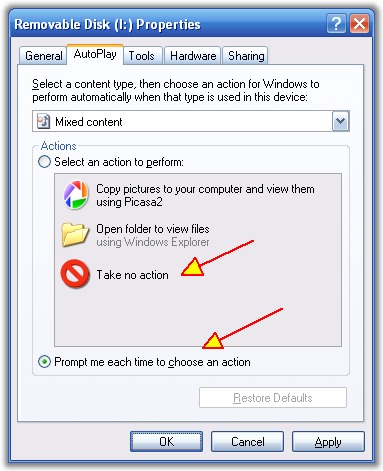
Do you hate AutoPlay? I Do.
This little tip will show you how to turn it off.
AutoPlay is one of those things that tries to be smart and figure out what to do when you insert a cd or removable drive. It will scan the drive (or cd) and run whatever installer is on the cd, or if its a removable usb drive it will pop up a dialog and start scanning the drive to try to guess what you might want to do with the drive. Guess what? It's my drive, I think I know what i want to do with it thank you very much. If i want a clippy artificial intelligence on my computer i'll install this.
Ok so if you want to disable autoplay for all or just some drives (or just removable drives), go to theMicrosoft PowerToys for Windows XP Web Page, and find the download for TweakUI on the bottom right.
Once TweakUI is installed, run it and go to the "My Computer -> AutoPlay" section, and there you go, just disable what you dont want, or re-enable it as you wish.

ps.
If you have the opposite problem - you lost your AutoPlay and TweakUI wont fix it for you, try this Microsoft AutoPlay fixer tool.
This little tip will show you how to turn it off.
AutoPlay is one of those things that tries to be smart and figure out what to do when you insert a cd or removable drive. It will scan the drive (or cd) and run whatever installer is on the cd, or if its a removable usb drive it will pop up a dialog and start scanning the drive to try to guess what you might want to do with the drive. Guess what? It's my drive, I think I know what i want to do with it thank you very much. If i want a clippy artificial intelligence on my computer i'll install this.
Ok so if you want to disable autoplay for all or just some drives (or just removable drives), go to theMicrosoft PowerToys for Windows XP Web Page, and find the download for TweakUI on the bottom right.
Once TweakUI is installed, run it and go to the "My Computer -> AutoPlay" section, and there you go, just disable what you dont want, or re-enable it as you wish.

ps.
If you have the opposite problem - you lost your AutoPlay and TweakUI wont fix it for you, try this Microsoft AutoPlay fixer tool.