DonationCoder.com forum
 
Read-only archive. This is a static copy of the DonationCoder.com forum. Reading and searching work as before; logging in, posting and private messages do not.
Archive of 2026-10-21 · About this archive · Main site

Author Topic: IDEA: Run Dialog aliases  (Read 9,379 times)

Josh

  • Charter Honorary Member
  • Joined in 2005
  • ***
  • Posts: 3,411
    • Gathering Badge
    • Official Forum Clown
    • Coding Snacks
    • Plugin Coding Medal
    • Volunteers/Staff
    • Military Service Badge - US Army
    • Furry Fandom Badge - Furry Fandom
    • Linux User
IDEA: Run Dialog aliases
« on: November 11, 2006, 02:55 PM »
ok, here is an idea that I derived from FARR.

The idea is to create a program, which can be modified to add an indefinite list of aliases, which allows a user to enter an "Alias" for a program to run via Windows Start - Run prompt. So, for example, the user has an alias for the Filezilla FTP client, he enters into the program an alias such as "FZ" which when typed into the start - run prompt, launches the filezilla client.

I know this can be done by adding each application to the system path variable, but that gets sloppy when lots of folders are added, plus its not a good practice as is taught in the MCSE classes for system administrators.

I would like for the gui of this app to have a grid style view where you can see all existing defined aliases, sort them alphabetically, and quickly add/remove existing entries.

Would this be feasible?

Anyways, I am not sure how easy it is to do something like this, but perhaps someone here has an idea. Thanks in advance!
Strength in Knowledge

TucknDar

  • Advanced coder of Nowt
  • Charter Member
  • Joined in 2005
  • ***
  • Posts: 1,133
Re: IDEA: Run Dialog aliases
« Reply #1 on: November 11, 2006, 03:26 PM »
I'm sure you can do this by adding aliases to the Win-registry... let me have a look at where they're supposed to be.

jgpaiva

  • Artificial Idiocy
  • Global Moderator
  • Joined in 2006
  • *****
  • Posts: 4,727
    • Cody Award
    • Participated in NANY Challenge Once
    • Coding Snacks
    • Portugal Inhabitant
    • Linux User
Re: IDEA: Run Dialog aliases
« Reply #2 on: November 11, 2006, 05:02 PM »
I had the most amazing program ever that did that. Looks like it's discontinued already, but you might still find it. It's name was "typeandrun". I was damn amazing!

Then, there's also slickrun, i think. Not as powerful, though. (imo)

lanux128

  • Global Moderator
  • Joined in 2005
  • *****
  • Posts: 6,277
    • Coding Snacks
    • Volunteers/Staff
    • Gathering Badge
    • Participated in NANY Challenge Once
    • Linux User
Re: IDEA: Run Dialog aliases
« Reply #3 on: November 13, 2006, 02:50 AM »
i'm not a big fan of these tools because i can't remember all the cryptic name that i give to the shortcuts when i first create them. :) for me, farr is a better option.

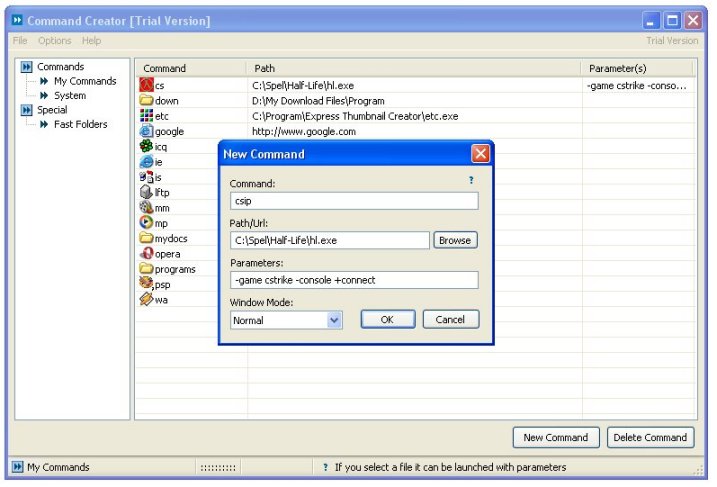
but here's one such tool that configures the Run dialog shortcuts via GUI: Command Creator.

[attach=#]

Ruffnekk

  • Uhm yeah...
  • Honorary Member
  • Joined in 2006
  • **
  • Posts: 332
    • Programming School - Stage 1 Medal
    • Programming School - Deluxe Bonus Medal
    • Participated in NANY Challenge Once
    • Linux User
Re: IDEA: Run Dialog aliases
« Reply #4 on: November 22, 2006, 01:18 PM »
I have been using my own solution to this for years:

1) Create a folder anywhere you like, with any name you like. I made mine in ‘My Documents’ called ‘QuickStart’.
2) Add the new folder to the path variable.
3) Create shortcuts to any commonly used applications or documents inside this folder and make sure the name of the shortcut is the command you want to use for it. For example, I made a shortcut to Visual Studio called ‘vs’. So when I execute the Start → Run dialog, I type ‘vs’ and the shortcut is executed because it’s in the path.

On top of that you can set all parameters like commandline arguments, working folders and Win95 compatibility emulation as well.

Very simple and no application needed  ;D
Regards,
RuffNekk

Programming is an art form that fights back.

thesteve

  • Participant
  • Joined in 2006
  • *
  • Posts: 6
Re: IDEA: Run Dialog aliases
« Reply #5 on: November 24, 2006, 08:53 PM »
Using the same basic technique as Ruffnekk suggested, you can skip the folder creation bit and stick your shortcuts directly in a folder already in your system path, like %SYSTEMROOT%\Windows\System32. The advantage to Ruffnekk's method is that you get a much more organized result.

skrommel

  • Fastest code in the west
  • Developer
  • Joined in 2005
  • ***
  • Posts: 933
    • Participated in NANY Challenge Twice
    • Coding Snacks
Re: IDEA: Run Dialog aliases
« Reply #6 on: November 28, 2006, 04:03 AM »
:) I've given this advice all day today, but have you tried my own AutoClip? You don't even have to open the Run dialog, you can write your aliases anywhere!

Skrommel

chedabob

  • C# Master (if only!!!)
  • Participant
  • Joined in 2006
  • *
  • Posts: 34
Re: IDEA: Run Dialog aliases
« Reply #7 on: December 02, 2006, 09:28 PM »
Try Launchy. Granted, it doesn't run on the run box, but if you press alt-space (which you get used to quickly) it autofills for you, and shows icons aswell. It also learns what you use most.

Original address: https://www.donationcoder.com/forum/index.php?topic=6138.0