DonationCoder.com forum
 
Read-only archive. This is a static copy of the DonationCoder.com forum. Reading and searching work as before; logging in, posting and private messages do not.
Archive of 2026-10-21 · About this archive · Main site

Author Topic: Not FARR; show Start>Programs  (Read 8,542 times)

Curt

  • Supporting Member
  • Joined in 2006
  • **
  • Posts: 7,565
Not FARR; show Start>Programs
« on: October 28, 2006, 06:51 PM »
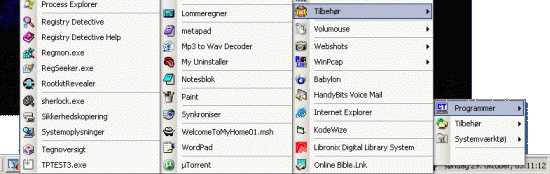
I have tried Find&RunRobot for some days, but realized that my memory works better with pictures than with names, saying; I can't remember the name of the program I want to open, but I clearly remember where it is placed. So I removed FARR again, and wonder if you can write a program for Windows that will make all of Start > Programs > Aux. > + 1 or 2 more, display at once??

[attachimg=#]

Those who will use this program may not have FARR, so the Break button should be available :-)
« Last Edit: October 28, 2006, 07:14 PM by Curt »

mouser

  • First Author
  • Administrator
  • Joined in 2005
  • *****
  • Posts: 40,931
    • Gathering Badge
    • Plugin Coding Medal
    • Participated in NANY Challenge Seventeen Times
    • Cody Award
    • Coding Snacks
    • Volunteers/Staff
Re: Not FARR; show Start>Programs
« Reply #1 on: October 28, 2006, 07:25 PM »
can you explain a bit more? it sounds like you might benefit from a launch bar tool like...

LaunchBar Commander :)
http://www.donationcoder.com/Software/Mouser/LaunchBarCommander/index.html

or something similar like TrueLaunchBar or FreeLaunchBar.

Curt

  • Supporting Member
  • Joined in 2006
  • **
  • Posts: 7,565
Re: Not FARR; show Start>Programs
« Reply #2 on: October 29, 2006, 12:57 AM »

you might benefit from a launch bar tool like...

LaunchBar Commander :)

You are so right. LaunchBar Commander now installed and tested: It is it!!
Thank you!!  :-*

--

But, ehh - it seems I have to place it in Start, myself??
« Last Edit: October 29, 2006, 01:08 AM by Curt »

mouser

  • First Author
  • Administrator
  • Joined in 2005
  • *****
  • Posts: 40,931
    • Gathering Badge
    • Plugin Coding Medal
    • Participated in NANY Challenge Seventeen Times
    • Cody Award
    • Coding Snacks
    • Volunteers/Staff
Re: Not FARR; show Start>Programs
« Reply #3 on: October 29, 2006, 02:05 AM »
now sure what you mean by having to place it in start, but:
1) you can put a button on the launch bar which will display the contents of your start menu (and in fact you can configure it to recurse into the submenus and show them at root as you seem to have said you wanted originally),
2) other than that, yes you have to create your own menus and buttons on the bar, using drag and drop or the tree configuration.

here's a screenshot of how you might try setting up your start menu emulation button on the launch bar:
Screenshot - 10_28_2006 , 9_04_33 PM.png

mouser

  • First Author
  • Administrator
  • Joined in 2005
  • *****
  • Posts: 40,931
    • Gathering Badge
    • Plugin Coding Medal
    • Participated in NANY Challenge Seventeen Times
    • Cody Award
    • Coding Snacks
    • Volunteers/Staff
Re: Not FARR; show Start>Programs
« Reply #4 on: October 29, 2006, 02:06 AM »
the 1 value is what tells the launch bar to delve into the submenus of the start menu and show them at the root - though i suspect this isnt really ideal.. creating your own custom menus is probably more useful.

Curt

  • Supporting Member
  • Joined in 2006
  • **
  • Posts: 7,565
Re: Not FARR; show Start>Programs
« Reply #5 on: October 29, 2006, 02:20 AM »
Quote
not sure what you mean by having to place it in start

The program did not start with Windows, as I would expect it to, so I am setting a shortcut in Start > Programs > Start - was what I meant.

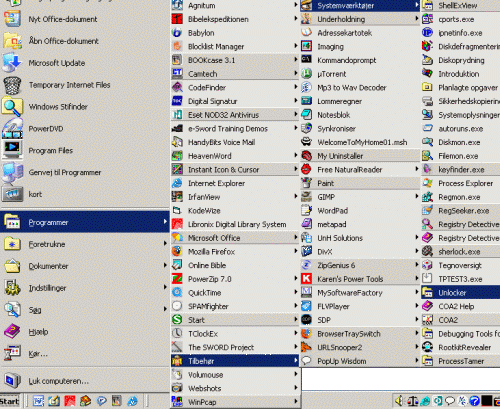
Otherwise it is working fine, as you can see:
[attachimg=#]
« Last Edit: October 29, 2006, 02:24 AM by Curt »

mouser

  • First Author
  • Administrator
  • Joined in 2005
  • *****
  • Posts: 40,931
    • Gathering Badge
    • Plugin Coding Medal
    • Participated in NANY Challenge Seventeen Times
    • Cody Award
    • Coding Snacks
    • Volunteers/Staff
Re: Not FARR; show Start>Programs
« Reply #6 on: October 29, 2006, 02:29 AM »
ah sorry i see what you mean now.

actually most of my programs dont start with windows by default when they really should, but you can usually find an option in them to tell them to.

so i suggest you remove the shortcut you created,  and instead go to the LaunchBar Commander preferences, and select the node at the very very top of the tree, it will give you general options including "start with windows" :)

Original address: https://www.donationcoder.com/forum/index.php?topic=5966.0