
i suggest you go to dell.com and play around with their configuration things, they are quite nice.
Re: Buying New PC. Suggestions?
« Reply #25 on: October 03, 2006, 04:45 PM »


 Topic: Buying New PC. Suggestions? (Read 59,208 times)


 - carpe noctem
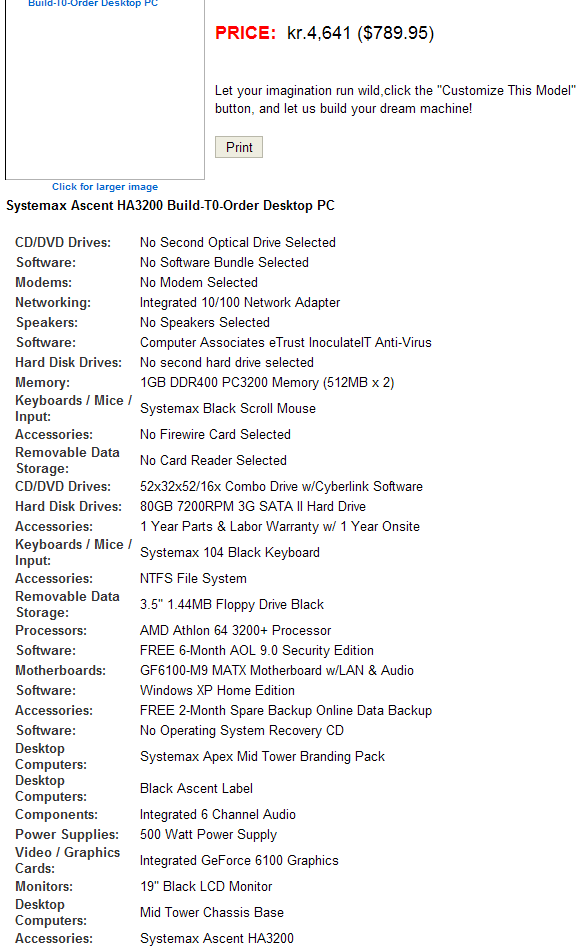
 Stock speed is only 2000mhz but 2400-2500 should be easy. Can fiddle with that later, plenty of speed and you can run it very very cool at stock levels. Even at oc-levels actually. Not much extra voltage needed. Biostar has a software tool letting you overclock, practially build in and so easy to do safely. Just in case you doubt the little cpu, has plenty of horsepower.
i would not recommend this:
1) you dont need cdrom and dvd drive. just 1 will do fine.
2) CRT -> i HIGHLY suggest you get an lcd. i recently moved to lcd and the different is dramatic in terms of desk space, convenience, image quality.
i wouldnt worry about the pci-e but i would absolutely worry about the monitor.
i also would try to decide if you are going to upgrade to xp pro for real, and if so, get a machine which comes with xp pro - you really dont want to have to upgrade it..
this price doesnt seem so great to me, but i don't know these things so it might be.
Remember that Pentium4 uses a lot of power and runs pretty hot... not a problem per se, but a thing to consider.
And I definitely agree with mouser on the monitor issue, go TFT. Also no reason for both CD and DVD, DVD drives can read CDs as well.
All information duly noted. Thank you!
 ) I can comfortably double it. Also, I have to keep in mind it'll be a little less than the price shown.
 As said the only disadvantage with LCD is you often need more power from video card. With CRT you can adjust resolution more easily. Still go LCD.


Remember an LCD almost require you to run games at its native resolution, 1280x1024.Not really - in games you won't generally notice running at non-native resolutions, that's mainly visible when dealing with text. And I doubt you'll find any video cards, even integrated, that can't deal with that properly at native resolution

And yes if you had both a 17 CRT and 19 LCD plugged so you could compare you would pick 19".Personally I'd pick a 17" TFT with decent refresh rate, then add another when I got the cash. Two monitors rock, and 1280x1024 on a 17" is just fine.
One thing you will also want...a BIG CASE...and plenty of PCI slots.Agreed. A big case with good airflow so you don't get overheating problems.
- carpe noctem
Personally I'd pick a 17" TFT with decent refresh rate, then add another when I got the cash. Two monitors rock, and 1280x1024 on a 17" is just fine.
 - carpe noctem
all this minutia talk is a good example of why, unless you love wallowing in this stuff and spending days and days of time obsessing, you should go to a site like dell and just use one of their configuration things to configure a reasonable pc and be done with it, imho.
Fixed solutions are rarely best buy - even when they do offer choices there are limitations. Important to be aware of them - to get most value or even prevent buying wrong parts for what computer will be used for. You have to investigate a little.
- carpe noctem Fortunately it looks like your options are limited anyway, lol. Did you forget XP or found other solution? New video pick will be much easier to use with games, still budget, even the more expensive cards on their list will be considered budget by some, but way better than 6100. With some help www.tweakguides.com I think most new games will run ok - perhaps scaled down to lower resolution but they run. With no soundcard that will be 30$ more. Faster again and about to leave budget card label. GeForce 7600GT cost so much more it is another question but I would consider 1300Pro or 1600Pro. 1600Pro not really in same class as the other 2. Difference is bigger than that of 7300GS vs 1300Pro. As is extra cost... Must put foot down at some point but since video is so important I would do what it takes to get 1600Pro. Same you did when picking 160gb hard disk, extra cost but double capacity. Hope you see what I mean - priorities. All this is very easy and painless or I wouldnt say it - but return with later questions, many here can guide you through. 5-10 minutes of demonstration and you could build own computer. Basically all you need is a screwdriver, same shop and Dell uses. They dont do much more so when box arrives dont be afraid of tinkering a bit and dont put up with things that only work 50%. Dont experiment though... . Oh, and Dell are available in multiple countries, so it's pretty easy to refer to - carpe noctem Not even talking about overclocking but lets say video card is not properly installed, needs to be pushed 0.01mm furhter into slot. Solution is open case and do it yourself not sending computer to shop. My theory is this approach translates into better computing - somehow people who know what they use, how things look like, works, run into fewer problems. Not the same as every fixed computer setup or purchase is bad. Not all have interest even if building is easy. Best to dig in at some point. Both Nvidia and ATI have made crap cards and crap drivers. Not really much to do about it.
 You can find same oppinions about Nvidia drivers f0dder. You are talking about 2.5 year old drivers and a documented known problem (see ATI knowledge base) which I think still is relevant today for some cards. Depend on chipset as well perhaps. Anyway, we are in 2006, PCI-E, new stuffI've had unstable nvidia drivers, but never something that resulted in massive data corruption... and yeah, the issue became documented, but they didn't check for it and they didn't fix it for at least 6 months... so fuck ATI, really.
- carpe noctemOriginal address: https://www.donationcoder.com/forum/index.php?topic=5514.0