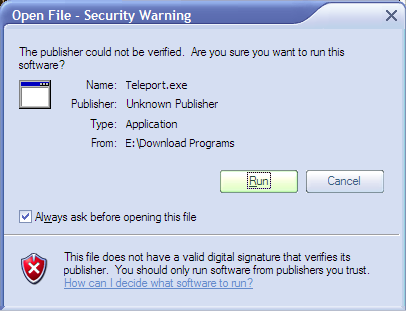
Hi this might be a bug....whenever this window comes out, when i click "Run" it does nothing....it doesn't run the program....
Joe

 Topic: Open File - Security Warning (Read 15,223 times)


Problem:
Running XP SP2 or higher, you try to run an executable located on another machine
on your network. Your accosted with a prompt: "The publisher could not be verified".
You are forced to confirm that you wish to run this program... every time you run
it.
Solution:
Run gpedit.msc
Go to User Configuration >> Administrative Templates >> Windows Components >> Attachment
Manager
Add "*.exe" to the "Inclusion list for moderate risk file types" setting.
"This policy setting allows you to configure the list of moderate risk file types.
If the attachment is in the list of moderate risk file types and is from the restricted
or Internet zone, Windows prompts the user before accessing the file. ..."
Original address: https://www.donationcoder.com/forum/index.php?topic=5459.0