DonationCoder.com forum
 
Read-only archive. This is a static copy of the DonationCoder.com forum. Reading and searching work as before; logging in, posting and private messages do not.
Archive of 2026-10-21 · About this archive · Main site

Author Topic: Prevent launching file manager after capture  (Read 18,427 times)

SuperMan

  • Participant
  • Joined in 2015
  • *
  • Posts: 54
Prevent launching file manager after capture
« on: October 14, 2024, 04:57 PM »
First... even though it has not been developed in a couple of years, SC is STILL THE BEST screenshot capture app I have ever seen.  Been using it 10 or 15 years...maybe more? (I lost count) and there is nothing better TO THIS DAY.

The last time I was here was around January 2024 I think I asked if Mouser is still around.  I was told he was but a quick check and I didn't see any posts from him in this part of the forum anyway.  Just want to give him a shout out!

I am almost certain I used to be able to take "Grab Selected Region" captures without the file manager opening after each capture.  I thought I vaguely remembered that at one time I changed a preference and it started doing that.  But now I want to turn it off and can't find the setting!

Anyone know if there is a setting to prevent that darn file manager from popping up after each capture?

Thank you!

Ath

  • Supporting Member
  • Joined in 2006
  • **
  • Posts: 3,649
    • Participated in NANY Challenge Eleven Times
    • Coding Snacks
    • Linux User
    • Hardware Hacker
Re: Prevent launching file manager after capture
« Reply #1 on: October 14, 2024, 06:17 PM »
In the Preferences screen, there's a page full of 'Post capture options' to choose from. Most likely you've set one of the options there that's causing this behavior, maybe a Commandline tool?
/Ton
Ath's software collection, Quote: "A problem well stated is a problem half-solved." (Charles Kettering)

SuperMan

  • Participant
  • Joined in 2015
  • *
  • Posts: 54
Re: Prevent launching file manager after capture
« Reply #2 on: October 14, 2024, 11:54 PM »
In the Preferences screen, there's a page full of 'Post capture options' to choose from. Most likely you've set one of the options there that's causing this behavior, maybe a Commandline tool?

Thank you for your response.

Yes, I felt sure it must be on that list too but I have already studied the Capture and Post Capture options and did not see it.

I should mention it happens when using the "Save Image As" button on the post capture pop-up dialog.  After you select the folder and save it, the file manager pops up.  I can't find any way to stop the file manager from launching after it saves, but unless my memory is failing (which is possible) I could swear I once had it set so it did not do that and changed it... some years ago.

I don't think it has to do with a command line... can probably rule that out.

hamradio

  • Amateur Radio Guy
  • Charter Honorary Member
  • Joined in 2006
  • ***
  • Posts: 893
    • Plugin Coding Medal
    • Participated in NANY Challenge Fifteen Times
    • Cody Award
    • Coding Snacks
    • Volunteers/Staff
    • Hardware Hacker
Re: Prevent launching file manager after capture
« Reply #3 on: October 15, 2024, 10:36 PM »
In the Preferences screen, there's a page full of 'Post capture options' to choose from. Most likely you've set one of the options there that's causing this behavior, maybe a Commandline tool?

Thank you for your response.

Yes, I felt sure it must be on that list too but I have already studied the Capture and Post Capture options and did not see it.

I should mention it happens when using the "Save Image As" button on the post capture pop-up dialog.  After you select the folder and save it, the file manager pops up.  I can't find any way to stop the file manager from launching after it saves, but unless my memory is failing (which is possible) I could swear I once had it set so it did not do that and changed it... some years ago.

I don't think it has to do with a command line... can probably rule that out.

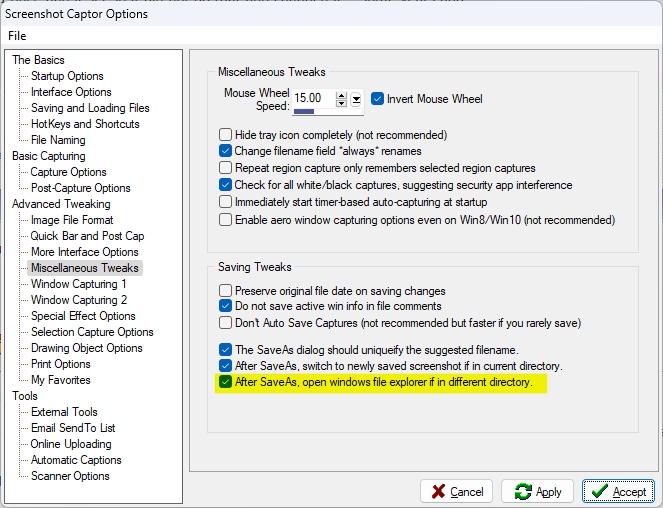
If you are changing the directory of each screenshot after each capture it could be this highlighted option under misc tweaks maybe...
screen_10152024_001.png

SuperMan

  • Participant
  • Joined in 2015
  • *
  • Posts: 54
Re: Prevent launching file manager after capture
« Reply #4 on: October 16, 2024, 12:35 AM »

If you are changing the directory of each screenshot after each capture it could be this highlighted option under misc tweaks maybe...]

Bullseye!

Thank you hamradio!  That is it and as soon as you pointed it out, I remembered setting it years ago.

This might say something about why I couldn't find it.  I've been a licensed ham for about 57 years. My age is showing and then some.  :(

Thank you again to you and to Ath and to Mouser!  :Thmbsup:

hamradio

  • Amateur Radio Guy
  • Charter Honorary Member
  • Joined in 2006
  • ***
  • Posts: 893
    • Plugin Coding Medal
    • Participated in NANY Challenge Fifteen Times
    • Cody Award
    • Coding Snacks
    • Volunteers/Staff
    • Hardware Hacker
Re: Prevent launching file manager after capture
« Reply #5 on: October 16, 2024, 01:04 AM »

If you are changing the directory of each screenshot after each capture it could be this highlighted option under misc tweaks maybe...]

Bullseye!

Thank you hamradio!  That is it and as soon as you pointed it out, I remembered setting it years ago.

This might say something about why I couldn't find it.  I've been a licensed ham for about 57 years. My age is showing and then some.  :(

Thank you again to you and to Ath and to Mouser!  :Thmbsup:

No problem and glad I managed to track down the right option. :up: It did take me a few minutes of tinkering to figure it out looking thru options and experimenting since I hardly use that button. Also neat on you being a licensed ham as well.

SuperMan

  • Participant
  • Joined in 2015
  • *
  • Posts: 54
Re: Prevent launching file manager after capture
« Reply #6 on: October 16, 2024, 01:22 AM »
It did take me a few minutes of tinkering to figure it out looking thru options and experimenting since I hardly use that button.

And thanks for trying to make me feel better about it!  :D Getting old is tough.

My grandfather was an on the air amateur in the early 1900s.  Built his own gear including a spark gap transmitter at one time.  It was before there was licensing.  When WW1 started, they were going house to house confiscating any transmitters people had to prevent spying.  He was only a teen.  They took his gear and he was never on the air again.  I have a picture of him in his "shack."  It is MEGA cool!

So it's in my blood line.

Okay... apologies for getting off topic and thanks again to all!

73  :)

Original address: https://www.donationcoder.com/forum/index.php?topic=54500.0