DonationCoder.com forum
 
Read-only archive. This is a static copy of the DonationCoder.com forum. Reading and searching work as before; logging in, posting and private messages do not.
Archive of 2026-10-21 · About this archive · Main site

Author Topic: Toolbar at screen top does not appear when Windows opens  (Read 36,037 times)

tigerdg

  • Supporting Member
  • Joined in 2008
  • **
  • Posts: 6
There used to be a small toolbar (sorry, I don't know what it is officially called) for Screenshot Captor that appeared at the top of my screen when I opened Windows. It contained buttons for some basic screengrabs. It would retract into the screen edge when not in use, and I could make it appear with the cursor (rather like the auto hide function on the Windows toolbar). Today it is gone and I cannot make it reappear. What I have done: 1) Rebooted; 2) I have made sure that "Start with Windows" is checked, and unchecked it, restarted and checked it again, restarted, but the bar did not reappear. 3) Gone to the Help file, but no avail.

I am running Windows 11 Pro, Screenshot Captor 4.36.2.

I really like that toolbar and would like to get it back. Help, anyone. Thanks much.

Ath

  • Supporting Member
  • Joined in 2006
  • **
  • Posts: 3,649
    • Participated in NANY Challenge Eleven Times
    • Coding Snacks
    • Linux User
    • Hardware Hacker
Re: Toolbar at screen top does not appear when Windows opens
« Reply #1 on: May 30, 2024, 06:11 AM »
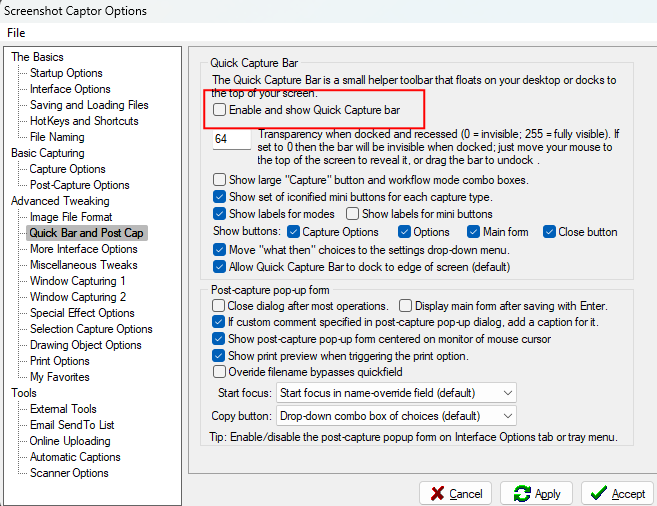
The Quick Capture Bar is in it's own settings page:
Screenshot - 30-05-2024 , 08_09_53.png
/Ton
Ath's software collection, Quote: "A problem well stated is a problem half-solved." (Charles Kettering)

tigerdg

  • Supporting Member
  • Joined in 2008
  • **
  • Posts: 6
Re: Toolbar at screen top does not appear when Windows opens
« Reply #2 on: May 30, 2024, 08:04 PM »
Well, that was easy! Worked perfectly, thank you. What I don't know is how it got unchecked. I know I didn't do it. It was probably the same gremlins who disabled my microphone the other day. It took me about a half an hour to figure that one out.

Thanks again!

Ath

  • Supporting Member
  • Joined in 2006
  • **
  • Posts: 3,649
    • Participated in NANY Challenge Eleven Times
    • Coding Snacks
    • Linux User
    • Hardware Hacker
Re: Toolbar at screen top does not appear when Windows opens
« Reply #3 on: May 30, 2024, 09:31 PM »
What I don't know is how it got unchecked.
One of the buttons in the toolbar hides it and disables that setting... 8)
/Ton
Ath's software collection, Quote: "A problem well stated is a problem half-solved." (Charles Kettering)

tigerdg

  • Supporting Member
  • Joined in 2008
  • **
  • Posts: 6
Re: Toolbar at screen top does not appear when Windows opens
« Reply #4 on: May 30, 2024, 11:06 PM »
Ah! The button with the red "X." I often use the button next to it; I must have hit the X by accident. Thanks again!

hamradio

  • Amateur Radio Guy
  • Charter Honorary Member
  • Joined in 2006
  • ***
  • Posts: 893
    • Plugin Coding Medal
    • Participated in NANY Challenge Fifteen Times
    • Cody Award
    • Coding Snacks
    • Volunteers/Staff
    • Hardware Hacker
Re: Toolbar at screen top does not appear when Windows opens
« Reply #5 on: June 01, 2024, 12:30 AM »
Ah! The button with the red "X." I often use the button next to it; I must have hit the X by accident. Thanks again!

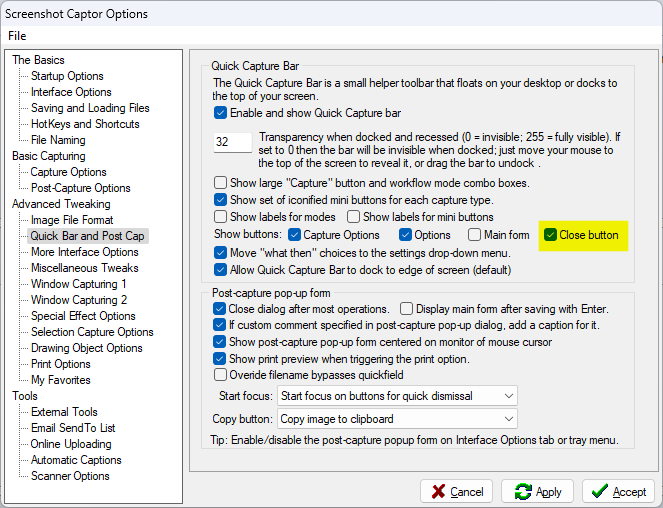
Tip: You can also disable the X if you want to be sure not to hit by accident. Uncheck the highlighted checkbox in my screenshot.

screen_05312024_001.png

tigerdg

  • Supporting Member
  • Joined in 2008
  • **
  • Posts: 6
Re: Toolbar at screen top does not appear when Windows opens
« Reply #6 on: June 01, 2024, 07:38 AM »
Done. And thanks again.  :)

tomos

  • Charter Member
  • Joined in 2006
  • ***
  • Posts: 11,970
    • Gathering Badge
    • Participated in NANY Challenge Once
Re: Toolbar at screen top does not appear when Windows opens
« Reply #7 on: June 02, 2024, 05:09 PM »
Learned something there - thanks :up:
Tom

AzureToad

  • Charter Member
  • Joined in 2006
  • ***
  • Posts: 101
Re: Toolbar at screen top does not appear when Windows opens
« Reply #8 on: July 12, 2024, 04:07 PM »
Is there an .INI or .CONFIG file that specifies the X/Y coordinates for where the Quick-Capture Bar is located? I've enable and disabled that item by right-clicking the systray icon, but it's not appearing anywhere for me. I have 3 monitors and have not changed the primary monitor nor resolution. I'm wondering if it's docking off-screen somewhere?

hamradio

  • Amateur Radio Guy
  • Charter Honorary Member
  • Joined in 2006
  • ***
  • Posts: 893
    • Plugin Coding Medal
    • Participated in NANY Challenge Fifteen Times
    • Cody Award
    • Coding Snacks
    • Volunteers/Staff
    • Hardware Hacker
Re: Toolbar at screen top does not appear when Windows opens
« Reply #9 on: July 12, 2024, 07:07 PM »
Is there an .INI or .CONFIG file that specifies the X/Y coordinates for where the Quick-Capture Bar is located? I've enable and disabled that item by right-clicking the systray icon, but it's not appearing anywhere for me. I have 3 monitors and have not changed the primary monitor nor resolution. I'm wondering if it's docking off-screen somewhere?

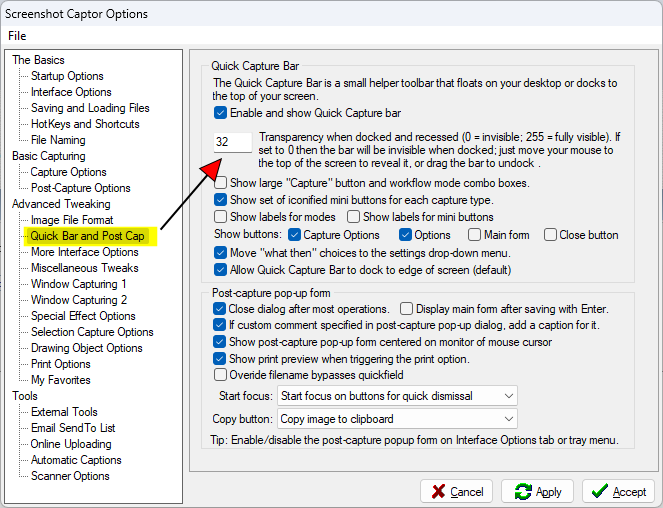
I don't think x/y coordinates exists but here is a check for you to make sure the value in screenshot isn't set to a low value (value of 0 = invisible as noted in the window) making it invisible to the eye. Even with that value at 0 if you hover over the correct place (should be the very top and the center of screen if docked to edge of screen) it will still show the bar it just wont show the place to hover to show it. Another to check is that last checkbox in quick capture bar portion of the settings page highlighted incase it is displaying off screen maybe docking it will get it to show back up if it is unchecked.
screen_07122024_002.png
« Last Edit: July 12, 2024, 07:15 PM by hamradio »

AzureToad

  • Charter Member
  • Joined in 2006
  • ***
  • Posts: 101
Re: Toolbar at screen top does not appear when Windows opens
« Reply #10 on: July 12, 2024, 07:51 PM »
I don't think x/y coordinates exists but here is a check for you to make sure the value in screenshot isn't set to a low value (value of 0 = invisible as noted in the window) making it invisible to the eye. Even with that value at 0 if you hover over the correct place (should be the very top and the center of screen if docked to edge of screen) it will still show the bar it just wont show the place to hover to show it. Another to check is that last checkbox in quick capture bar portion of the settings page highlighted incase it is displaying off screen maybe docking it will get it to show back up if it is unchecked.

Thanks for the quick reply. As (hopefully) shown here, my settings look to me like they should be working correctly - transparency was 255, changed it to 250 for giggles, no change. I had the default set to dock to the edge, but just now unchecked that box and applied changes, then checked the box again and applied changes. No luck, quick bar still isn't visible and doesn't appear when my mouse slides across the top of any one of my monitors - I've tried all 3.

Screenshot Captor Options - 7_12_2024 , 1_40_56 PM.png

hamradio

  • Amateur Radio Guy
  • Charter Honorary Member
  • Joined in 2006
  • ***
  • Posts: 893
    • Plugin Coding Medal
    • Participated in NANY Challenge Fifteen Times
    • Cody Award
    • Coding Snacks
    • Volunteers/Staff
    • Hardware Hacker
Re: Toolbar at screen top does not appear when Windows opens
« Reply #11 on: July 13, 2024, 12:22 AM »
I don't think x/y coordinates exists but here is a check for you to make sure the value in screenshot isn't set to a low value (value of 0 = invisible as noted in the window) making it invisible to the eye. Even with that value at 0 if you hover over the correct place (should be the very top and the center of screen if docked to edge of screen) it will still show the bar it just wont show the place to hover to show it. Another to check is that last checkbox in quick capture bar portion of the settings page highlighted incase it is displaying off screen maybe docking it will get it to show back up if it is unchecked.

Thanks for the quick reply. As (hopefully) shown here, my settings look to me like they should be working correctly - transparency was 255, changed it to 250 for giggles, no change. I had the default set to dock to the edge, but just now unchecked that box and applied changes, then checked the box again and applied changes. No luck, quick bar still isn't visible and doesn't appear when my mouse slides across the top of any one of my monitors - I've tried all 3.

[attachment 1 not found]

Ahh. So sounds like mouser will need to help you more. That was all I could think of right off that might be of help.

Original address: https://www.donationcoder.com/forum/index.php?topic=54200.0