


NANY 2024 Entry Information
| Application Name | ChunkPatcher |
| Version | 1.0.0.6 |
| Short Description | Removes the obnoxious Steam "What's New" section. |
| Supported OSes | Windows 10/11 |
| Download Link | https://download.ru/files/CIMHD8n7 |
| System Requirements | .NET Framework 4.8.0 |
| Version History |
|
| Author | Grumpy Coder |
Description
This is based on Kopert solution to removing the obnoxious Steam What's New section, because Valve couldn't be bothered to make it optional for some stupid reason.
Features
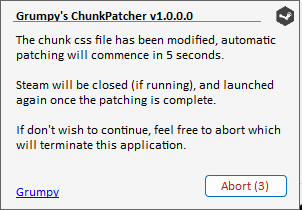
The application runs in the background to monitor the chunk css file, and when it detects it has been
It will first close Steam, patch the file, and re-launch Steam when it's done. The whole process should take a few seconds.
Planned Features
You tell me.
Screenshots
Usage
Installation
The application is portable, just extract it somewhere safe, and run the exe file.
Using the Application
The application is completely automated, and there's no real UI. It relies on an INI file for settings.
I don't suggest you mess around with it (INI) unless you know what you're doing, though.
Uninstallation
Delete it.
Tips
If you don't like seeing the popup window every time, just change the QuickPatch to 1, in the INI file, and restart the application.
You can adjust the checking interval, by changing the "CheckInterval" in the INI file (number of seconds).
Known Issues
None that I know of.