DonationCoder.com forum
 
Read-only archive. This is a static copy of the DonationCoder.com forum. Reading and searching work as before; logging in, posting and private messages do not.
Archive of 2026-10-21 · About this archive · Main site

Author Topic: Feature request  (Read 9,218 times)

NovakD

  • Supporting Member
  • Joined in 2006
  • **
  • Posts: 1
Feature request
« on: September 16, 2006, 03:32 PM »
Make it possible to load any image file. The annotation features of Screenshot Captor are great and I have used them to annotate pictures from other sources by using import picture object. However, that import feature seems to add the imported image to the current image and resizes it. I would like the image to be loaded as a new item and without resizing.

Keep up the good work!
David

mouser

  • First Author
  • Administrator
  • Joined in 2005
  • *****
  • Posts: 40,931
    • Gathering Badge
    • Plugin Coding Medal
    • Participated in NANY Challenge Seventeen Times
    • Cody Award
    • Coding Snacks
    • Volunteers/Staff
Re: Feature request
« Reply #1 on: September 16, 2006, 03:43 PM »
Hi David,

I know what you are asking..
currently the easiest way to do it is, just drag your file from the file explorer or desktop or whererever it resides, into the THUMBNAIL panel in screenshot captor.

you can then edit it in screenshot captor, save.

and then drag it FROM the thumbnail back to target folder.

lanux128

  • Global Moderator
  • Joined in 2005
  • *****
  • Posts: 6,277
    • Coding Snacks
    • Volunteers/Staff
    • Gathering Badge
    • Participated in NANY Challenge Once
    • Linux User
Re: Feature request
« Reply #2 on: November 06, 2006, 06:16 AM »
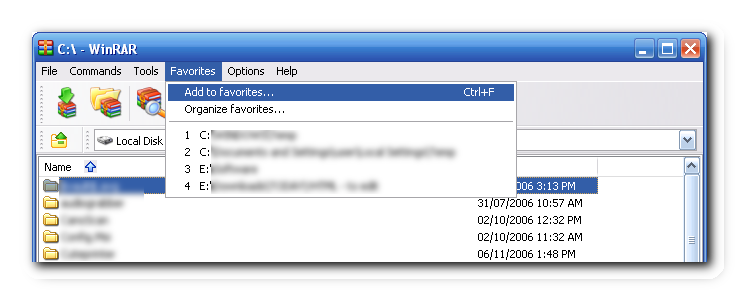
in addition to this request, i'd like to suggest a favourites' folders option so that images can stay in their own folders yet can be accessed quickly. WinRar does something like this so i'm attaching a screenshot of it.

[attach=#]

mouser

  • First Author
  • Administrator
  • Joined in 2005
  • *****
  • Posts: 40,931
    • Gathering Badge
    • Plugin Coding Medal
    • Participated in NANY Challenge Seventeen Times
    • Cody Award
    • Coding Snacks
    • Volunteers/Staff
Re: Feature request
« Reply #3 on: November 06, 2006, 06:28 AM »
sc has a place where you can specify a number of directories, which will appear on your MoveTo menu..
i could add an additional menu like "changedir to" that could also use these directories to quickly switch your current screenshot directory?

lanux128

  • Global Moderator
  • Joined in 2005
  • *****
  • Posts: 6,277
    • Coding Snacks
    • Volunteers/Staff
    • Gathering Badge
    • Participated in NANY Challenge Once
    • Linux User
Re: Feature request
« Reply #4 on: November 06, 2006, 06:39 AM »
sc has a place where you can specify a number of directories, which will appear on your MoveTo menu..

i had been aware of the MoveTo menu but i didn't want to move my images around. yes, a "chdir" or "Go to" menu would be more apt in situations, where i use SC as an annotation tool.

hgtwn

  • Participant
  • Joined in 2006
  • *
  • Posts: 2
Re: Feature request
« Reply #5 on: December 13, 2006, 05:16 PM »
Another good feature to have in this program would be the ability to print ALL files selected.  I take many screen shots of programs and their screens and it would be great to be able to print them all at once.  Also, the print dialog box always shows my image as being Portrait when all the previous images i printed were landscape.  It would be nice if there was an option to choose a default print settings (portrait/landscape, paper size, printer etc.) for the program so you don't have to choose those settings every time.

Keep up the great work!

Original address: https://www.donationcoder.com/forum/index.php?topic=5300.0