DonationCoder.com forum
 
Read-only archive. This is a static copy of the DonationCoder.com forum. Reading and searching work as before; logging in, posting and private messages do not.
Archive of 2026-10-21 · About this archive · Main site

Last post Author Topic: GroffStudio under Windows 10?  (Read 39,160 times)

porkroast

  • Participant
  • Joined in 2022
  • *
  • Posts: 16
GroffStudio under Windows 10?
« on: November 09, 2022, 01:21 PM »
Hello! 

I have been looking for a Groff IDE forever-- thank you for your work!  However, I can't make GroffStudio work under Windows 10-- the program won't open after clicking on the .exe file.  I have placed the .dlls in the System and System32 folders, kept the .dlls in the working directory-- I can't figure this out.  Any advice would be much appreciated!  Thanks--

Tuxman

  • OMG not him again!
  • Supporting Member
  • Joined in 2006
  • **
  • Posts: 2,522
    • Participated in NANY Challenge Seven Times
Re: GroffStudio under Windows 10?
« Reply #1 on: February 05, 2023, 09:19 PM »
Uh... hi.  ;D Sorry, I missed this thread completely!
It "won't open"? Do you have an anti-virus software that blocks it, maybe?
I bet when Cheetahs race and one of them cheats, the other one goes "Man, you're such a Cheetah!" and they laugh & eat a zebra or whatever.

porkroast

  • Participant
  • Joined in 2022
  • *
  • Posts: 16
Re: GroffStudio under Windows 10?
« Reply #2 on: February 06, 2023, 01:46 AM »
Thanks so much for getting back to me!  When I double click on the .exe, I get a minimized icon ("quick start"), and when I hover the mouse over it, I get a blank mini-groffstudio window, and when I click on the minimized icon, nothing happens.  I have "allowed" the program in my Avast AntiVirus/Firewall-- what could I be doing wrong?  Lou

Tuxman

  • OMG not him again!
  • Supporting Member
  • Joined in 2006
  • **
  • Posts: 2,522
    • Participated in NANY Challenge Seven Times
Re: GroffStudio under Windows 10?
« Reply #3 on: February 06, 2023, 02:19 AM »
This is a pretty good question, especially as groffstudio does not have a "quick start".  :huh:
"Works for me" is probably not a good answer.

Have you restarted your PC recently? Surprisingly, that fixes a lot of things sometimes... if that does not work, we'll have to dig deeper, I'm afraid.
I bet when Cheetahs race and one of them cheats, the other one goes "Man, you're such a Cheetah!" and they laugh & eat a zebra or whatever.

porkroast

  • Participant
  • Joined in 2022
  • *
  • Posts: 16
Re: GroffStudio under Windows 10?
« Reply #4 on: February 06, 2023, 02:31 AM »
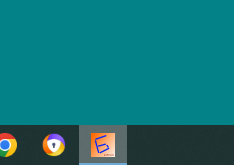
Just restarted the computer, same issue-- forgive me, it's the "Taskbar" where the groffstudio icon is underlined, like any other open program.  But there is no big main window!

porkroast

  • Participant
  • Joined in 2022
  • *
  • Posts: 16
Re: GroffStudio under Windows 10?
« Reply #5 on: February 06, 2023, 02:33 AM »
Here goes:Screenshot 2023-02-05 213241.png

Tuxman

  • OMG not him again!
  • Supporting Member
  • Joined in 2006
  • **
  • Posts: 2,522
    • Participated in NANY Challenge Seven Times
Re: GroffStudio under Windows 10?
« Reply #6 on: February 06, 2023, 02:37 AM »
Ugh. My icon skills...  ;D

Anyway, I still suspect some "security" software to chime in. Is there anything suspicious in Avast's logs?
Other than that ... which .exe did you download (e.g. where and when)?

(Off for the night - Germany here - time zones - will reply later!)
I bet when Cheetahs race and one of them cheats, the other one goes "Man, you're such a Cheetah!" and they laugh & eat a zebra or whatever.

porkroast

  • Participant
  • Joined in 2022
  • *
  • Posts: 16
Re: GroffStudio under Windows 10?
« Reply #7 on: February 06, 2023, 02:42 AM »
Again, thanks for your patience and help!  I will scour my computer for offending security software, I will post again tomorrow!  Good night, Lou

porkroast

  • Participant
  • Joined in 2022
  • *
  • Posts: 16
Re: GroffStudio under Windows 10?
« Reply #8 on: February 06, 2023, 02:45 AM »
Sorry-- "studio-win-0.12.0", downloaded today, unzipped in it's own folder without a groff.exe (hoping to download it through GroffStudio)-- in the folder, there is only the .exe with two .dlls.

Tuxman

  • OMG not him again!
  • Supporting Member
  • Joined in 2006
  • **
  • Posts: 2,522
    • Participated in NANY Challenge Seven Times
Re: GroffStudio under Windows 10?
« Reply #9 on: February 06, 2023, 02:49 AM »
If everything else fails, I might try to build a new version from the current sources and attach it here. Not before tomorrow though.
I bet when Cheetahs race and one of them cheats, the other one goes "Man, you're such a Cheetah!" and they laugh & eat a zebra or whatever.

porkroast

  • Participant
  • Joined in 2022
  • *
  • Posts: 16
Re: GroffStudio under Windows 10?
« Reply #10 on: April 28, 2023, 03:03 AM »
Hello again-- any luck with a new build?  Thank you--

mrHappy

  • Charter Member
  • Joined in 2006
  • ***
  • Posts: 69
Re: GroffStudio under Windows 10?
« Reply #11 on: April 28, 2023, 10:50 AM »
Could be that the window is outside your screen area.
Press alt-space then m, see if you can't move the window back on screen
There are only 10 types of people in the world. Those who understand binary and those who have friends.

porkroast

  • Participant
  • Joined in 2022
  • *
  • Posts: 16
Re: GroffStudio under Windows 10?
« Reply #12 on: April 28, 2023, 12:21 PM »
MrHappy,

It worked!  Thank you!  Don't know how I missed this. . .

Tuxman

  • OMG not him again!
  • Supporting Member
  • Joined in 2006
  • **
  • Posts: 2,522
    • Participated in NANY Challenge Seven Times
Re: GroffStudio under Windows 10?
« Reply #13 on: April 28, 2023, 08:25 PM »
Oh, and thank YOU!
I bet when Cheetahs race and one of them cheats, the other one goes "Man, you're such a Cheetah!" and they laugh & eat a zebra or whatever.

porkroast

  • Participant
  • Joined in 2022
  • *
  • Posts: 16
Re: GroffStudio under Windows 10?
« Reply #14 on: January 08, 2024, 01:15 AM »
Hello again!  Having some trouble with GroffStudio-- may I bother you again?  My groff -me file compiles just fine under the Windows command prompt, but GroffStudio seems to not see my Tmac folder-- I get a .ps file with GroffStudio, but the .pp and the .(f (and the .b and .i) commands weren't acknowledged.  I tried editing my System Environment Variables-- I also read something about problems with the TEMP directory and permissions-- any insights here?  Best, Lou

Tuxman

  • OMG not him again!
  • Supporting Member
  • Joined in 2006
  • **
  • Posts: 2,522
    • Participated in NANY Challenge Seven Times
Re: GroffStudio under Windows 10?
« Reply #15 on: January 08, 2024, 01:45 AM »
groffstudio does not really care about where your macros are. In theory, all it does is call cmd /c groff -<options>, at least on Windows.
Where did you install groff?
I bet when Cheetahs race and one of them cheats, the other one goes "Man, you're such a Cheetah!" and they laugh & eat a zebra or whatever.

porkroast

  • Participant
  • Joined in 2022
  • *
  • Posts: 16
Re: GroffStudio under Windows 10?
« Reply #16 on: January 08, 2024, 04:16 PM »
C:\ProgramData\Chocolatey\Bin

I also get an error when I try to, "log to file"-- my -me file won't compile at all.

Tuxman

  • OMG not him again!
  • Supporting Member
  • Joined in 2006
  • **
  • Posts: 2,522
    • Participated in NANY Challenge Seven Times
Re: GroffStudio under Windows 10?
« Reply #17 on: January 08, 2024, 10:43 PM »
Does any error occur or does nothing happen at all?  :huh:
I bet when Cheetahs race and one of them cheats, the other one goes "Man, you're such a Cheetah!" and they laugh & eat a zebra or whatever.

porkroast

  • Participant
  • Joined in 2022
  • *
  • Posts: 16
Re: GroffStudio under Windows 10?
« Reply #18 on: January 09, 2024, 12:00 AM »
I get the message, "build problem", but actually I do get a .ps file with the missing -me macro commands (bold and italic commands are ignored, as are footnote commands).  Again, I have 100% success with the Windows Command Prompt, everything works as it should. . . is there something that I have not configured correctly?

Tuxman

  • OMG not him again!
  • Supporting Member
  • Joined in 2006
  • **
  • Posts: 2,522
    • Participated in NANY Challenge Seven Times
Re: GroffStudio under Windows 10?
« Reply #19 on: January 10, 2024, 12:44 AM »
One idea is that TProcess doesn't catch your PATH (which would be weird).
Just curious: copy groffstudio to C:\ProgramData\Chocolatey\Bin and see if it works from there. If it does, I might have to reset a thing or two.
I bet when Cheetahs race and one of them cheats, the other one goes "Man, you're such a Cheetah!" and they laugh & eat a zebra or whatever.

porkroast

  • Participant
  • Joined in 2022
  • *
  • Posts: 16
Re: GroffStudio under Windows 10?
« Reply #20 on: January 10, 2024, 01:38 AM »
Same problem-- I get a .ps file, a "build successful" message, but still the missing formatting.  Enclosed is the input file that I pasted into GroffStudio-- could this be the issue?

Tuxman

  • OMG not him again!
  • Supporting Member
  • Joined in 2006
  • **
  • Posts: 2,522
    • Participated in NANY Challenge Seven Times
Re: GroffStudio under Windows 10?
« Reply #21 on: January 10, 2024, 03:04 AM »
Ah, now I have an idea what might be wrong. It's not your file!
I'll take a look at it soon and report back. (Not on Windows right now, but fixed a few unrelated issues while I was at it. Not yours yet.)
I bet when Cheetahs race and one of them cheats, the other one goes "Man, you're such a Cheetah!" and they laugh & eat a zebra or whatever.

porkroast

  • Participant
  • Joined in 2022
  • *
  • Posts: 16
Re: GroffStudio under Windows 10?
« Reply #22 on: January 10, 2024, 03:44 AM »
Excellent!  Thank you for patience!

Tuxman

  • OMG not him again!
  • Supporting Member
  • Joined in 2006
  • **
  • Posts: 2,522
    • Participated in NANY Challenge Seven Times
Re: GroffStudio under Windows 10?
« Reply #23 on: January 10, 2024, 11:14 AM »
The "build problem" message was a missing check. Please ignore it. (Fixed in 0.13, to be released when your file works.)  :P

Creating a PDF file has another potential (Windows-only) problem which I'll hunt next. But let's first see if I can do something about your "-me is ignored" problem.
How does this version work for you?

(Yes, there are UI changes. Not sure whether they're final.)
I bet when Cheetahs race and one of them cheats, the other one goes "Man, you're such a Cheetah!" and they laugh & eat a zebra or whatever.

porkroast

  • Participant
  • Joined in 2022
  • *
  • Posts: 16
Re: GroffStudio under Windows 10?
« Reply #24 on: January 10, 2024, 07:42 PM »
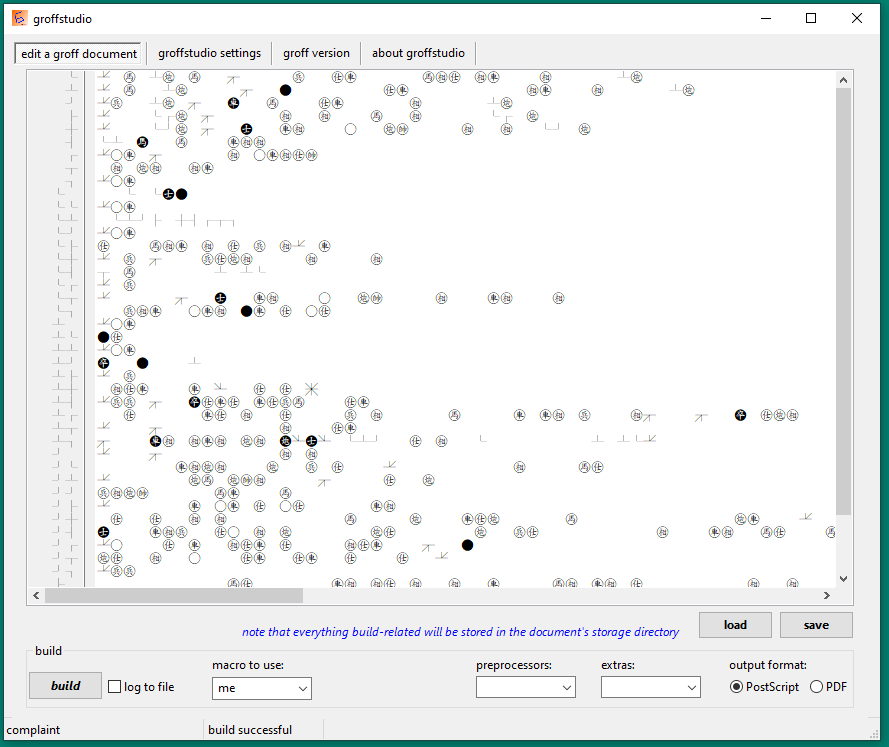
Everything worked!  Well done!  Compilation was perfect!  One small thing, though-- when I pasted in the input file, strange things appeared-- see attached file.  What do you think?  Anyway, everything worked great! 

Original address: https://www.donationcoder.com/forum/index.php?topic=52792.0