


*Basic Info
Intro:
Unlike other operating systems, Windows has a quite limited number of available command shells (minus the WSL). I have also said in the past that, three decades after the Plan 9 operating system was first released, I think that virtual teletypes ("terminals") are not really the way to control a computer in the 21st century anymore.
Nushell - one of those "look, we develop code in Rust!" projects, as if the language was sufficiently relevant - aims to be a "modern" shell which tries to go new ways: Instead of the classical Unix philosophy "everything is text", everything is a sortable, filterable object in Nushell, even results from remote APIs. That makes a lot of things easier if it's done right. Now is it?
Who is this app designed for:
People who actively work on the command line and would like to have a shell that has more modern constructs than just text, e.g. JSON from an API.
The Good
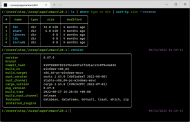
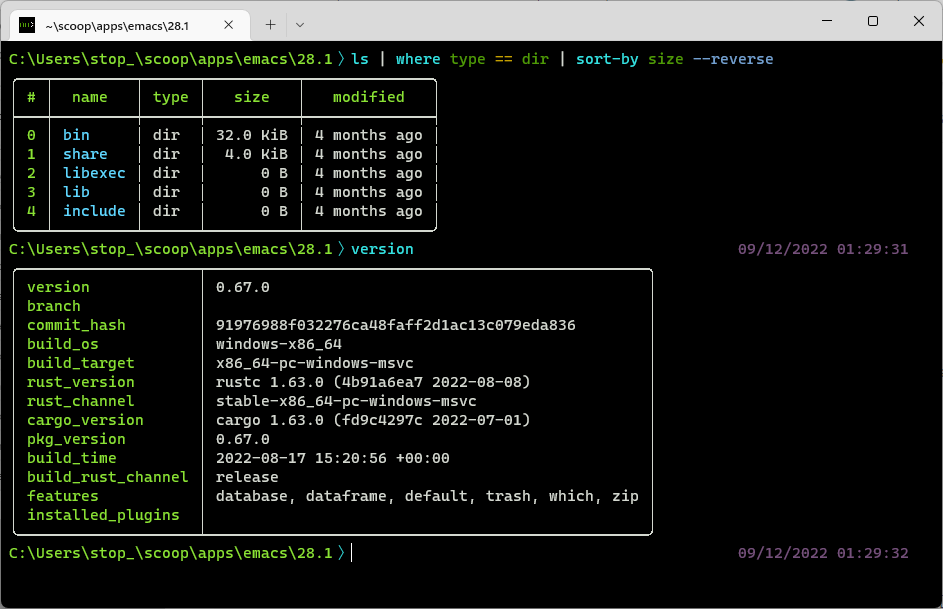
In theory, the shell works rather well: Right after its installation (I used Windows's package manager: winget install nu), it will add itself to the Windows Terminal (so you can make it your default shell if you like), display a startup screen (which contains information on how to remove it - basically, you'll need to edit the shell's configuration file which is documented quite well) and not get in your way. Even basic commands (like "ls", as seen on the screenshot) can make use of the object-based processing, but also the output of arbitrary external applications like Rust's Cargo can be parsed without a problem.
Windows-native shell built-ins like "dir" and "del" won't work though - "dir" and "del" are not valid applications. This should be less of a problem if you already use(d) PowerShell and/or a Unix-like operating system which also knows the "ls" and "rm" commands. (Note that Nushell's built-ins behave differently from their POSIX counterparts, but the help system is pretty good.)
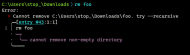
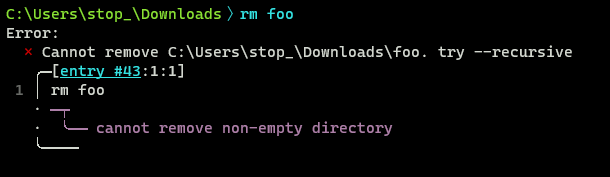
As we're talking about the help system, this is also a quite good feature of the Nushell: While conservative shells usually have the verbosity of the ed text editor when you make a mistake, Nushell will guide you towards fixing your input.
The needs improvement section
A few things are still broken on the Windows version of Nushell; for example, you can't use it with a non-mapped network drive because of a quirky dependency, and a few other commands which work just fine in a PowerShell window lead to unforeseen errors as well. Windows is not a primary target for Nushell yet, but they're slowly getting there.
All we can do is report all problems which occur on our systems.
Why I think you should use this product
Try something new, finally work with long lists efficiently, maybe even help the developers make Nushell a good alternative.
How does it compare to similar apps
I think that the number of "similar" applications is roughly 0 - most shells, even "modern" ones like Elvish, stick to the classical approach of having (relatively) unstructured text as the only input and output format. While that approach has its advantages, Nushell is different; also, the fact that it works natively on contemporary Windows systems makes it stand out.
Conclusions
Nushell is a solid alternative command shell for Windows (and other operating systems) which needs a few more weeks to mature. I can imagine using it as my primary shell once its most obvious itches have been scratched.
| App Name | Nushell |
| App URL | https://www.nushell.sh |
| App Version Reviewed | 0.67.0 |
| Test System Specs | Windows 11 with the Windows Terminal |
| Supported OSes | Linux, macOS, and Windows (officially). |
| Support Methods | Discord and GitHub (no account-free support, it seems). |
| Pricing Scheme | Free software. |
| Reviewer Donation Link |  Give me money! Give me money! |
| Relationship btwn. Reviewer and Product | None at all. |
Intro:
Unlike other operating systems, Windows has a quite limited number of available command shells (minus the WSL). I have also said in the past that, three decades after the Plan 9 operating system was first released, I think that virtual teletypes ("terminals") are not really the way to control a computer in the 21st century anymore.
Nushell - one of those "look, we develop code in Rust!" projects, as if the language was sufficiently relevant - aims to be a "modern" shell which tries to go new ways: Instead of the classical Unix philosophy "everything is text", everything is a sortable, filterable object in Nushell, even results from remote APIs. That makes a lot of things easier if it's done right. Now is it?
Who is this app designed for:
People who actively work on the command line and would like to have a shell that has more modern constructs than just text, e.g. JSON from an API.
The Good
In theory, the shell works rather well: Right after its installation (I used Windows's package manager: winget install nu), it will add itself to the Windows Terminal (so you can make it your default shell if you like), display a startup screen (which contains information on how to remove it - basically, you'll need to edit the shell's configuration file which is documented quite well) and not get in your way. Even basic commands (like "ls", as seen on the screenshot) can make use of the object-based processing, but also the output of arbitrary external applications like Rust's Cargo can be parsed without a problem.
Windows-native shell built-ins like "dir" and "del" won't work though - "dir" and "del" are not valid applications. This should be less of a problem if you already use(d) PowerShell and/or a Unix-like operating system which also knows the "ls" and "rm" commands. (Note that Nushell's built-ins behave differently from their POSIX counterparts, but the help system is pretty good.)
As we're talking about the help system, this is also a quite good feature of the Nushell: While conservative shells usually have the verbosity of the ed text editor when you make a mistake, Nushell will guide you towards fixing your input.
The needs improvement section
A few things are still broken on the Windows version of Nushell; for example, you can't use it with a non-mapped network drive because of a quirky dependency, and a few other commands which work just fine in a PowerShell window lead to unforeseen errors as well. Windows is not a primary target for Nushell yet, but they're slowly getting there.
All we can do is report all problems which occur on our systems.
Why I think you should use this product
Try something new, finally work with long lists efficiently, maybe even help the developers make Nushell a good alternative.
How does it compare to similar apps
I think that the number of "similar" applications is roughly 0 - most shells, even "modern" ones like Elvish, stick to the classical approach of having (relatively) unstructured text as the only input and output format. While that approach has its advantages, Nushell is different; also, the fact that it works natively on contemporary Windows systems makes it stand out.
Conclusions
Nushell is a solid alternative command shell for Windows (and other operating systems) which needs a few more weeks to mature. I can imagine using it as my primary shell once its most obvious itches have been scratched.