DonationCoder.com forum
 
Read-only archive. This is a static copy of the DonationCoder.com forum. Reading and searching work as before; logging in, posting and private messages do not.
Archive of 2026-10-21 · About this archive · Main site

Author Topic: Add a "Unread topics: New" button for screens <1920 width?  (Read 15,614 times)

4wd

  • Pedantic Old Bastard
  • Supporting Member
  • Joined in 2006
  • **
  • Posts: 5,652
    • Coding Snacks
Since I usually seem to check DC via either a tablet or phone these days I really miss the Unread topics: New link that the desktop site has.

Is there any chance of it being added please?

Hopefully with an attendant: Mark all topics read
"I will not follow where the path may lead, but I will go where there is no path, and I will leave a trail." - Muriel Strode, 1903
« Last Edit: August 16, 2022, 02:43 PM by 4wd »

tomos

  • Charter Member
  • Joined in 2006
  • ***
  • Posts: 11,970
    • Gathering Badge
    • Participated in NANY Challenge Once
Re: Add a "Unread topics: New" button to mobile view?
« Reply #1 on: August 16, 2022, 10:28 AM »
Is that with a mobile version of the site?
I just use the normal URL on my phone.
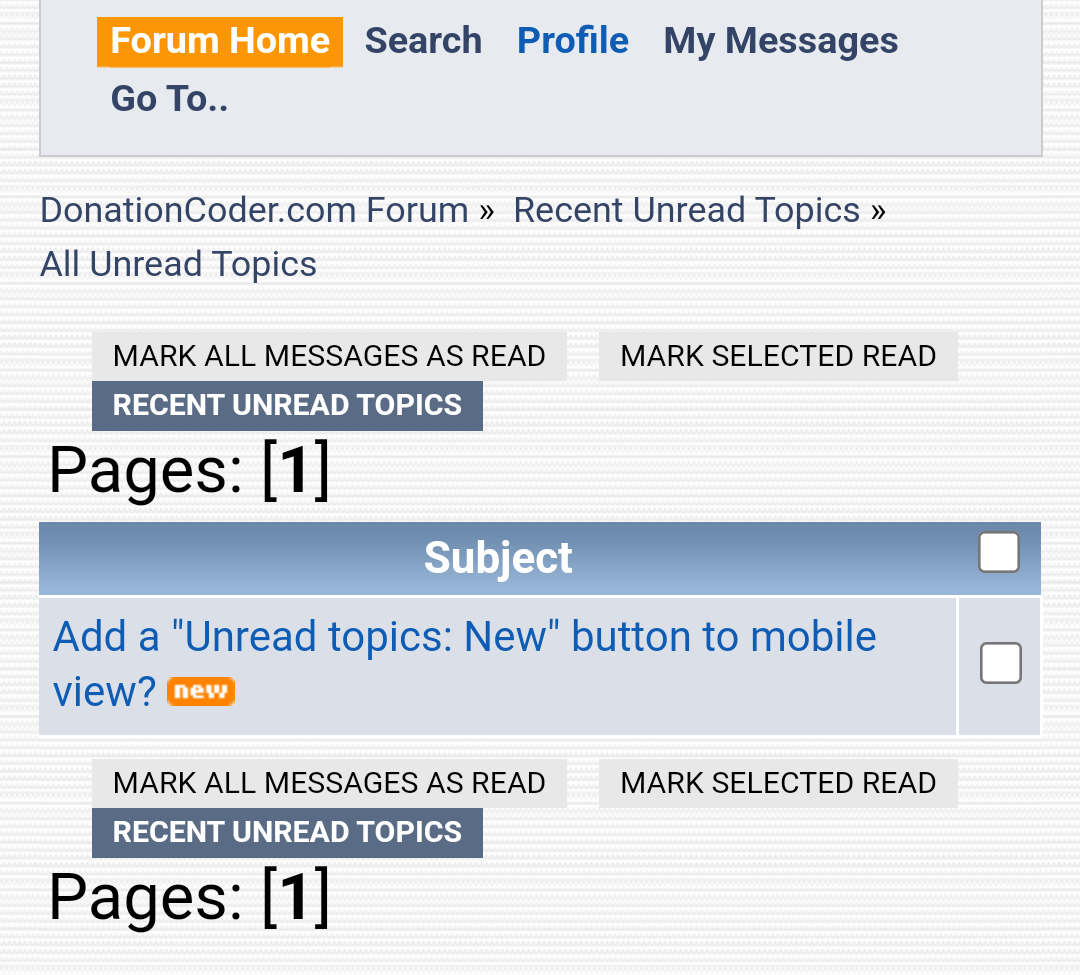
[Unread all] (or "since last visit") not available at top level, but under [go to]
Mark all as read then also available.

Screenshot_20220816-121648~2.png

EDIT//
1080 X 2340 phone screen size -- the screenshot above is a crop of portrait screen.
Tom
« Last Edit: August 16, 2022, 03:16 PM by tomos »

4wd

  • Pedantic Old Bastard
  • Supporting Member
  • Joined in 2006
  • **
  • Posts: 5,652
    • Coding Snacks
Re: Add a "Unread topics: New" button to mobile view?
« Reply #2 on: August 16, 2022, 02:41 PM »
No, normal site but it looks like it's connected with the device orientation, ie. detected screen width.

Tablet in portrait mode it doesn't show up, (1200px), but in landscape it does, (1920px).
Same with the phone, 1080x2400px.

Never noticed it because I rarely go to landscape mode due to if I ever have to type anything 85% of the display gets obliterated by the keyboard so I find myself scrolling up/down in the remaining 15% to see what I'm referring to, add markdown, etc, etc.

Be nice if you could customise what's in the top header box in some way, ie. I don't really need the Profile, Search, Go To... links.

I'll change the topic subject.

Btw, what is the screen width at which point it starts removing objects if someone knows?
"I will not follow where the path may lead, but I will go where there is no path, and I will leave a trail." - Muriel Strode, 1903

Deozaan

  • Charter Member
  • Joined in 2006
  • ***
  • Posts: 9,827
    • Participated in NANY Challenge Eight Times
    • Cody Award
Re: Add a "Unread topics: New" button for screens <1920 width?
« Reply #3 on: August 16, 2022, 05:54 PM »
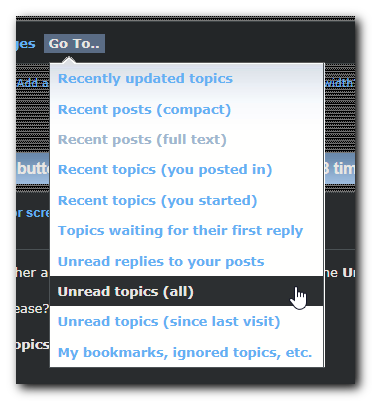
I don't really need the Profile, Search, Go To... links.

The "Go To..." link contains what you want.

Go To Unread Topics.png

4wd

  • Pedantic Old Bastard
  • Supporting Member
  • Joined in 2006
  • **
  • Posts: 5,652
    • Coding Snacks
Re: Add a "Unread topics: New" button for screens <1920 width?
« Reply #4 on: August 16, 2022, 06:17 PM »
DOH!  :-[

Although it's not quite "touch screen aware".
While it brings up a drop down menu, it only hangs around for less than half a second and then proceeds to load the "Go To..." web page if you don't select something within that time.

ie. The drop down menu should hang around until you either select something or tap somewhere else to close it.

The My Messages drop down menu has the same problem on touch screens.
"I will not follow where the path may lead, but I will go where there is no path, and I will leave a trail." - Muriel Strode, 1903
« Last Edit: August 16, 2022, 06:32 PM by 4wd »

Deozaan

  • Charter Member
  • Joined in 2006
  • ***
  • Posts: 9,827
    • Participated in NANY Challenge Eight Times
    • Cody Award
Re: Add a "Unread topics: New" button for screens <1920 width?
« Reply #5 on: August 18, 2022, 04:27 AM »
I've found that you can kind of "click and drag" the Go To... menu to get the dropdown to remain and allow you to tap what you actually want to do.

Original address: https://www.donationcoder.com/forum/index.php?topic=52608.0