DonationCoder.com forum
 
Read-only archive. This is a static copy of the DonationCoder.com forum. Reading and searching work as before; logging in, posting and private messages do not.
Archive of 2026-10-21 · About this archive · Main site

Author Topic: Windows 10 Prnt Scrn hotkey  (Read 11,559 times)

rrrr

  • Participant
  • Joined in 2012
  • *
  • Posts: 3
Windows 10 Prnt Scrn hotkey
« on: May 19, 2022, 08:01 PM »
I have licensed Screenshot Captor v4.36.2. Sometimes it does not start with the system, sometimes it stops silently. Sometimes it prevents Windows to shut down or reboot with some error message about using memory.
So, Windows took over it's own Prnt Screen hotkey and even when SC runs the Prnt Scr hotkey does not launch SC's capture but Windows own built-in capture. I cant find where to change it. I even reinstalled SC in hope that it rewrited the Windows own print screen function but no way it did.

Suggest me what to try next, please!

Thanks in advance!

Deozaan

  • Charter Member
  • Joined in 2006
  • ***
  • Posts: 9,827
    • Participated in NANY Challenge Eight Times
    • Cody Award
Re: Windows 10 Prnt Scrn hotkey
« Reply #1 on: May 19, 2022, 09:06 PM »
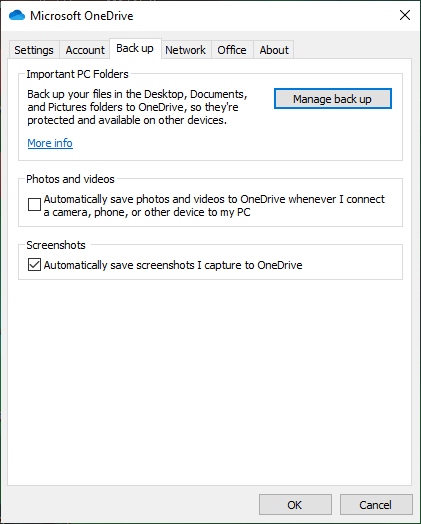
Try checking the settings of OneDrive. I seem to recall that stealing print-screen functionality away from Screenshot Captor.

rrrr

  • Participant
  • Joined in 2012
  • *
  • Posts: 3
Re: Windows 10 Prnt Scrn hotkey
« Reply #2 on: May 20, 2022, 08:02 AM »
Yes, that was it! Thank you so much!!!  :Thmbsup:

Screenshot - 20_05_2022 , 09_53_14.png

erikts

  • Supporting Member
  • Joined in 2007
  • **
  • Posts: 227
Re: Windows 10 Prnt Scrn hotkey
« Reply #3 on: June 30, 2022, 04:41 AM »
Try checking the settings of OneDrive. I seem to recall that stealing print-screen functionality away from Screenshot Captor.

+100 Thank You

danipg

  • Participant
  • Joined in 2011
  • *
  • Posts: 3
Re: Windows 10 Prnt Scrn hotkey
« Reply #4 on: March 24, 2023, 10:05 AM »
I've similar problem, but combination with prntscr besides triggering SSC function also prints directly to the main printer.

BUt unexpectedly a Custom combination without prntscr, such as CTRL- Fx triggers the printing


BTW One drive is not logged in.
« Last Edit: March 24, 2023, 10:14 AM by danipg »

Original address: https://www.donationcoder.com/forum/index.php?topic=52354.0