DonationCoder.com forum
 
Read-only archive. This is a static copy of the DonationCoder.com forum. Reading and searching work as before; logging in, posting and private messages do not.
Archive of 2026-10-21 · About this archive · Main site

Author Topic: Firefox: how to disable one single keyboard shortcut?  (Read 8,114 times)

brotherS

  • Master of Good Ideas
  • Honorary Member
  • Joined in 2005
  • **
  • Posts: 2,261
Firefox: how to disable one single keyboard shortcut?
« on: September 12, 2006, 09:15 AM »
Hi,

I'd like to disable "Restore Text Size" that is executed when I press Ctrl+0. Is this somehow possible?
Thank you.

kimmchii

  • Honorary Member
  • Joined in 2005
  • **
  • Posts: 360
Re: Firefox: how to disable one single keyboard shortcut?
« Reply #1 on: September 12, 2006, 11:14 AM »
yes, with keyconfig extension.
If you find a good solution and become attached to it, the solution may become your next problem.
~Robert Anthony

allen

  • Charter Member
  • Joined in 2006
  • ***
  • Posts: 1,206
    • Participated in NANY Challenge Once
    • Cody Award
    • Programming School - Deluxe Bonus Medal
    • Military Service Badge - US Navy
    • Linux User
    • Writer
Re: Firefox: how to disable one single keyboard shortcut?
« Reply #2 on: September 12, 2006, 11:18 AM »
You could always use a browser that natively supports keyboard configuration as well. ;)

brotherS

  • Master of Good Ideas
  • Honorary Member
  • Joined in 2005
  • **
  • Posts: 2,261
Re: Firefox: how to disable one single keyboard shortcut?
« Reply #3 on: September 15, 2006, 08:00 AM »
yes, with keyconfig extension.
Thanks, I'd like to use that with my Firefox 1.5.0.6, but...


:huh:
Thank you.

sri

  • Honorary Member
  • Joined in 2006
  • **
  • Posts: 689
Re: Firefox: how to disable one single keyboard shortcut?
« Reply #4 on: September 15, 2006, 08:05 AM »
brotherS: Use keyconfig enhanced. It can be downloaded from http://www.extensionsmirror.nl/index.php?showtopic=254 (at the bottom).

It's working on my latest Firefox, 1.5.0.7.

lanux128

  • Global Moderator
  • Joined in 2005
  • *****
  • Posts: 6,277
    • Coding Snacks
    • Volunteers/Staff
    • Gathering Badge
    • Participated in NANY Challenge Once
    • Linux User
Re: Firefox: how to disable one single keyboard shortcut?
« Reply #5 on: September 18, 2006, 02:51 AM »
Thanks, I'd like to use that with my Firefox 1.5.0.6, but...
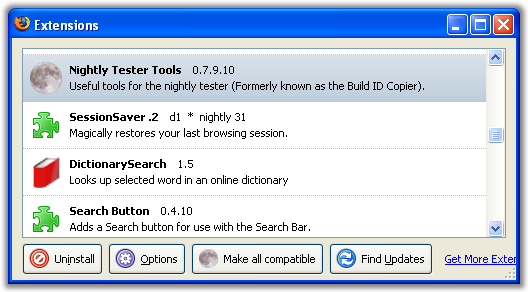
brotherS, make it compatible with Nightly Tester Tools.. :Thmbsup:

nightly-tester-tool1.png

brotherS

  • Master of Good Ideas
  • Honorary Member
  • Joined in 2005
  • **
  • Posts: 2,261
Re: Firefox: how to disable one single keyboard shortcut?
« Reply #6 on: October 08, 2006, 09:47 PM »
Thanks, I'd like to use that with my Firefox 1.5.0.6, but...

brotherS, make it compatible with Nightly Tester Tools.. :Thmbsup:
I tried to... only to see that the Nightly Tester Tools extension requires at least FF 2.x!  >:(

And keyconfig is not compatible with Firefox 1.5.0.7 either... ARGH!! :down:
Thank you.

dk70

  • Charter Member
  • Joined in 2005
  • ***
  • Posts: 269
Re: Firefox: how to disable one single keyboard shortcut?
« Reply #7 on: October 08, 2006, 11:41 PM »
Use latest version for 1.5.0.x http://users.blueprintit.co.uk/~dave/web/firefox/nightly/history

Or use this instead https://addons.mozilla.org/firefox/421/ has tons of extra features. A few you might like.

Or download keyconfig.xpi file - open it in any file manager which can work with zip files. Extract and edit install.rdf. Look for maxversion xxx, increase to what you feel like, anything higher than 1.5.0.6 will do. Repack file, drag it on to Firefox window. No protests this time. You dont really need extension for this.

Original address: https://www.donationcoder.com/forum/index.php?topic=5228.0