DonationCoder.com forum
 
Read-only archive. This is a static copy of the DonationCoder.com forum. Reading and searching work as before; logging in, posting and private messages do not.
Archive of 2026-10-21 · About this archive · Main site

Author Topic: Adobe Premiere Extension coding: TimeStamper, Multicam Deluxe, SoundFx Adder, et  (Read 29,979 times)

mouser

  • First Author
  • Administrator
  • Joined in 2005
  • *****
  • Posts: 40,931
    • Gathering Badge
    • Plugin Coding Medal
    • Participated in NANY Challenge Seventeen Times
    • Cody Award
    • Coding Snacks
    • Volunteers/Staff
I will be releasing these as part of NANY 2022:

Code is now available on github: https://github.com/dcmouser/jrPremiere


Some of you know I've gone pretty far down the rabbit hole of video editing for my latest project, a Boardgame YouTube channel (see this thread).

I've actually spent a lot of time creating custom After Effects (motion graphic) scripts and templates for the channel, to speed up the process of creating nice looking edits and overlays.

This week I decided to learn how to code an Adobe Premiere extension, to automate the generation of YouTube timestamps and to make it easier to navigate around the interesting parts of nested sequences.

Here's a teaser screenshot of my extension called "TimeStamper":
TimeStamperSampleOutput.png


From the README:

Quote
Scans your active sequence and builds a timestamp list of "notable" clips and mogrt item times in your active sequence.
Mogrt items are listed with text field values.
The timestamp list is presented on the extension panel as a clickable list to quickly jump to locations.
The timestamp list is exported to a timestamp text file in your project directory in YouTube timestamp format, for easy copy+paste into a YouTube video description to provice clickable timestamp links for your video.
« Last Edit: December 31, 2021, 08:34 PM by mouser »

mouser

  • First Author
  • Administrator
  • Joined in 2005
  • *****
  • Posts: 40,931
    • Gathering Badge
    • Plugin Coding Medal
    • Participated in NANY Challenge Seventeen Times
    • Cody Award
    • Coding Snacks
    • Volunteers/Staff
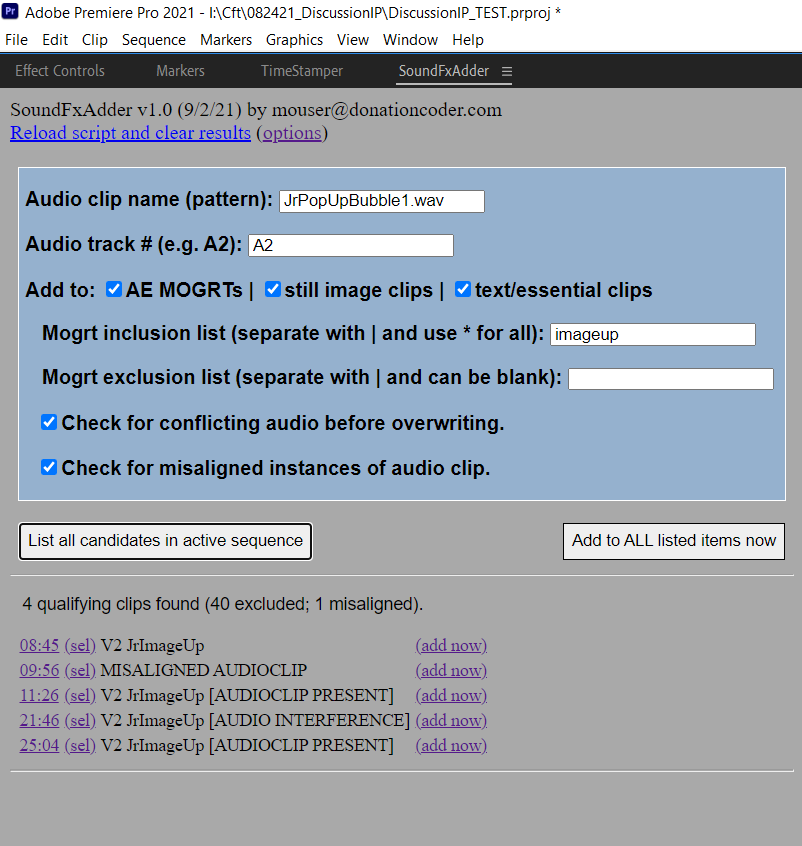
And my second extension, again designed to automate another thing I do a LOT of in my editing, "SoundFxAdder":
[attachthumb]
« Last Edit: November 02, 2021, 06:21 PM by mouser »

mouser

  • First Author
  • Administrator
  • Joined in 2005
  • *****
  • Posts: 40,931
    • Gathering Badge
    • Plugin Coding Medal
    • Participated in NANY Challenge Seventeen Times
    • Cody Award
    • Coding Snacks
    • Volunteers/Staff
Another extension coded:
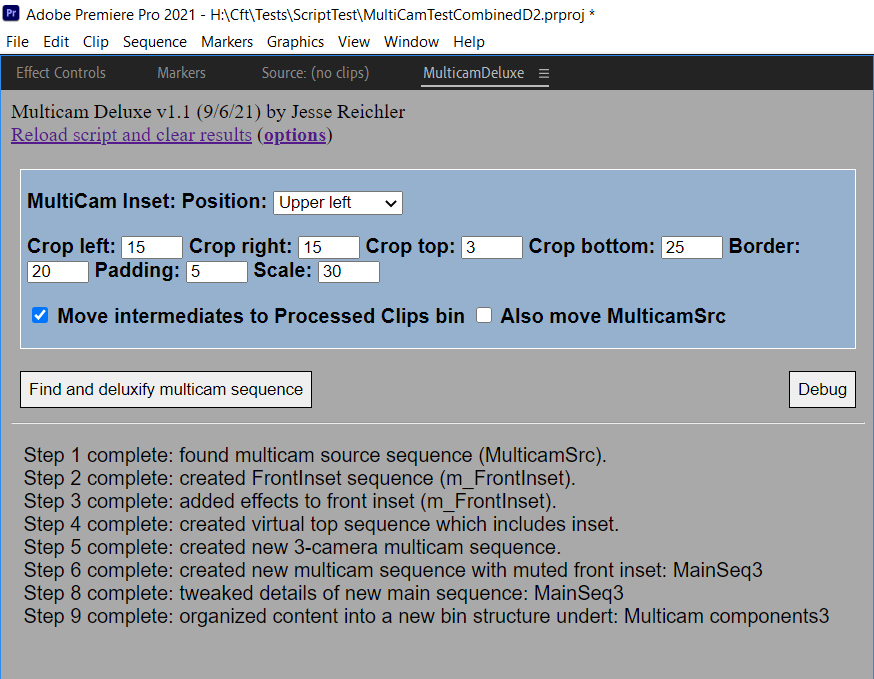
Multicam Deluxe

This one is a doozy -- it automates the elaborate process I use to turn dual (multi) camera footage into a sequence with a 3rd virtual camera angle that is top down with a small front inset picture-in-picture, and some other helper stuff for that.

SampleOutput.png


« Last Edit: November 02, 2021, 06:21 PM by mouser »

mouser

  • First Author
  • Administrator
  • Joined in 2005
  • *****
  • Posts: 40,931
    • Gathering Badge
    • Plugin Coding Medal
    • Participated in NANY Challenge Seventeen Times
    • Cody Award
    • Coding Snacks
    • Volunteers/Staff
Another extension coded:
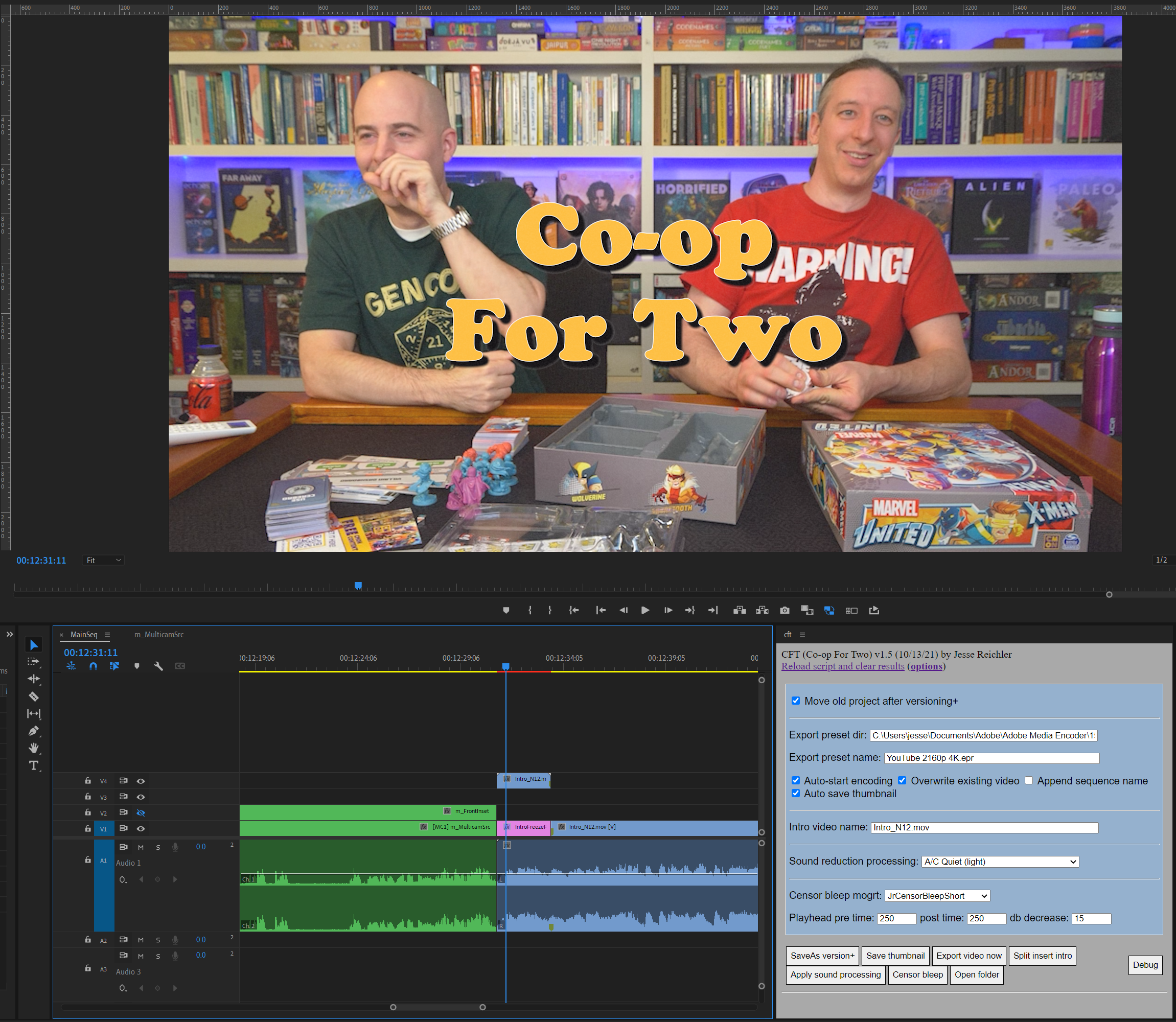
CFT

Automates the process of inserting a freeze-frame retro-style intro:
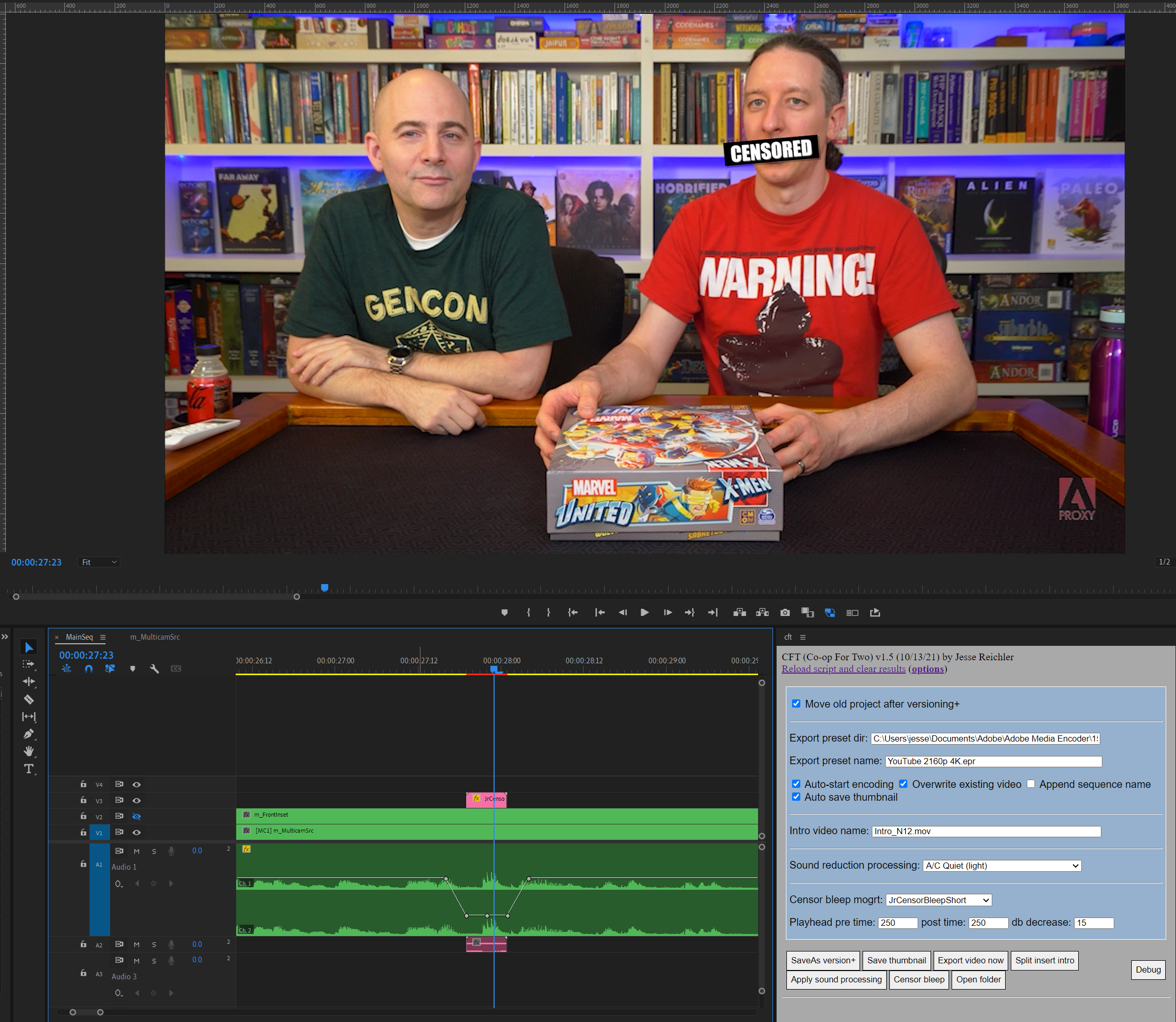
SampleOutput.png cansorbleep.png

Plus does a few more things that I commonly do, to make editing my videos easier.  Like saving an increasing version# in the file, exporting thumbnail images, rendering for youtube with the project filename, etc.

[UPDATED 10/15/21]
Updated screenshot to show a couple more new items added to this extension:
  • A censor-bleep action that adds keyframes to drop the volume around the playhead, and add a mogrt that plays a beep sound and shows a censor bar over the person's mouth.
  • And a simple action that applies a sound fx processing to the audio clips that I use for sound reduction if I record with A/C running.


« Last Edit: November 02, 2021, 06:22 PM by mouser »

mouser

  • First Author
  • Administrator
  • Joined in 2005
  • *****
  • Posts: 40,931
    • Gathering Badge
    • Plugin Coding Medal
    • Participated in NANY Challenge Seventeen Times
    • Cody Award
    • Coding Snacks
    • Volunteers/Staff
A minor new extension coded:
Preflight

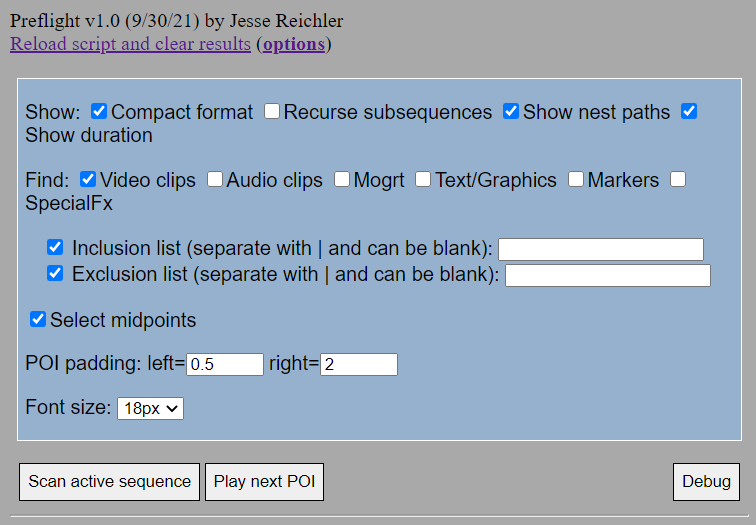
"This extension helps facilitate doing manual preflight checks of your sequence to look for problems.
Scans the active sequence according to your options and makes a list of timestamps of potentially interesting items, that you can easily jump to and select.
In essence, this extension reuses the code from my Timestamper extension but with it's own independent options to make it easier for you to configure it to list only timeline objects that are important to you.
The list of timeline events makes it easier to jump around and check for any problems.
For example, I find that I occasionally have mistakes in my multicamera edits where I zoom in on a clip and erroneously switch to a different camera; I can use the Preflight extension to find all clips with special effects (including zooms), and then rapidly select them each in turn to check that they are correct.
Pressing the preview POI button will jump to the next interesting timestamp in the list and play a section around this timestamp.  Or hit "Preview all" to have it play through each point of interest in order.  In this way you can very quickly preview all of the transitions, mogrts, etc. without having to rewatch the entire video.
"

[attachthumb]
« Last Edit: November 02, 2021, 06:22 PM by mouser »

tomos

  • Charter Member
  • Joined in 2006
  • ***
  • Posts: 11,970
    • Gathering Badge
    • Participated in NANY Challenge Once
I'm wondering where are these available?
And are they getting the attention they deserve (they sound very helpful to youtubers)...

PS I not a youtuber, and have never used Premiere
Tom
« Last Edit: October 02, 2021, 06:16 PM by tomos »

mouser

  • First Author
  • Administrator
  • Joined in 2005
  • *****
  • Posts: 40,931
    • Gathering Badge
    • Plugin Coding Medal
    • Participated in NANY Challenge Seventeen Times
    • Cody Award
    • Coding Snacks
    • Volunteers/Staff
They are not released yet.. I was thinking of releasing for this year's NANY..

mouser

  • First Author
  • Administrator
  • Joined in 2005
  • *****
  • Posts: 40,931
    • Gathering Badge
    • Plugin Coding Medal
    • Participated in NANY Challenge Seventeen Times
    • Cody Award
    • Coding Snacks
    • Volunteers/Staff
If anyone here is a Premiere user on an apple mac product, drop me a message --- it would be nice to test out these tools on that platform.

mouser

  • First Author
  • Administrator
  • Joined in 2005
  • *****
  • Posts: 40,931
    • Gathering Badge
    • Plugin Coding Medal
    • Participated in NANY Challenge Seventeen Times
    • Cody Award
    • Coding Snacks
    • Volunteers/Staff
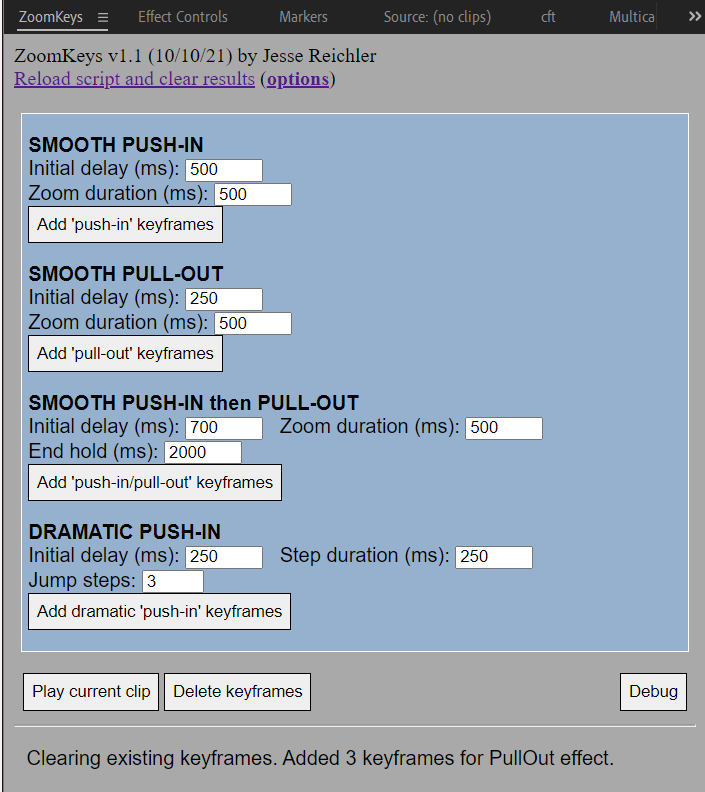
Another small one, ZoomKeys:
[attachthumb]
« Last Edit: November 02, 2021, 06:23 PM by mouser »

mouser

  • First Author
  • Administrator
  • Joined in 2005
  • *****
  • Posts: 40,931
    • Gathering Badge
    • Plugin Coding Medal
    • Participated in NANY Challenge Seventeen Times
    • Cody Award
    • Coding Snacks
    • Volunteers/Staff
Edited the above posts to add (draft) videos for each extension to show how they work and how to use them.

mouser

  • First Author
  • Administrator
  • Joined in 2005
  • *****
  • Posts: 40,931
    • Gathering Badge
    • Plugin Coding Medal
    • Participated in NANY Challenge Seventeen Times
    • Cody Award
    • Coding Snacks
    • Volunteers/Staff
My plan is to open source them all for NANY 2022.

I will have to decide before then if these videos are good enough or if it's worth the time and effort to remake them.

mouser

  • First Author
  • Administrator
  • Joined in 2005
  • *****
  • Posts: 40,931
    • Gathering Badge
    • Plugin Coding Medal
    • Participated in NANY Challenge Seventeen Times
    • Cody Award
    • Coding Snacks
    • Volunteers/Staff
Moves this thread to NANY 2022 section as I will be releasing these extensions freely for NANY 2022.

mouser

  • First Author
  • Administrator
  • Joined in 2005
  • *****
  • Posts: 40,931
    • Gathering Badge
    • Plugin Coding Medal
    • Participated in NANY Challenge Seventeen Times
    • Cody Award
    • Coding Snacks
    • Volunteers/Staff
Code is now available on github:
https://github.com/dcmouser/jrPremiere

mouser

  • First Author
  • Administrator
  • Joined in 2005
  • *****
  • Posts: 40,931
    • Gathering Badge
    • Plugin Coding Medal
    • Participated in NANY Challenge Seventeen Times
    • Cody Award
    • Coding Snacks
    • Volunteers/Staff
Just a little warning: My MulticamDeluxe extension makes use of the awesome FeatheredCrop plugin for Adobe Premiere (https://www.creativeimpatience.com/feathered-crop/), but that plugin seems to have been broken with the latest Premiere release.
I may add a workaround that will crop using built-in crop filter in Adobe premiere (but without the nice border provided by FeatheredCrop) in the near future.
Hopefully they will fix it soon.

mouser

  • First Author
  • Administrator
  • Joined in 2005
  • *****
  • Posts: 40,931
    • Gathering Badge
    • Plugin Coding Medal
    • Participated in NANY Challenge Seventeen Times
    • Cody Award
    • Coding Snacks
    • Volunteers/Staff
Update: Feathered Crop author has created an update which works well again, hooray!

mouser

  • First Author
  • Administrator
  • Joined in 2005
  • *****
  • Posts: 40,931
    • Gathering Badge
    • Plugin Coding Medal
    • Participated in NANY Challenge Seventeen Times
    • Cody Award
    • Coding Snacks
    • Volunteers/Staff
Minor update to my extensions posted to github to better let you filter out MOGRT from normal video clips in the TimeStamper and SoundFxAdder extensions.

mouser

  • First Author
  • Administrator
  • Joined in 2005
  • *****
  • Posts: 40,931
    • Gathering Badge
    • Plugin Coding Medal
    • Participated in NANY Challenge Seventeen Times
    • Cody Award
    • Coding Snacks
    • Volunteers/Staff
Featured on the awesome VideoRevealed YouTube channel today:
https://www.youtube.com/watch?v=Hc5TDhNW8zI

Ath

  • Supporting Member
  • Joined in 2006
  • **
  • Posts: 3,649
    • Participated in NANY Challenge Eleven Times
    • Coding Snacks
    • Linux User
    • Hardware Hacker
Instant fame!  :Thmbsup: :)
/Ton
Ath's software collection, Quote: "A problem well stated is a problem half-solved." (Charles Kettering)

tomos

  • Charter Member
  • Joined in 2006
  • ***
  • Posts: 11,970
    • Gathering Badge
    • Participated in NANY Challenge Once
Featured on the awesome VideoRevealed YouTube channel today:

Some people having trouble -- from the comments (in case you haven't seen):
"Cant use it: in my configuration, the text inside the TimeSampler windows is black on a black background... The same for all the extensions.
An idea?"
Tom

mouser

  • First Author
  • Administrator
  • Joined in 2005
  • *****
  • Posts: 40,931
    • Gathering Badge
    • Plugin Coding Medal
    • Participated in NANY Challenge Seventeen Times
    • Cody Award
    • Coding Snacks
    • Volunteers/Staff
Some people having trouble -- from the comments (in case you haven't seen):

Yeah it's due to missing that you need to install my shared adobe extension helper library available on same github download page. I've added more clear instructions about that.

Original address: https://www.donationcoder.com/forum/index.php?topic=51718.0