DonationCoder.com forum
 
Read-only archive. This is a static copy of the DonationCoder.com forum. Reading and searching work as before; logging in, posting and private messages do not.
Archive of 2026-10-21 · About this archive · Main site

Author Topic: Need a recursive utility  (Read 5,118 times)

fdwojo

  • My CASTLE is my home (and Stana should be, too).
  • Supporting Member
  • Joined in 2006
  • **
  • Posts: 20
    • Military Service Badge - US Army
    • Military Service Badge - US Navy
    • Writer
    • Hardware Hacker
Need a recursive utility
« on: May 27, 2021, 10:35 PM »
Hey there folks. I'm in need of a utility that can either:

1) allow me to execute a standard DOS/CMD command in every sub-directory of a particular folder
  or
2) create a 0-byte file in every sub-directory of a particular folder, all with the same name of my choice.

Way back in the day of Windows 95 and MS-DOS, I had a tool that would do option #1, but it seems those older 16-bit tools don't work in Windows 10. I've tried the FOR /R tool, but it doesn't seem to be able to create files, only manipulate existing files which is no help.

Does anyone know where I could find a tool like that? *** or *** could someone here write a utility that will do that?

Thanks for reading! Please let me know if you have any thoughts of an existing tool, or if creating one is possible.
==================================
No matter where you go, there you are… - B.B. 1984
-------------------------------------------------------
My System: Win 10 Pro 64-bit. Currently updated to version 21H1. RAM: 64GB, CPU: Intel Core i7 6700 CPU @ 4.0 GHz, and if it matters, ~½ TB space left on C:
« Last Edit: May 27, 2021, 10:40 PM by fdwojo »

4wd

  • Pedantic Old Bastard
  • Supporting Member
  • Joined in 2006
  • **
  • Posts: 5,652
    • Coding Snacks
Re: Need a recursive utility
« Reply #1 on: May 27, 2021, 11:48 PM »
Simple PowerShell script to create zero byte file in all sub-directories:

Code: ( powershell)
<#
p0b.ps1

In a Powershell console:

path/to/p0b.ps1 -dir <dir> -file <file>

Example:

./p0b.ps1 -dir r:/abc -file hello.txt

#>

param (
  [Parameter(Mandatory = $true)][string]$dir,
  [Parameter(Mandatory = $true)][string]$file
)

# Get a list of all sub-dirs
Get-ChildItem -Path $dir -Recurse -Directory | `
# For each one create a file
  ForEach-Object { New-Item "$($_)/$($file)" -ItemType File -Force}

NOTE: The -Force parameter will cause existing files to be overwritten, remove it if necessary.

PS. PowerShell doesn't care what you use for a path separator, / or \
"I will not follow where the path may lead, but I will go where there is no path, and I will leave a trail." - Muriel Strode, 1903
« Last Edit: May 27, 2021, 11:56 PM by 4wd »

publicdomain

  • Honorary Member
  • Joined in 2019
  • **
  • Posts: 732
    • Participated in NANY Challenge Three Times
    • Linux User
Re: Need a recursive utility
« Reply #2 on: June 13, 2021, 11:05 PM »
could someone here write a utility that will do that?

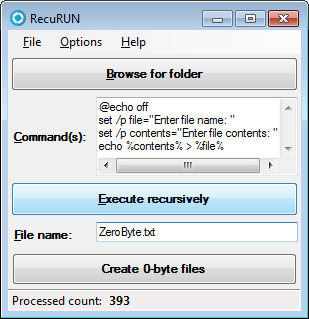
Hi there! :) Adding RecuRUN to the thread:

https://www.donationcoder.com/forum/index.php?topic=51481.0

RecuRUN_v0-1-0.png

Enjoy! :Thmbsup:
Vic

Original address: https://www.donationcoder.com/forum/index.php?topic=51436.0