DonationCoder.com forum
 
Read-only archive. This is a static copy of the DonationCoder.com forum. Reading and searching work as before; logging in, posting and private messages do not.
Archive of 2026-10-21 · About this archive · Main site

Author Topic: Can you view folders in FARR via an alias?  (Read 9,653 times)

jinxx

  • Supporting Member
  • Joined in 2014
  • **
  • Posts: 10
Can you view folders in FARR via an alias?
« on: May 19, 2021, 11:45 PM »
If you type a path with a trailing backslash you can view the contents of a folder without opening explorer e.g.:
Code
C:\users\someone\

Is there some way to view a folders contents the same way, but with an alias to a path. for example:

an example alias:
Code
my_docs = "C:\users\someone\"

and typing the "my_docs" alias in FARR to reveal the contents of the folder in "C:\users\someone\" within the FARR window?

Nod5

  • Supporting Member
  • Joined in 2006
  • **
  • Posts: 1,175
    • Coding Snacks
    • Participated in NANY Challenge Three Times
    • Plugin Coding Medal
Re: Can you view folders in FARR via an alias?
« Reply #1 on: May 20, 2021, 08:20 AM »
Is there some way to view a folders contents the same way, but with an alias to a path.
Here are three slightly different ways. In each start with
alias name: my_docs
alias regex: ^(my_docs|my_doc|my_do|my_d)$        (Not required, but faster. Modify as you want it.)

and then choose one of these
alias result: dosearch C:\users\someone\
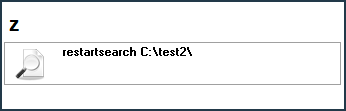
alias result: restartsearch C:\users\someone\
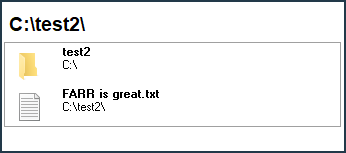
alias result: dolaunch restartsearch C:\users\someone\

How they differ:
dosearch: Immediately list folder contents in FARR results.
restartsearch: Show result "restartsearch C:\users\someone" and wait for (Enter) to list folder contents.
dolaunch restartsearch: Immediately list folder contents in FARR results and show folder path in FARR search box.

1.png
2.png

Original address: https://www.donationcoder.com/forum/index.php?topic=51417.0