Someone will come up with something fancier but it gave me something to do

It's only requirement is
PowerShell 7 or higher, (I no longer use earlier versions).
Doesn't write to console, just directly to the output file.
<#
  pinger.ps1

  Run: pwsh -F path\to\pinger.ps1
#>

$ip = "8.8.8.8"       # IP/site to ping
$file = "R:\ping.csv" # Output file, (will be output as CSV)
$maxlag = 40          # Latency above which to go beep

# If it ain't PowerShell 7+ we don't want to know about it.
if ($PSVersionTable.PSVersion.Major -lt 7) {
  "Requires PowerShell 7" | Out-Host
  Start-Sleep 10
} else {
  While ($true) {  # Loop-de-loop
    # Ping a site once and select latency
    $lag = (Test-Connection -ComputerName $ip -Count 1 -Ping -IPv4 -DontFragment | Select-Object Latency)
    # Format file output and append latest to file (date time,ip,latency,exceeds max)
    "$(Get-Date -Format 'yyyy/MM/dd HH:mm:ss'),$($ip),$($lag.Latency),$($lag.Latency -gt $maxlag)" | Out-File $file -Append
    # If latency is above maximum allowed value ...
    if ($lag.Latency -gt $maxlag) {
      # Go beep
      [console]::beep(1000,500)
    }
    # Sleep, restful sleep ... for all of 2 seconds >:|
    Start-Sleep -Seconds 2
  }
}
File output is in CSV format:
2021/05/17 22:22:35,8.8.8.8,6,False
2021/05/17 22:22:37,8.8.8.8,17,False
2021/05/17 22:22:39,8.8.8.8,41,True
2021/05/17 22:22:42,8.8.8.8,32,False
2021/05/17 22:22:44,8.8.8.8,32,False
2021/05/17 22:22:46,8.8.8.8,41,True
2021/05/17 22:22:48,8.8.8.8,33,False
2021/05/17 22:22:51,8.8.8.8,44,True
2021/05/17 22:22:53,8.8.8.8,43,True


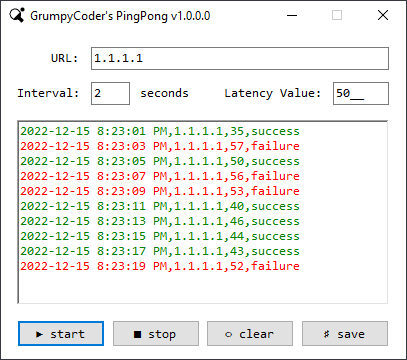
 PingPong.zip


