DonationCoder.com forum
 
Read-only archive. This is a static copy of the DonationCoder.com forum. Reading and searching work as before; logging in, posting and private messages do not.
Archive of 2026-10-21 · About this archive · Main site

Last post Author Topic: [IDEA] Display the weather in the command line (Weather forcast to text)  (Read 33,313 times)

user45454

  • Participant
  • Joined in 2010
  • *
  • Posts: 22
What I want: To display the weather from www.klart.se in the command line.

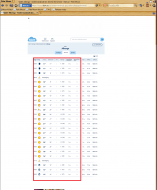
From this page https://www.klart.se/se/s%C3%B6dermanlands-l%C3%A4n/v%C3%A4der-alberga/timmar/
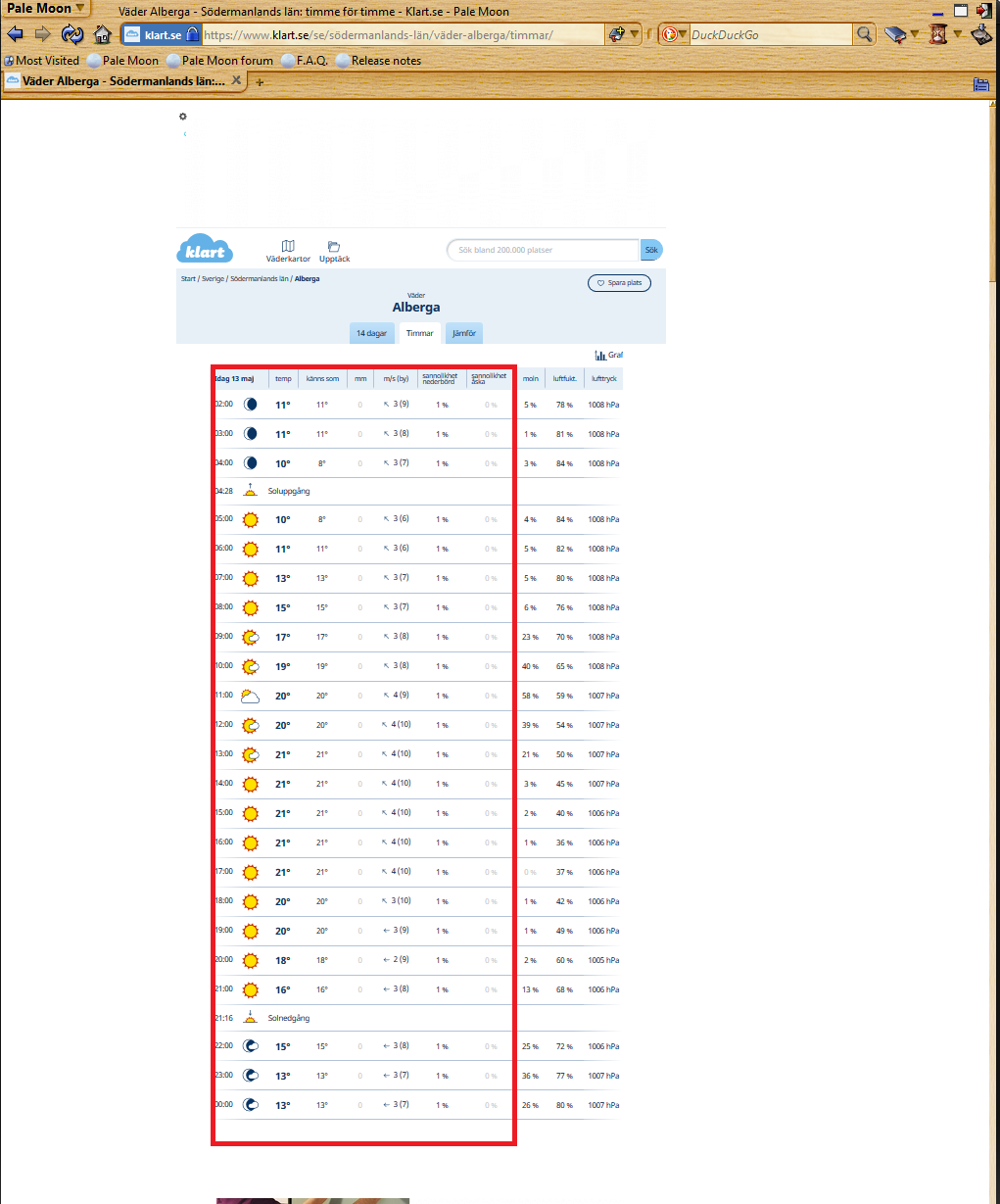
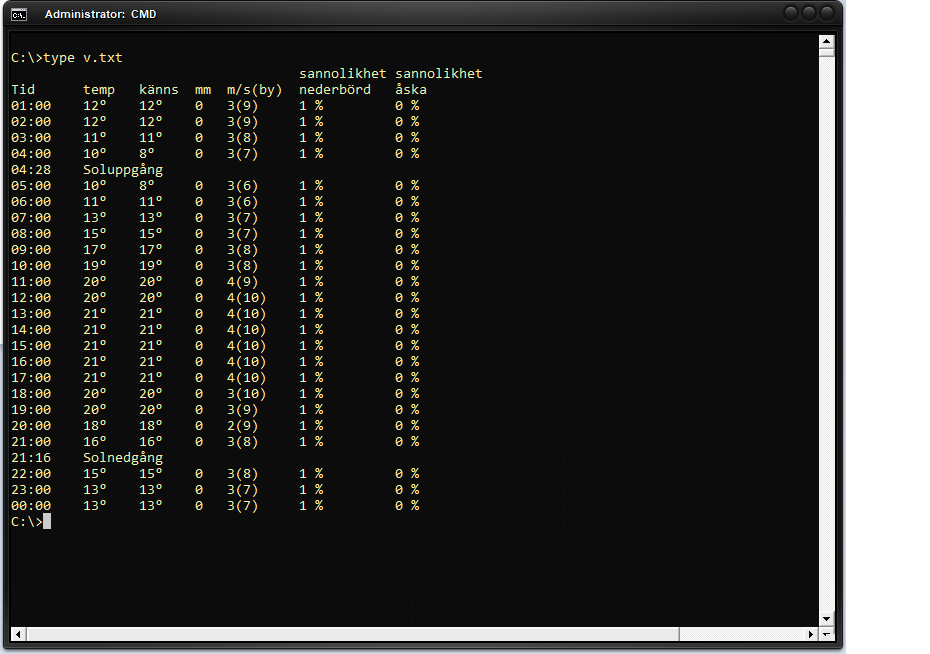
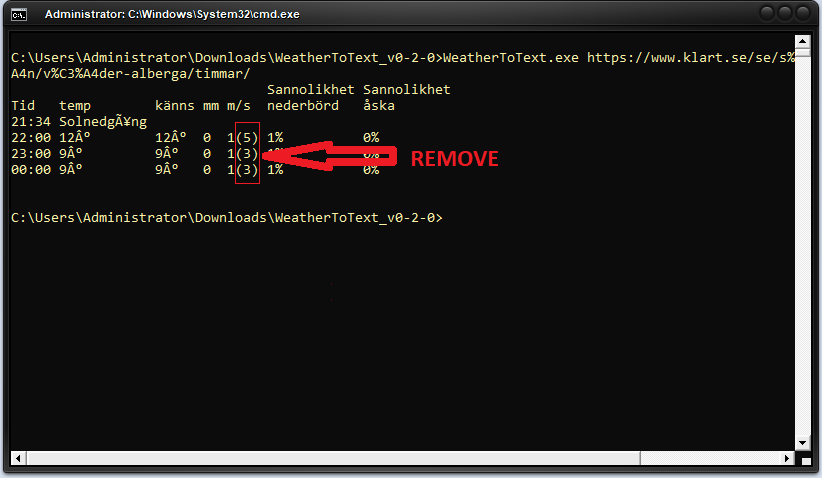
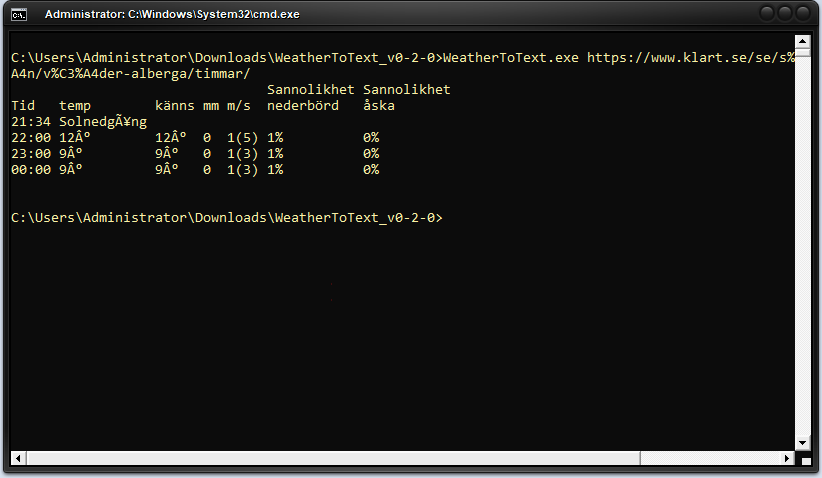
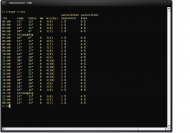
I want a program that gets the today weather forcast part (part marked in screen shot 1) and saves it to a textfile so it can be typed into into a command line window, or directly types it into the command line window (see screen shot 2).
Note that I changed some tittles in the command line version.
The text on the webpage is in Swedish, I hope it is not a problem.
Picture1.pngPicture2.png
« Last Edit: January 18, 2022, 09:45 PM by user45454 »

publicdomain

  • Honorary Member
  • Joined in 2019
  • **
  • Posts: 732
    • Participated in NANY Challenge Three Times
    • Linux User
What I want: To display the weather from www.klart.se in the command line.

From this page https://www.klart.se/se/s%C3%B6dermanlands-l%C3%A4n/v%C3%A4der-alberga/timmar/

Hi! I'm currently finishing several "dangling" releases yet yours gets included as well since it's a 1-day code :)

https://github.com/publicdomain/weather-to-text

wraith808

  • Supporting Member
  • Joined in 2006
  • **
  • Posts: 11,205
    • Participated in NANY Challenge Fourteen Times
    • Coding Snacks
    • Writer
    • Hardware Hacker
So, this isn't exactly what you asked for, but it was an interesting problem, so I did it anyway :)

It uses wttr.in (I couldn't figure out that other site- when I put in a location, it required a more specific name for the results page than I could figure out quickly).

It's in powershell, and I documented it in the comments. Save it to Get-Weather.ps1 and run it, i.e.

.\Get-Weather.ps1

It will prompt you for the city- you can specify it just by city and it will sometimes get it right from your location, but you can also use state/province/country, etc - just separate with ,. i.e.

.\Get-Weather.ps1
Enter name of the City to get weather report: Cairo

This would display the weather for Cairo,Egypt, but

.\Get-Weather.ps1
Enter name of the City to get weather report: Cairo,Illinois

Would display the weather for Cairo,Illinois

Code: ( powershell)
<#
Get-Weather

Created in response to a request on DonationCoder
- https://www.donationcoder.com/forum/index.php?topic=51394

Retrieves weather from http://wttr.in/ and prints it to commandline

Parameters:
-City: [required] City to retrieve the weather for
-IncludeTomorrow : Also include tomorrow's weather
-IncludeNext2Days : Also include the weather for the next two days

#>

param (
    [string]$City = $( Read-Host "Enter name of the City to get weather report" ),
    [switch] $IncludeTomorrow,
    [switch] $IncludeNext2Days
    )

try {
    $url = "http://wttr.in/$($City)"

    $Weather = $(Invoke-WebRequest $url –UserAgent curl).content -split "`n"

    if($Weather)
    {
        $Weather[0..16]
        if(($IncludeTomorrow) -or ($IncludeNext2Days)){ $Weather[17..26] }
        if($IncludeNext2Days){ $Weather[27..36] }
    }
}
catch {
    $_.exception.Message
}

publicdomain

  • Honorary Member
  • Joined in 2019
  • **
  • Posts: 732
    • Participated in NANY Challenge Three Times
    • Linux User
So, this isn't exactly what you asked for, but it was an interesting problem, so I did it anyway :)

Wowie!!! Thanks for your willingness to help a fellow!


Note that I changed some tittles in the command line version.

WeatherToText v0.1.0 is released: https://www.donationcoder.com/forum/index.php?topic=51403.0

Text substitution comes @ v0.1.1

Please check what's there suits you Cheers!
« Last Edit: May 15, 2021, 01:05 PM by publicdomain »

user45454

  • Participant
  • Joined in 2010
  • *
  • Posts: 22
So, this isn't exactly what you asked for, but it was an interesting problem, so I did it anyway :)

Wowie!!! Thanks for your willingness to help a fellow!


Note that I changed some tittles in the command line version.

WeatherToText v0.1.0 is released: https://www.donationcoder.com/forum/index.php?topic=51403.0

Text substitution comes @ v0.1.1

Please check what's there suits you Cheers!

Verry nice but I get this error
"Error: The request was aborted: Could not create SSL/TLS secure channel."

:o

publicdomain

  • Honorary Member
  • Joined in 2019
  • **
  • Posts: 732
    • Participated in NANY Challenge Three Times
    • Linux User
"Error: The request was aborted: Could not create SSL/TLS secure channel."

Thanks for reporting, I tested it on Linux/Mono version 6.12.0.122 (.NET framework 4.5 compilation target).

Going to add text replacements & test it on Windows for patched v0.1.1 :Thmbsup: Cheers!

WeatherToText_v0-1-0.png

« Last Edit: May 16, 2021, 08:01 AM by publicdomain »

wraith808

  • Supporting Member
  • Joined in 2006
  • **
  • Posts: 11,205
    • Participated in NANY Challenge Fourteen Times
    • Coding Snacks
    • Writer
    • Hardware Hacker
I just realized looking at the source, I was reading too much into the request- you wanted that specific page, not a parameterized query from that site.

publicdomain

  • Honorary Member
  • Joined in 2019
  • **
  • Posts: 732
    • Participated in NANY Challenge Three Times
    • Linux User
Fixed the cross-platform code from the report:

"Error: The request was aborted: Could not create SSL/TLS secure channel."

v0.1.1 has been released! :)

WeatherToText topic updated to reflect it: https://www.donationcoder.com/forum/index.php?topic=51403.0

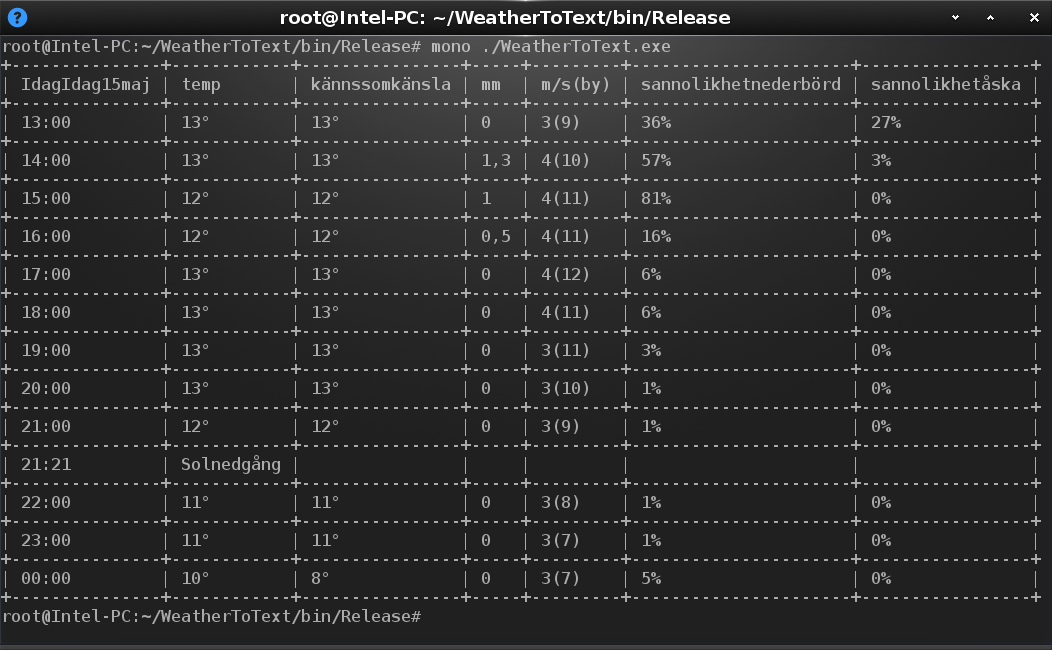
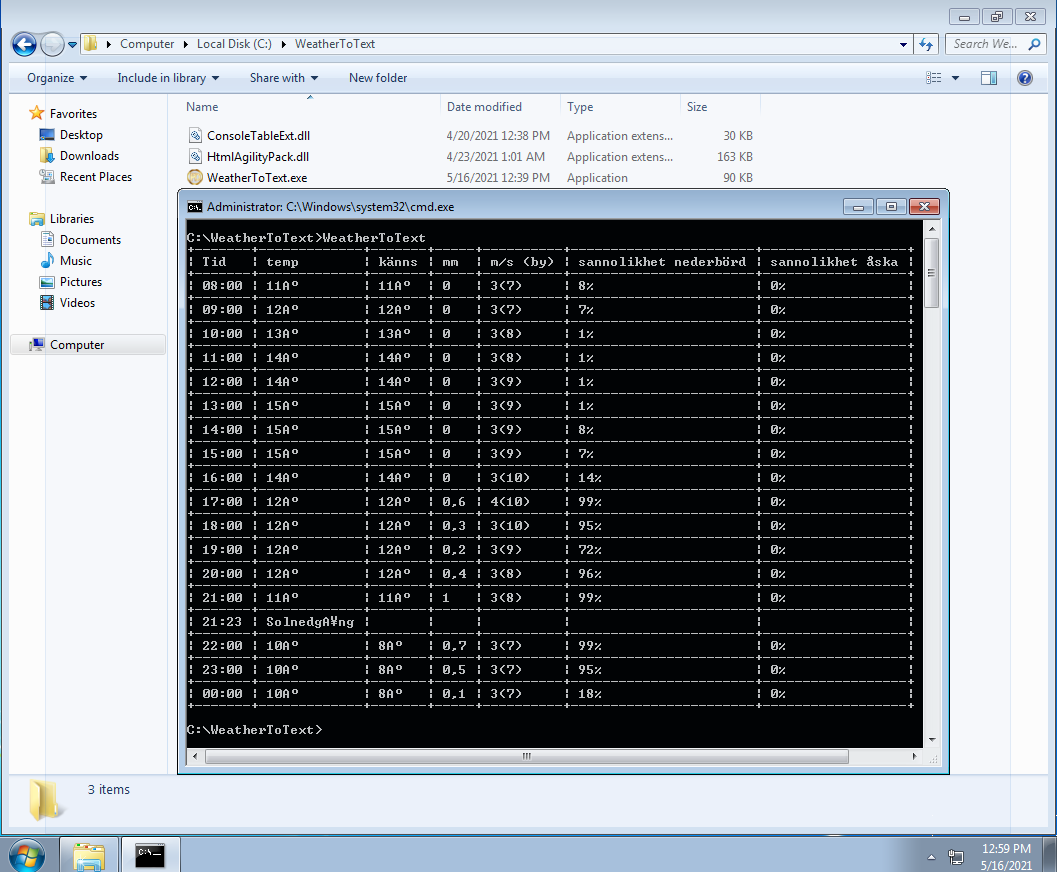
Tested on Windows & Linux. Both running:

WeatherToText_v0-1-1_Windows.png

WeatherToText_v0-1-1_Linux.png

Cheers! :Thmbsup:
« Last Edit: May 16, 2021, 08:32 AM by publicdomain »

user45454

  • Participant
  • Joined in 2010
  • *
  • Posts: 22
Hi,

A short translation of what the Swedish words mean.


Tid=Time
Känns=Feels (känns som=feels like)
BY = Gust of wind (should say "vindby" because vind=wind)
Sannolikhet nederbörd =  Probability of precipitation
Sannolikhet åska = Probability of thunder
Soluppgång = Sun Rise
Solnedgång = Sun set

user45454

  • Participant
  • Joined in 2010
  • *
  • Posts: 22
Fixed the cross-platform code from the report:

"Error: The request was aborted: Could not create SSL/TLS secure channel."

v0.1.1 has been released! :)

WeatherToText topic updated to reflect it: https://www.donationcoder.com/forum/index.php?topic=51403.0

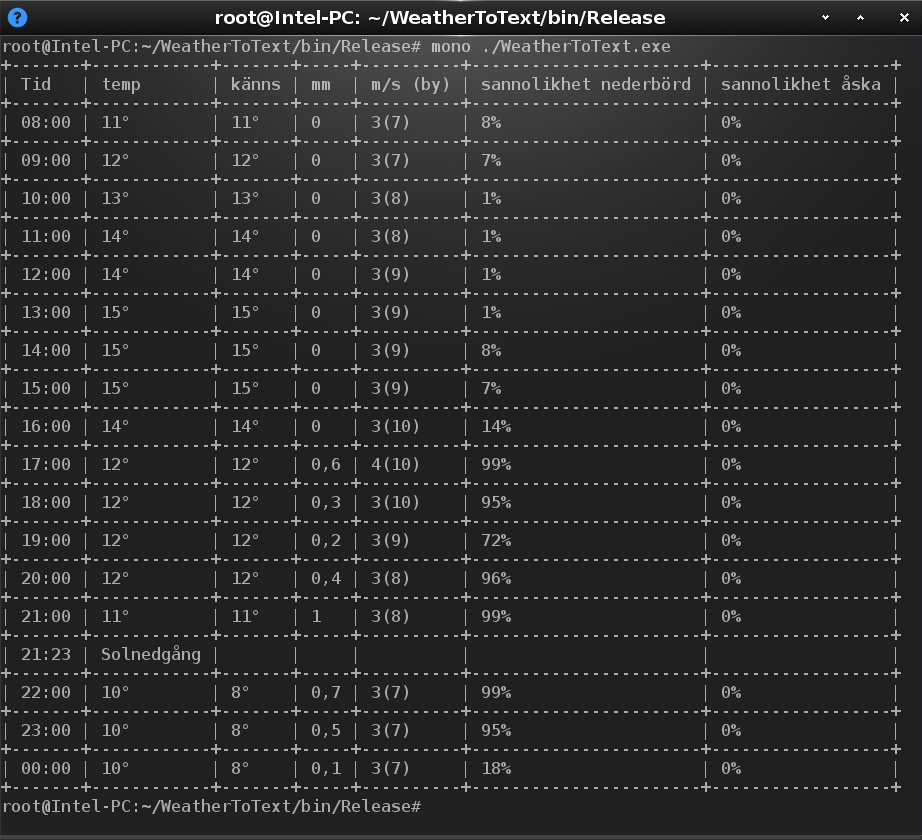
Tested on Windows & Linux. Both running:

Picture3.png

[attachment 2 not found]

Cheers! :Thmbsup:

Things are really starting to take form.
Looking good :-)
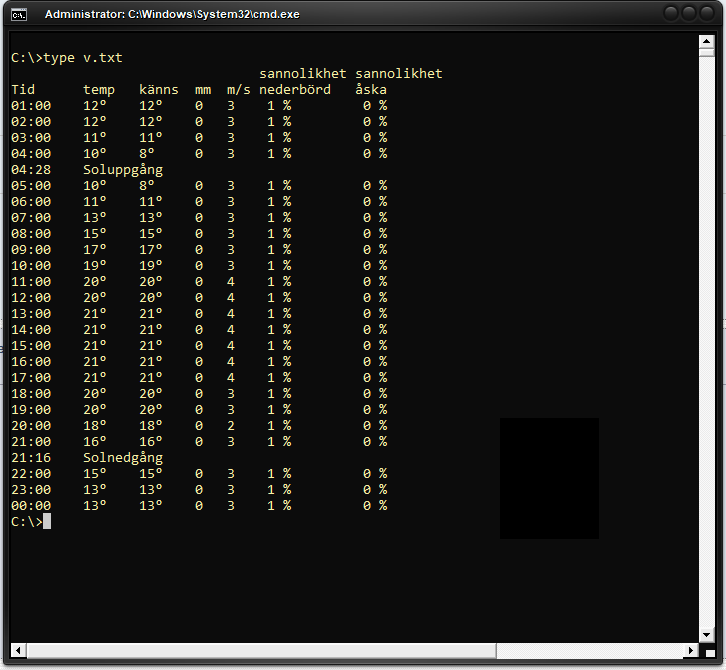
Is it possible to make it look like picture provided?
No borders, removed "(by)" more compact with row separtion for "nederbörd" & "åska" and no letter "A" after the temp.
Picture3.png

For future release
If the weather location could be made as an input like this
"WeatherToText.exe https://www.klart.se/se/s%C3%B6dermanlands-l%C3%A4n/v%C3%A4der-alberga/timmar/"
"WeatherToText.exe https://www.klart.se/ve/distrito-federal/v%C3%A4der-caracas/timmar/"
It would be usable for alot more people.

Right now it is hardcoded so the program is only usable for about the 100 people
that lives in my small town. :-)

wraith808

  • Supporting Member
  • Joined in 2006
  • **
  • Posts: 11,205
    • Participated in NANY Challenge Fourteen Times
    • Coding Snacks
    • Writer
    • Hardware Hacker
For future release
If the weather location could be made as an input like this
"WeatherToText.exe https://www.klart.se...4der-alberga/timmar/"
"WeatherToText.exe https://www.klart.se...4der-caracas/timmar/"
It would be usable for alot more people.

Yeah, this was what I was trying to do, but couldn't figure out the API for the urls, it being Swedish limited my ability to search. Your suggestion of sending in the URL is a good one!

publicdomain

  • Honorary Member
  • Joined in 2019
  • **
  • Posts: 732
    • Participated in NANY Challenge Three Times
    • Linux User
Is it possible to make it look like picture provided?

Yes afirmar.gif

For future release [...]

Sure thing! :up:

I'm coding AppFolderIcon + a couple other proggies for the community simultaneously; this update is added to the flow of releases  :)

(Stay tuned! We're talking days only)
« Last Edit: May 19, 2021, 10:33 PM by publicdomain »

publicdomain

  • Honorary Member
  • Joined in 2019
  • **
  • Posts: 732
    • Participated in NANY Challenge Three Times
    • Linux User
WeatherToText v0.2.0 is out! porra.gif

Download + info: https://www.donationcoder.com/forum/index.php?topic=51403.0

Cross-platform:

WeatherToText_v0-2-0_screenshot_2.png
Windows

WeatherToText_v0-2-0.png
Linux

Enjoy! dedosarriba.png
Vic
« Last Edit: May 20, 2021, 12:13 PM by publicdomain »

user45454

  • Participant
  • Joined in 2010
  • *
  • Posts: 22
WeatherToText v0.2.0 is out! [attachment 4 not found]

Download + info: https://www.donationcoder.com/forum/index.php?topic=51403.0

Cross-platform:

Picture5.png
Windows

[attachment 3 not found]
Linux

Enjoy! Picture4.png
Vic


This is looking real great now!  :up: :D

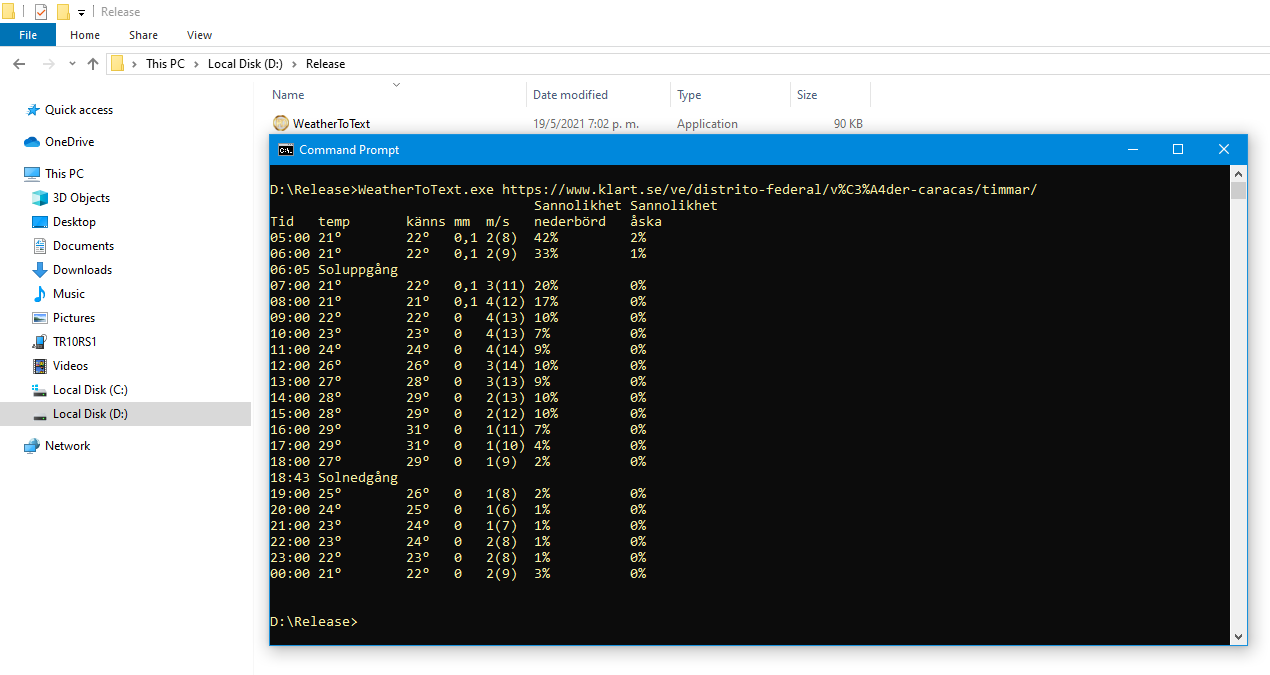
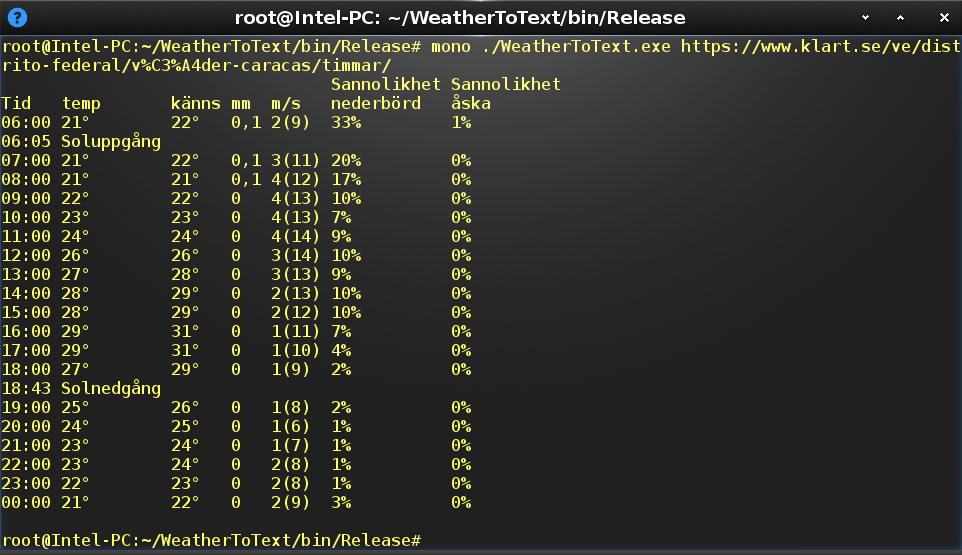
Just a few things.
Picture 1:Picture4.png
1) You can see in the picture that I get an "Â" between the numer and the grade sign.
2) And the sunset is getting the "Å" letter wrong, "21:34 SolnedgÃ¥ng".
At the time of writing Sun rise is gone but I think sun rise aka "Soluppgång" was correct, "åska" and "nederbörd" is also working fine.


Picture2:Picture5.png
1) I would  like to have the whole part that is in between the "()" removed.
See picture two what I mean.
2) It looks like the program forcing yellow ouput ?
We dont need to do that, some day we might want to change output color.
« Last Edit: May 21, 2021, 07:31 PM by user45454 »

publicdomain

  • Honorary Member
  • Joined in 2019
  • **
  • Posts: 732
    • Participated in NANY Challenge Three Times
    • Linux User

user45454

  • Participant
  • Joined in 2010
  • *
  • Posts: 22

user45454

  • Participant
  • Joined in 2010
  • *
  • Posts: 22
This is looking real great now!

Please check v0.3.0: https://www.donationcoder.com/forum/index.php?topic=51403.msg445163#msg445163

:Thmbsup:


Could we add the option to load also tomorrows forcast ?
The data is on the same site to be read.
Im running this at home, reloading once an hour, works great!  :up:
But the later it gets the more I would like to see whats happens after midnight.

publicdomain

  • Honorary Member
  • Joined in 2019
  • **
  • Posts: 732
    • Participated in NANY Challenge Three Times
    • Linux User
Could we add the option to load also tomorrows forcast ?

Yes, sure! :) What do you have in mind? Extra parameter added to the program? (i.e. for passing "tomorrow" as argument).

It can also be integrated into regular operation, perhaps having 24-hour data always displayed on screen (regardless of day boundaries).

Fell free to express! I'm here to code it :up:

Vic

user45454

  • Participant
  • Joined in 2010
  • *
  • Posts: 22
Could we add the option to load also tomorrows forcast ?

Yes, sure! :) What do you have in mind? Extra parameter added to the program? (i.e. for passing "tomorrow" as argument).

It can also be integrated into regular operation, perhaps having 24-hour data always displayed on screen (regardless of day boundaries).

Fell free to express! I'm here to code it :up:

Vic

Is it possible to load the next comming day but only after a certain time ?
Im runnning this program 24/7 and realoading it once an hour.

Something like (or maybe not at all, but you understand)
C:\WeatherToText.exe /?
Displays the hourerly weather forcast for a given location from klart.se.

/N Display the next day forcast
/T Specifies at what time WeatherToText shall load the next day forcast

c:\WeatherToText.exe https://www.klart.se/se/södermanlands-län/väder-alberga/timmar/ yellow /N /T 1900
Would only start loading the next day when my clock is 19:00 or after (7 pm) and until 00:00, otherwise it would loop forever.

publicdomain

  • Honorary Member
  • Joined in 2019
  • **
  • Posts: 732
    • Participated in NANY Challenge Three Times
    • Linux User
/N Display the next day forcast
/T Specifies at what time WeatherToText shall load the next day forcast

Sounds like a plan! :)

Added to the batch of releases to close the month :Thmbsup:

publicdomain

  • Honorary Member
  • Joined in 2019
  • **
  • Posts: 732
    • Participated in NANY Challenge Three Times
    • Linux User
...Took a bit longer than expected! WeatherToText v0.4.0 is finally here, working as requested:

https://www.donationcoder.com/forum/index.php?topic=51403.0

Enjoy!  :Thmbsup:
Vic

user45454

  • Participant
  • Joined in 2010
  • *
  • Posts: 22

Thanks for a great program,
I have a few update ideas.

1. Ouput the data to a text file.
c:\WeatherToText.exe https://www.klart.se/se/södermanlands-län/väder-alberga/timmar/ yellow > Weather.txt

2. Get weather overview from the "14 day output" page.
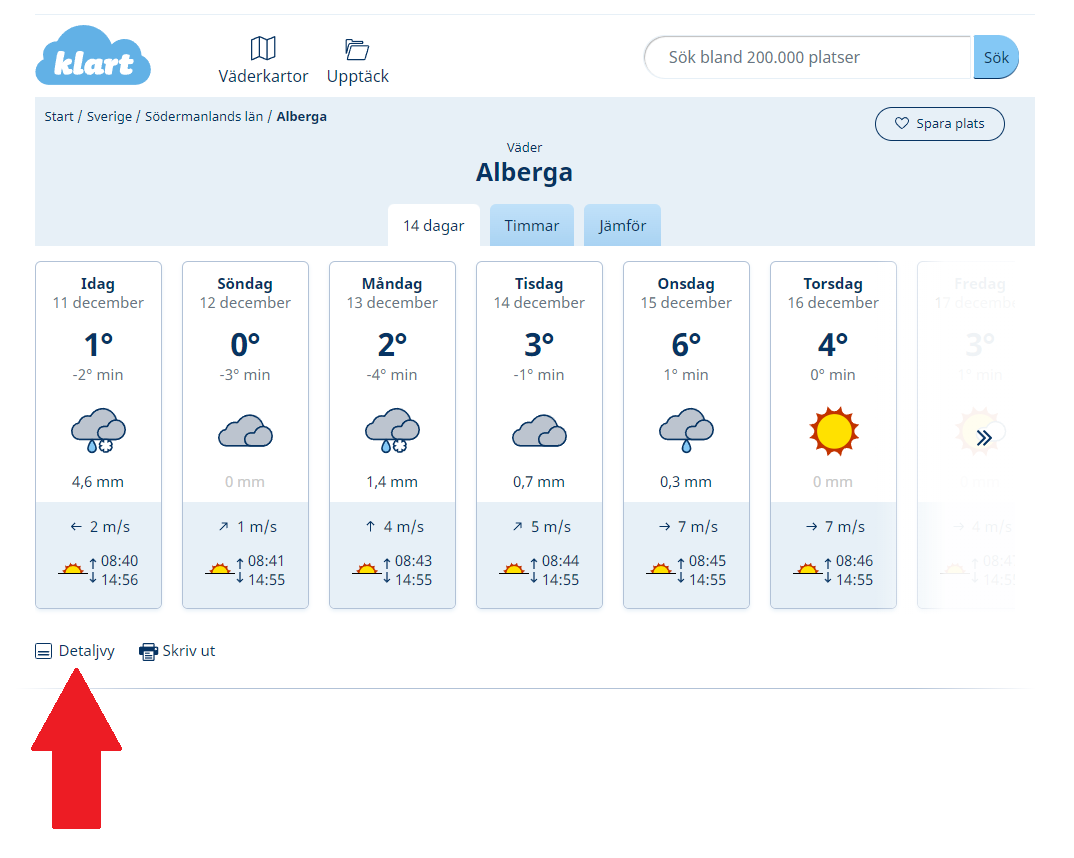
https://www.klart.se/se/s%C3%B6dermanlands-l%C3%A4n/v%C3%A4der-alberga/
Note that the page says "14 dagar" (dagar = days) but it gives a forcast well beyond, up to 24th december at this point.
(This doesnt need to be the same program if it easier to make a seperate program)

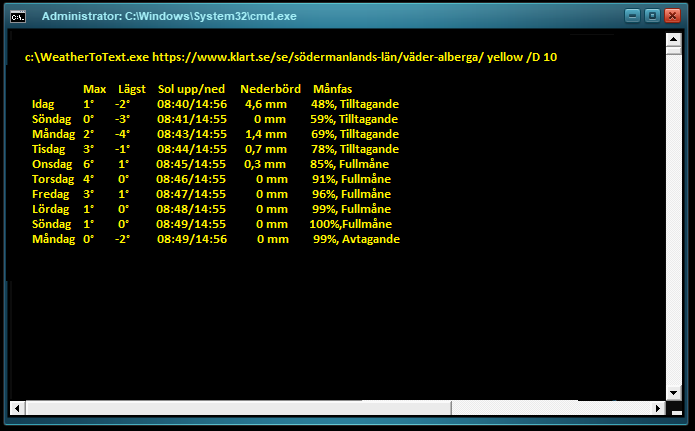
Im thinking something like this would give the forcast for 10 days, yellow output and 10 day output.
c:\WeatherToText.exe https://www.klart.se/se/södermanlands-län/väder-alberga/ yellow /D 10

Text.png
Klart.png
You can get the moon phase by clicking "Detaljvy" (marked with a big arrow in the picture)

Translations
Swedish -> English
  • Lägsta = Lowest
  • Sol      =Sun
  • Upp    = Up
  • Ned    = Down
  • Regn    = Rain
  • Månfas  = Moon phase
  • Tilltagande = Increasing
  • Avtagande = Decreasing
  • Fullmånde = Full moon
  • Detaljvy    = Detail view
  • Dagar    = Days
  • Idag      = Today
  • Måndag  = Monday
  • Tisdag    = Tuesday
  • Onsdag  = Wednesday
  • Torsdag  = Thursday
  • Fredag  = Friday
  • Lördag  = Saturday
  • Söndag  = Sunday
« Last Edit: December 11, 2021, 05:47 PM by user45454 »

publicdomain

  • Honorary Member
  • Joined in 2019
  • **
  • Posts: 732
    • Participated in NANY Challenge Three Times
    • Linux User

Thanks for a great program,
I have a few update ideas.

I'm in! :Thmbsup: I have several half-baked ones about to release right now so please ping back after Christmas. I should have published several of the most impending releases for the month by then :)

Happy to serve you again,
Vic
« Last Edit: December 12, 2021, 12:54 AM by publicdomain »

user45454

  • Participant
  • Joined in 2010
  • *
  • Posts: 22
Hi,

I have some ideas for changes for the new  "14 day output" version.
I dont The Moon phase "månfas" is not very usefull, it can be removed and replaced with thunder probability, that is much more useful.

Thunder is called "Sannolikhet åska" and like the current version of Weather2Text only a percentage is needed, not the text part.
The page writes "Sannolikhet åska Ingen (0%)" (translated: probability thunder None (0%)"

If we get the possibility to do the Weather2Text ouput to a textfile Im thinking of scheduling the output to a webpage and break free from big weathers telementry data and their apps.  :D

publicdomain

  • Honorary Member
  • Joined in 2019
  • **
  • Posts: 732
    • Participated in NANY Challenge Three Times
    • Linux User
Sure! I'm currently doing a coding spree :Thmbsup:

If we get the possibility to do the Weather2Text ouput to a textfile Im thinking of scheduling the output to a webpage and break free from big weathers telementry data and their apps. 

Yup.  Do you want it timestamped or "fixed"? (i.e. Weather2Text.txt all the time or formatted like: YYYY-MM-DD-HH-MM-SS.txt)

Cheers!

Original address: https://www.donationcoder.com/forum/index.php?topic=51394.0