What a great application. Tried this out for a number of hours and it worked really well. I was toggling between Email, a Word processing document and the browser. My use case was keeping a somewhat searchable visual log of what I had done/was doing.
The only issue I ran into was when deleting the images from the internal screenshot browser. I needed to back out of the folder containing the images I had deleted and then navigate back in for the image thumbnails to disappear.
I figured I would leave a few quick comments and thoughts. I put some thoughts in this thread already regarding more file/window context in the filename. Add window title to custom naming
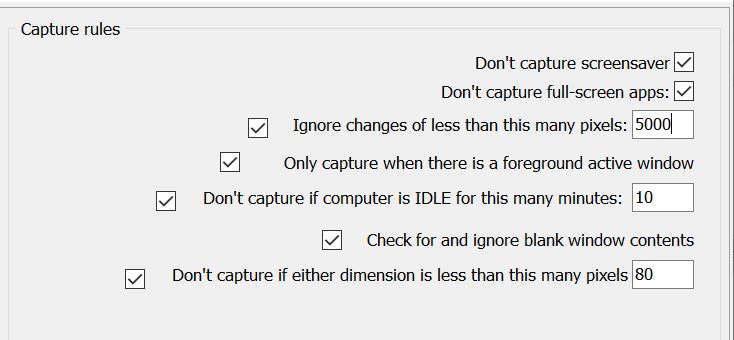
I think that for my use case, having program specific profiles for capture would be useful. When I am in the word processing program, I do not need as frequent captures. In fact captures based on pixel difference seemed enough. When in my email client I could see it being helpful to capture only emails that had been opened in a new window or that I was replying/forwarding or composing. If it is possible to utilize the windows title like mentioned in the other thread, then I wonder if it would be possible to only screen capture windows with "re:" or "fwd:" or some other keyword in the window name, as that would limit the number of captures when working in the email client. I imagine that having application specific capture profiles could be difficult to implement. What might be easier is having different profiles and being able to switch between them with a hot key.
I really liked the capture when shifting the focus window, but with the task I was doing, it resulted in many unneeded captures. I wonder if it would be possible to set to not capture with a focus change, IF a focus change capture was made within a certain amount of time, or IF a focus change was made between two specific applications within a certain time?
Having captures during certain events might also be helpful. Like when saving a file. It would be important to capture after the input, so perhaps using the pixel compare to wait until a certain number of characters were input before doing the capture?
When browsing web pages, there just was not a way I see to make screen captures work better. Having a separate profile might help. Maybe turning off captures when if scrolling? I have a scroll button on my mouse
I also wish there was a way of choosing the frame of a specific window, to cut out the stuff I really dd not need for my uses. So for instance, the menu bar and tool bar on the word processor and in the email compose client. I do not think there is a way to auto select the inner most frame. I did see the user could define a specific area to be captured. Which is a way to make this work.
If someone were using this to audit their time, I could see it being helpful to add a "project" tag and be able to apply that tag to the captures being collected.
Again. Really cool application.
The only issue I ran into was when deleting the images from the internal screenshot browser. I needed to back out of the folder containing the images I had deleted and then navigate back in for the image thumbnails to disappear.
I figured I would leave a few quick comments and thoughts. I put some thoughts in this thread already regarding more file/window context in the filename. Add window title to custom naming
I think that for my use case, having program specific profiles for capture would be useful. When I am in the word processing program, I do not need as frequent captures. In fact captures based on pixel difference seemed enough. When in my email client I could see it being helpful to capture only emails that had been opened in a new window or that I was replying/forwarding or composing. If it is possible to utilize the windows title like mentioned in the other thread, then I wonder if it would be possible to only screen capture windows with "re:" or "fwd:" or some other keyword in the window name, as that would limit the number of captures when working in the email client. I imagine that having application specific capture profiles could be difficult to implement. What might be easier is having different profiles and being able to switch between them with a hot key.
I really liked the capture when shifting the focus window, but with the task I was doing, it resulted in many unneeded captures. I wonder if it would be possible to set to not capture with a focus change, IF a focus change capture was made within a certain amount of time, or IF a focus change was made between two specific applications within a certain time?
Having captures during certain events might also be helpful. Like when saving a file. It would be important to capture after the input, so perhaps using the pixel compare to wait until a certain number of characters were input before doing the capture?
When browsing web pages, there just was not a way I see to make screen captures work better. Having a separate profile might help. Maybe turning off captures when if scrolling? I have a scroll button on my mouse
I also wish there was a way of choosing the frame of a specific window, to cut out the stuff I really dd not need for my uses. So for instance, the menu bar and tool bar on the word processor and in the email compose client. I do not think there is a way to auto select the inner most frame. I did see the user could define a specific area to be captured. Which is a way to make this work.
If someone were using this to audit their time, I could see it being helpful to add a "project" tag and be able to apply that tag to the captures being collected.
Again. Really cool application.