


| Application Name | MoveFileHere |
| Version | 2022-01-09 |
| Short Description | AutoHotkey tool to quickly move newest file from Downloads to the active File Explorer folder in Windows 10. |
| Supported OSes | Windows 10 |
| Web Page | https://github.com/nod5/MoveFileHere |
| Download Link | Standalone EXE file https://github.com/nod5/MoveFileHere/releases AHK source file https://github.com/nod5/MoveFileHere/blob/main/MoveFileHere.ahk |
Description
A very small hotkey tool that I use all the time, now released for NANY in case other people also often move files soon after downloading them and find the sequence Right click, Click "Show in folder", Ctrl+X, Alt+Tab Tab Tab, Ctrl+V way too long
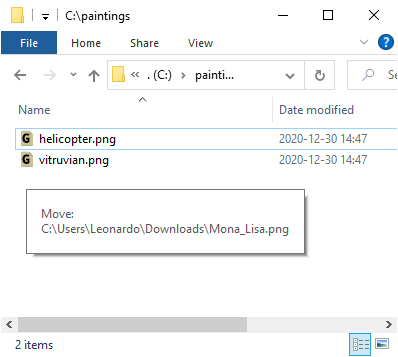
 . With MoveFileHere you press F7 to move the latest downloaded file to the active Explorer folder. The hotkey and folder can be changed in settings. Copy and rename MoveFileHere.exe to e.g. MoveFileHere2.exe to set up multiple hotkeys and folders.
See GitHub README for more details.
Note: antivirus tools may incorrectly flag the AutoHotkey compiled .exe file. You can always install AutoHotkey and then compile MoveFileHere yourself from the .ahk source file or simply run the .ahk source directly.
MoveFileHere helps a workflow where we make the browser always download to a fixed Downloads folder and then quickly move the file elsewhere afterwards. Compare that to the workflow of quickly picking a custom download/save folder for each download using Listary or the small SaveAsPathHelper script I quickly made to mimic some Listary features.
After pressing F7 the user accepts the move with Enter, Space or Left Click. To instead cancel the move press Esc, F7 again or wait 2 seconds.


