DonationCoder.com forum
 
Read-only archive. This is a static copy of the DonationCoder.com forum. Reading and searching work as before; logging in, posting and private messages do not.
Archive of 2026-10-21 · About this archive · Main site

Author Topic: Getting just a copy ...  (Read 3,723 times)

CheechGe

  • Participant
  • Joined in 2020
  • *
  • Posts: 1
Getting just a copy ...
« on: November 13, 2020, 10:21 PM »
of the captured screen

Once a screen has been captured is there a way to get it (Windows 10 and Ctl-C) so that it can be pasted (Ctl-V) somewhere else.  It seems that to do that one must save it to the clipboard and retrieve it from there which takes longer to do because of the extra steps needed to retrieve it.

Thanks,

Frank

Ath

  • Supporting Member
  • Joined in 2006
  • **
  • Posts: 3,649
    • Participated in NANY Challenge Eleven Times
    • Coding Snacks
    • Linux User
    • Hardware Hacker
Re: Getting just a copy ...
« Reply #1 on: November 14, 2020, 11:01 AM »
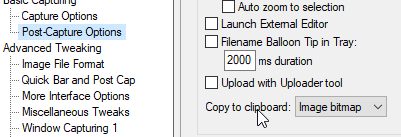
On the 'Post-Capture Options' preferences page, there is the 'Copy to clipboard' combobox with a choice of what you can copy to the clipboard. I've set it to 'Image bitmap' myself:

Screenshot - 14-11-2020 , 11_58_29.png
/Ton
Ath's software collection, Quote: "A problem well stated is a problem half-solved." (Charles Kettering)

Original address: https://www.donationcoder.com/forum/index.php?topic=50703.0