DonationCoder.com forum
 
Read-only archive. This is a static copy of the DonationCoder.com forum. Reading and searching work as before; logging in, posting and private messages do not.
Archive of 2026-10-21 · About this archive · Main site

Author Topic: Resize Window (CTRL-G) display Wonky  (Read 4,170 times)

springro

  • Charter Member
  • Joined in 2006
  • ***
  • Posts: 41
Resize Window (CTRL-G) display Wonky
« on: October 02, 2020, 08:26 PM »
 
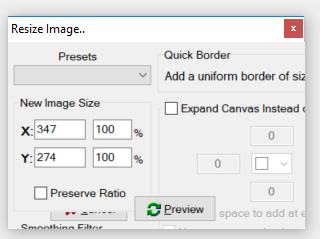
I see this was brought up a long time ago, but just like the person then I can't see all the options in the prompt.    I also tried switching from my 125% font magnification (eyes getting old, screens higher resolution) to 100% and it looks the same (didn't try rebooting, but everything else dynamically changed).

Appearance wise I can survive, I just can't use it because the only buttons visible are cancel and preview.    Could the default window size be increased even if it means some empty space padding around it for people who aren't having any issues?

[attachthumb=#]

Windows 10.

I'm running v4.36.2

Thanks again for ScreenCaptor.  I feel bad for the all the people out there using windows Snip and feeling it's a nice tool


Here's the old topic:
https://www.donationcoder.com/forum/index.php?topic=41808.msg391233#msg391233
« Last Edit: October 02, 2020, 08:48 PM by springro »

mouser

  • First Author
  • Administrator
  • Joined in 2005
  • *****
  • Posts: 40,931
    • Gathering Badge
    • Plugin Coding Medal
    • Participated in NANY Challenge Seventeen Times
    • Cody Award
    • Coding Snacks
    • Volunteers/Staff
Re: Resize Window (CTRL-G) display Wonky
« Reply #1 on: January 29, 2021, 01:20 PM »
Sorry this took so long to fix; it's fixed in my internal copy now, will be fixed in next release, shortly.

Original address: https://www.donationcoder.com/forum/index.php?topic=50535.0