DonationCoder.com forum
 
Read-only archive. This is a static copy of the DonationCoder.com forum. Reading and searching work as before; logging in, posting and private messages do not.
Archive of 2026-10-21 · About this archive · Main site

Author Topic: Prompt for Name  (Read 4,726 times)

brellis2011

  • Supporting Member
  • Joined in 2011
  • **
  • Posts: 3
Prompt for Name
« on: August 29, 2020, 02:02 PM »
I sometimes need to do a screenshot for online tutorials in an LMS. As such, I need to name them a specific way depending on which course I happen to be working on so that the image is ADA compliant for screen readers. It would be SOOOOO handy if there was a preference for Screenshot Captor to prompt me for the specific name for the image. Is that possible and I'm overlooking it? I saw the question asked back in 2006 but it wasn't possible then.

Thanks in advance  :)

Ath

  • Supporting Member
  • Joined in 2006
  • **
  • Posts: 3,649
    • Participated in NANY Challenge Eleven Times
    • Coding Snacks
    • Linux User
    • Hardware Hacker
Re: Prompt for Name
« Reply #1 on: August 30, 2020, 02:12 PM »
If you have SC to open the built-in image editor by selecting 'Show Main Form' on the 'Interface Options' preferences page, the cursor is initially placed in the (file)name input field. Would that work for you?
/Ton
Ath's software collection, Quote: "A problem well stated is a problem half-solved." (Charles Kettering)

wraith808

  • Supporting Member
  • Joined in 2006
  • **
  • Posts: 11,205
    • Participated in NANY Challenge Fourteen Times
    • Coding Snacks
    • Writer
    • Hardware Hacker
Re: Prompt for Name
« Reply #2 on: August 30, 2020, 03:52 PM »
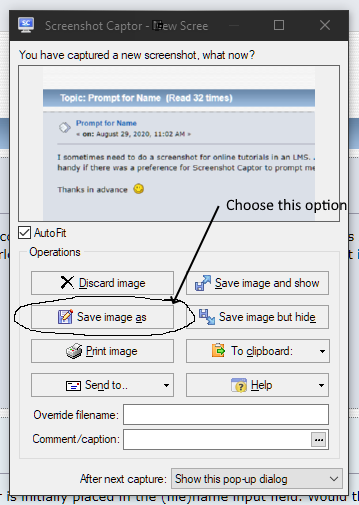
Save As is the easiest way to you do that.  I use it all the time for that reason.

ScreenshotCaptor.png

Click that button and it will bring up the standard save dialog where you can name it and choose the location.  No worrying with different windows or anything like that.

You can also use the Override Filename text box at the bottom- it will save the image to your standard location with the new image name.  You don't have to add the extension- it will do it for you.

Hope that Helps!

brellis2011

  • Supporting Member
  • Joined in 2011
  • **
  • Posts: 3
Re: Prompt for Name
« Reply #3 on: August 31, 2020, 10:25 PM »
Thank you, Ath. That will work. I guess I didn't understand that feature. That will work. And, unlike the Save As feature, it doesn't clutter my folder with multiple named files.

Yeah!

mouser

  • First Author
  • Administrator
  • Joined in 2005
  • *****
  • Posts: 40,931
    • Gathering Badge
    • Plugin Coding Medal
    • Participated in NANY Challenge Seventeen Times
    • Cody Award
    • Coding Snacks
    • Volunteers/Staff
Re: Prompt for Name
« Reply #4 on: September 08, 2020, 12:55 PM »
Quote
You can also use the Override Filename text box at the bottom- it will save the image to your standard location with the new image name.  You don't have to add the extension- it will do it for you.

What Wraith said above I think is exactly what you want.  It was made to handle the exact situation you describe, allow you to quickly name the screenshot and then just hit enter.

You can also do some tweaks to make the process even quicker:
Screenshot - 9_8_2020 , 7_54_33 AM.png

With these settings you can just start typing the desired name of the screenshot as soon as that post-capture dialog shows, and then hit enter.

brellis2011

  • Supporting Member
  • Joined in 2011
  • **
  • Posts: 3
Re: Prompt for Name
« Reply #5 on: September 08, 2020, 06:37 PM »
Thank you!

Original address: https://www.donationcoder.com/forum/index.php?topic=50359.0