DonationCoder.com forum
 
Read-only archive. This is a static copy of the DonationCoder.com forum. Reading and searching work as before; logging in, posting and private messages do not.
Archive of 2026-10-21 · About this archive · Main site

Author Topic: Feature request: Grab and stick it/them in the foreground  (Read 7,827 times)

chashnniel

  • Member
  • Joined in 2018
  • **
  • Posts: 127
Feature request: Grab and stick it/them in the foreground
« on: August 21, 2020, 06:15 AM »
Add a new button: Grab and Stick (or Paste?)

The original post is here.

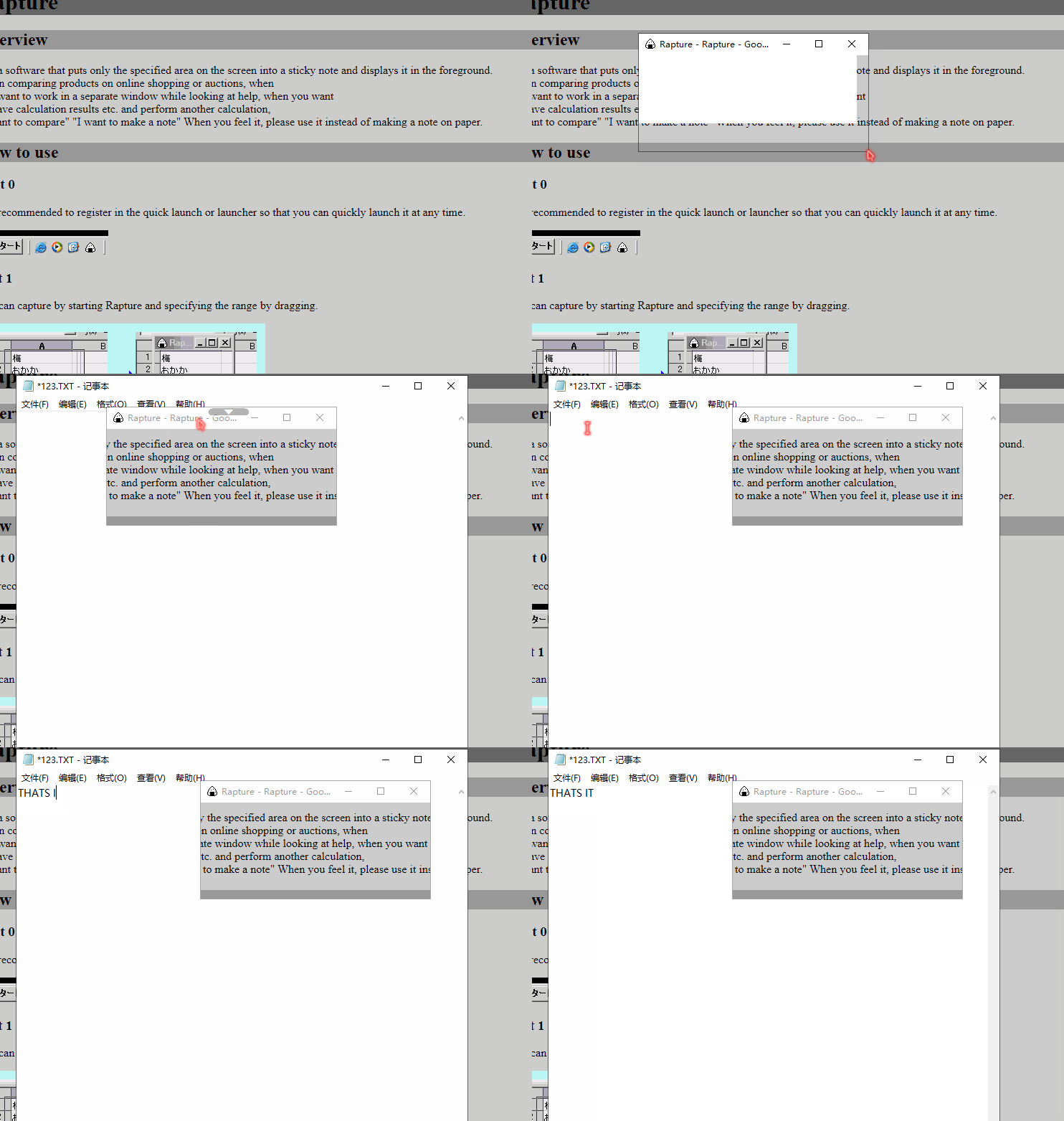
See a demo gif here
RAPTURE_DEMO.gif
It grabs selected region then sets it always on top using a simple photo viewer(I guess so).

Cons: The title bar on the screenshot is meaningless and ugly, remove it.
And don't forget... Move it around with mouse dragging on the screenshots.

KodeZwerg

  • Honorary Member
  • Joined in 2018
  • **
  • Posts: 718
    • Participated in NANY Challenge Four Times
    • Coding Snacks
Re: Feature request: Grab and stick it/them in the foreground
« Reply #1 on: August 21, 2020, 10:56 AM »
I may try to replica this as a standalone tool, with your wishes (no caption, on top, dragable) just for fun since it makes not much sence to me :-)
Keyboard Escape-Key would close snapped Window.

chashnniel

  • Member
  • Joined in 2018
  • **
  • Posts: 127
Re: Feature request: Grab and stick it/them in the foreground
« Reply #2 on: August 21, 2020, 11:38 AM »
@KodeZwerg
Glad to hear that  :up:

I think this feature would help you a lot sometimes.
eg. it's useful if you are a blogger, CPDA... when comparing different contents... Thus we don't have to switch between different windows.
Take a look at rapture android version tutorial on Youtube.

Note:
Besides no caption, on top, dragable. Don't forget opacity(50%), temporarily hide, zoom in/out,
And maybe simple annotation, add to group(by dragging them together)...

KodeZwerg

  • Honorary Member
  • Joined in 2018
  • **
  • Posts: 718
    • Participated in NANY Challenge Four Times
    • Coding Snacks
Re: Feature request: Grab and stick it/them in the foreground
« Reply #3 on: August 21, 2020, 12:12 PM »
Let me first try to do like I wrote, if after testing you find it good/useful, we can talk about more features.
One thing I can predict: Zoom in/out = ATM I have no skills for that matter and I really dont know if I am willing to learn such stuff :-)

Why I want to first get it tested by you (or others) before talking about additional features:
I have a bad memory in my mind where a User needed an application,
I was already 80-90% done with it, without sharing my application, just showing screenshots,
more and more wishes came in, more and more people did their positive and negative feedback,
up to a point where I lost my fun in producing it = deleted project.
To not let this happen ever again is the reason why.

Anyway:
opacity = no problem
temporarily hide = here I need to re-ask at given time how you mean it.
zoom in/out = problem
annotation = here I need to re-ask at given time how you mean it. (I guess a picture say more than a thousand words....)

chashnniel

  • Member
  • Joined in 2018
  • **
  • Posts: 127
Re: Feature request: Grab and stick it/them in the foreground
« Reply #4 on: August 21, 2020, 12:25 PM »
Thank you KodeZwerg

I would like to be a tester if you have interests in this feature.  :)
But I still wish this could be a build-in feature on Screenshot Captor. To make SC better.
« Last Edit: August 21, 2020, 12:38 PM by chashnniel »

KodeZwerg

  • Honorary Member
  • Joined in 2018
  • **
  • Posts: 718
    • Participated in NANY Challenge Four Times
    • Coding Snacks
Re: Feature request: Grab and stick it/them in the foreground
« Reply #5 on: August 21, 2020, 02:32 PM »
Ofc mouser first, I will play anyway this weekend with that topic, lets see how close I come to rapeture.

KodeZwerg

  • Honorary Member
  • Joined in 2018
  • **
  • Posts: 718
    • Participated in NANY Challenge Four Times
    • Coding Snacks
Re: Feature request: Grab and stick it/them in the foreground
« Reply #6 on: August 24, 2020, 10:42 AM »
I hope to be able on Tuesday/Wednesday to deliver a working standalone Demo version.
ATM I do fight speedproblems with drawing a rectangle while holding left mouse button.
Either my mouse hook is crap or the way how I draw rectangle or probably both

Today I will redo my work.
If I can't fix it, I will still upload to let you decide if going on or trashcan project.

chashnniel

  • Member
  • Joined in 2018
  • **
  • Posts: 127
Re: Feature request: Grab and stick it/them in the foreground
« Reply #7 on: August 24, 2020, 02:30 PM »
No worry, take your time.  :up:

KodeZwerg

  • Honorary Member
  • Joined in 2018
  • **
  • Posts: 718
    • Participated in NANY Challenge Four Times
    • Coding Snacks
Re: Feature request: Grab and stick it/them in the foreground
« Reply #8 on: August 25, 2020, 06:18 AM »
It is done  :-*

Feel free to test it. You will find download here.
Add wishes etc over there and enjoy that  8)

Now back to you mouser  :D

Original address: https://www.donationcoder.com/forum/index.php?topic=50307.0