DonationCoder.com forum
 
Read-only archive. This is a static copy of the DonationCoder.com forum. Reading and searching work as before; logging in, posting and private messages do not.
Archive of 2026-10-21 · About this archive · Main site

Author Topic: Saving Settings 'Screenshot Captor'  (Read 6,135 times)

james48

  • Like it working computer
  • Supporting Member
  • Joined in 2017
  • **
  • Posts: 50
Saving Settings 'Screenshot Captor'
« on: August 18, 2020, 08:16 AM »
Dear emloyee,
It is possible to SAVE 'Screenshot Captor' settings, please?
Windows 10
ASUS ROG STRIX Z690-A GAMING
- Intel Core i9 13900KF - 3,0Ghz
- Corsair Vengeance 32GB(3600Mhz)
- Samsung 970 EVO Plus 1TB (M.2)
- DVD Brander (Extern)
- NVIDIA RTX 4070 Ti 12GB
- Onboard - 7.1 HD audio Realtek ALC4080  - NZXT Kraken X63
- Corsair AF120 2.0(Wit)
- Corsair RM1000x (1000Watt)

tomos

  • Charter Member
  • Joined in 2006
  • ***
  • Posts: 11,970
    • Gathering Badge
    • Participated in NANY Challenge Once
Re: Saving Settings 'Screenshot Captor'
« Reply #1 on: August 18, 2020, 09:06 AM »
They should automatically be saved. Can you describe the problem?
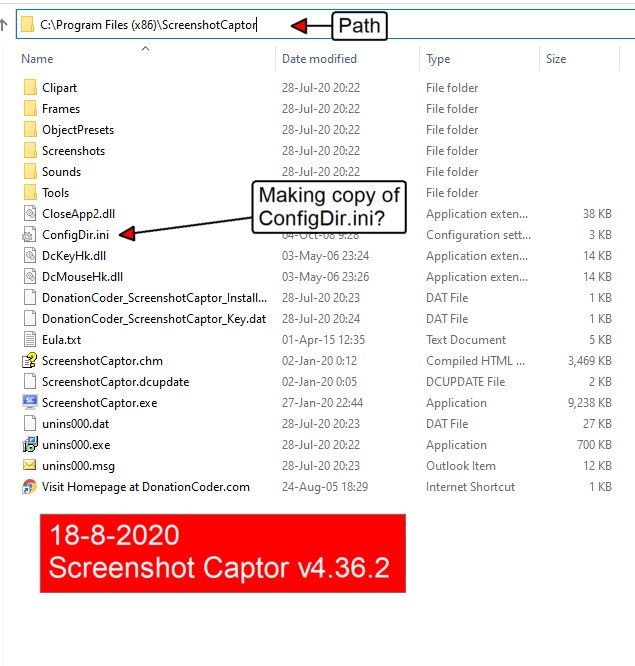
Also let us know which version of the software (version number, whether portable or installable) and the location of the software (where installed/unpacked).
PS, no employees here :-)
Tom

james48

  • Like it working computer
  • Supporting Member
  • Joined in 2017
  • **
  • Posts: 50
Re: Saving Settings 'Screenshot Captor'
« Reply #2 on: August 18, 2020, 12:44 PM »
Helllo, thank you for responding, it sometimes happens that Sreenshot Captor does not start automatically anymore, then I've to reinstall the settings again, a program Settings backup would be nice for me!

The cause can be my Computer Organizer? I'll check this out too.

Version number of my beautifull program 'Screenshot Captor' is: v4.36.2

I'm working on a desktop computer.

Regards,
Jaap Mooijer

Path Screenshot Captor 18-8-2020.png
Windows 10
ASUS ROG STRIX Z690-A GAMING
- Intel Core i9 13900KF - 3,0Ghz
- Corsair Vengeance 32GB(3600Mhz)
- Samsung 970 EVO Plus 1TB (M.2)
- DVD Brander (Extern)
- NVIDIA RTX 4070 Ti 12GB
- Onboard - 7.1 HD audio Realtek ALC4080  - NZXT Kraken X63
- Corsair AF120 2.0(Wit)
- Corsair RM1000x (1000Watt)

tomos

  • Charter Member
  • Joined in 2006
  • ***
  • Posts: 11,970
    • Gathering Badge
    • Participated in NANY Challenge Once
Re: Saving Settings 'Screenshot Captor'
« Reply #3 on: August 18, 2020, 04:20 PM »
Helllo, thank you for responding, it sometimes happens that Sreenshot Captor does not start automatically anymore, then I've to reinstall the settings again
neither of these should happen.
I wanted to rule out the possibility that you unzipped the portable version to the default Programs folder (where SC doesnt have write permissions), but that's not the case. So we'll have to wait see what mouser says....
Tom

tomos

  • Charter Member
  • Joined in 2006
  • ***
  • Posts: 11,970
    • Gathering Badge
    • Participated in NANY Challenge Once
Re: Saving Settings 'Screenshot Captor'
« Reply #4 on: August 24, 2020, 09:01 PM »
Dear emloyee,
It is possible to SAVE 'Screenshot Captor' settings, please?
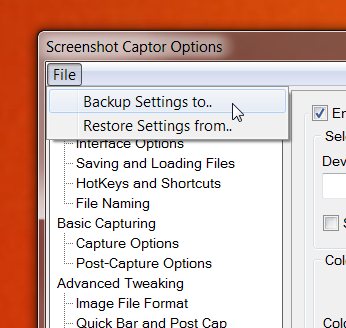
to answer your original question -- see screenshot of Options window below -- click on 'File' and select backup settings.

Screenshot - 2020-08-24 , 22_58_53.jpg
Tom

james48

  • Like it working computer
  • Supporting Member
  • Joined in 2017
  • **
  • Posts: 50
Re: Saving Settings 'Screenshot Captor'
« Reply #5 on: August 24, 2020, 10:52 PM »
Dear Employee, best Tom.

Thank you very much, it's all clear now. But even now, for me it was difficult to find.
I'm glad it's possible to make a program settings backup.

I've also send a topic about minimize Screenshot Captor, after minimize 'Screenshot Captor' the program is closing?

Regards,
James48
Windows 10
ASUS ROG STRIX Z690-A GAMING
- Intel Core i9 13900KF - 3,0Ghz
- Corsair Vengeance 32GB(3600Mhz)
- Samsung 970 EVO Plus 1TB (M.2)
- DVD Brander (Extern)
- NVIDIA RTX 4070 Ti 12GB
- Onboard - 7.1 HD audio Realtek ALC4080  - NZXT Kraken X63
- Corsair AF120 2.0(Wit)
- Corsair RM1000x (1000Watt)

tomos

  • Charter Member
  • Joined in 2006
  • ***
  • Posts: 11,970
    • Gathering Badge
    • Participated in NANY Challenge Once
Re: Saving Settings 'Screenshot Captor'
« Reply #6 on: August 25, 2020, 08:57 AM »
Hi James, I repeat: there are no employees here on donationcoder. Please note ;-)

Dear Employee, best Tom.

Thank you very much, it's all clear now. But even now, for me it was difficult to find.
I'm glad it's possible to make a program settings backup.
Yes, it is difficult to find.
But you should not be having problems with SC not starting with windows and/or losing the settings....

Quote
I've also send a topic about minimize Screenshot Captor, after minimize 'Screenshot Captor' the program is closing?
You got a reply there from KodeZwerg
Tom

Original address: https://www.donationcoder.com/forum/index.php?topic=50293.0