DonationCoder.com forum
 
Read-only archive. This is a static copy of the DonationCoder.com forum. Reading and searching work as before; logging in, posting and private messages do not.
Archive of 2026-10-21 · About this archive · Main site

Author Topic: File-icons disappear when changing "Toolbar icon sizing"  (Read 7,846 times)

ralfs

  • Charter Member
  • Joined in 2005
  • ***
  • Posts: 81
Hi Mouser,
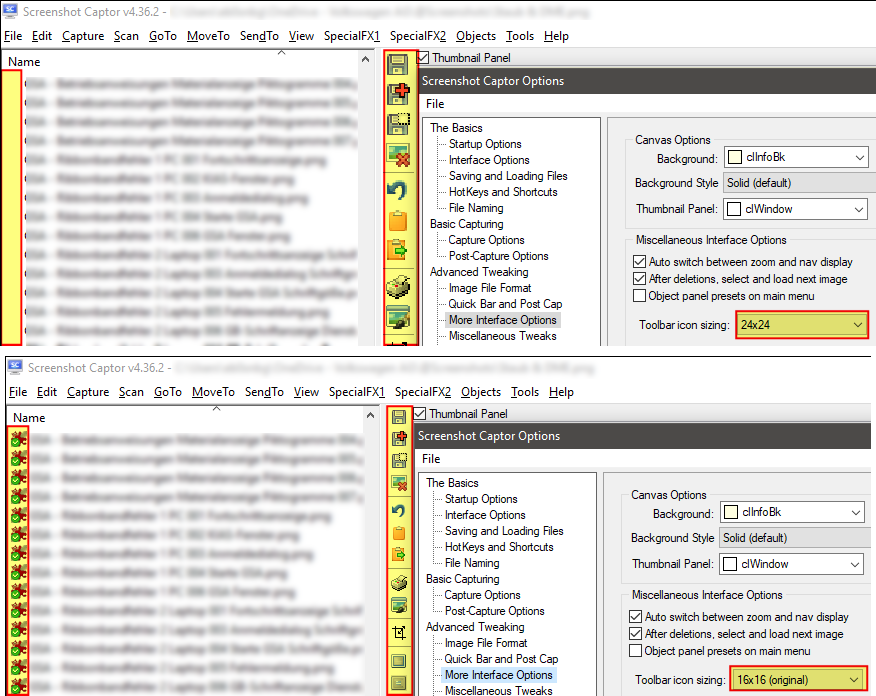
I'm using the new option for "Toolbar icon sizing" with icon size 24x24.
With this setting the screenshotpanel on the left is also enlarging the file- and folder-icons so that the place for them is too small.
They are only displayed with iconsize 16x16.
[attachthumb=#]
Ralf
« Last Edit: July 08, 2020, 08:26 PM by ralfs »

mouser

  • First Author
  • Administrator
  • Joined in 2005
  • *****
  • Posts: 40,931
    • Gathering Badge
    • Plugin Coding Medal
    • Participated in NANY Challenge Seventeen Times
    • Cody Award
    • Coding Snacks
    • Volunteers/Staff
Re: File-icons disappear when changing "Toolbar icon sizing"
« Reply #1 on: July 13, 2020, 03:32 AM »
Help me understand a little better -- what's happening?

ralfs

  • Charter Member
  • Joined in 2005
  • ***
  • Posts: 81
Re: File-icons disappear when changing "Toolbar icon sizing"
« Reply #2 on: July 13, 2020, 04:48 AM »
If I use bigger icons for the toolbar the file- and folder-icons on the left side of the filnames disappear.
(Top picture on the attachment)

It seems that they are also resized and the size is too big for the column.

If I switch to 16x16 px for the toolbar the file- and folder-icons are displayed.
(Bottom picture on the attachment)

EDIT: This is strange! After writing this in the morning, I started SC and everything is ok!
        The file- and folder-icons are displayed also with bigger size.
        I sweare, they were disappeared for weeks, so I made that screenshot in the first post.

Excuse me, I think it was a falsch alarm.

Best wishes
Ralf
Ralf
« Last Edit: July 13, 2020, 06:48 AM by ralfs »

mouser

  • First Author
  • Administrator
  • Joined in 2005
  • *****
  • Posts: 40,931
    • Gathering Badge
    • Plugin Coding Medal
    • Participated in NANY Challenge Seventeen Times
    • Cody Award
    • Coding Snacks
    • Volunteers/Staff
Re: File-icons disappear when changing "Toolbar icon sizing"
« Reply #3 on: July 13, 2020, 09:25 PM »
To understand more fully -- you don't use the normal default THUMBNAIL panel on the left -- you use the view mode that shows a list of filenames in that left panel?

ralfs

  • Charter Member
  • Joined in 2005
  • ***
  • Posts: 81
Re: File-icons disappear when changing "Toolbar icon sizing"
« Reply #4 on: July 14, 2020, 04:43 AM »
Yes, it's "list of filenames".
Ralf

ralfs

  • Charter Member
  • Joined in 2005
  • ***
  • Posts: 81
Re: File-icons disappear when changing "Toolbar icon sizing"
« Reply #5 on: March 08, 2021, 01:06 PM »
I've tested with other screenshot folder because my original screenshot folder is synchronized with OneDrive so that file icons have overlay icons with synchronization information.

When I chose another folder without overlay icons I can use bigger toolbar icon.
The file and folder icons in the "list of filenames" on the left side are correctly shown (also in the desired size).

When I switch back to my default screenshot folder which is synchronized with OneDrive, all file and folder icons are gone away.
But I need the folder on OneDrive because I have the same folder on 2 PC.

So I think the problem is to scale the overlays icons (ore to disable the overlays).

Ralf

ralfs

  • Charter Member
  • Joined in 2005
  • ***
  • Posts: 81
Re: File-icons disappear when changing "Toolbar icon sizing"
« Reply #6 on: October 06, 2021, 12:00 PM »
Hi Mouser,

did you have time to look for this topic?

The file icons in the sreenshot panel (simple list) are really disappearing when switching "Toolbar icon sizing" to bigger icons (24, 32, 48, 64)
and the screenshot folder is on a synchronized folder (e.g. onedrive) with overlay-icons. (picture in first post 08-07-2020).

If I use another screenshot folder without overlay-icons, I can use bigger icons without problems.
But I need the screenshot folder in the cloud.

Ralf

Original address: https://www.donationcoder.com/forum/index.php?topic=50113.0