DonationCoder.com forum
 
Read-only archive. This is a static copy of the DonationCoder.com forum. Reading and searching work as before; logging in, posting and private messages do not.
Archive of 2026-10-21 · About this archive · Main site

Author Topic: Hotkey and graphical control  (Read 8,315 times)

RolandoTa

  • Supporting Member
  • Joined in 2019
  • **
  • Posts: 1
Hotkey and graphical control
« on: June 17, 2020, 01:31 PM »
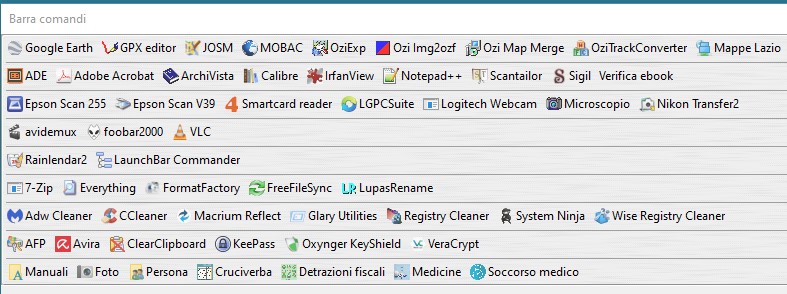
I am newbye the forum and hope to post in the right thread. I organized the dock ( a better solution is wellcome ) in a list of Commands grouped by separators with the advantage  to take up little space and visualize all the start buttons. Using the hotkey ( thank you Superboyac! ) the toolbar developes vertically and part of the start buttons are off the screen. Is there a way to use hotkey button and keep the same graphical look? Thanks for tips.

mouser

  • First Author
  • Administrator
  • Joined in 2005
  • *****
  • Posts: 40,931
    • Gathering Badge
    • Plugin Coding Medal
    • Participated in NANY Challenge Seventeen Times
    • Cody Award
    • Coding Snacks
    • Volunteers/Staff
Re: Hotkey and graphical control
« Reply #1 on: July 13, 2020, 03:37 AM »
Welcome to the site Rolando, sorry for the delay in replying!

Can you elaborate on what happens and what you want to happen, I'm not sure I understand..

Target

  • Honorary Member
  • Joined in 2006
  • **
  • Posts: 1,840
    • Coding Snacks
Re: Hotkey and graphical control
« Reply #2 on: July 13, 2020, 11:22 AM »
First thing that jumps out at me is your naming convention.  Try to come up with shorter names, eg 'cam' instead of 'logitech webcam'
Alcohol is photoshop, bottled
Askhole - someone who ask for advice, then ignores it
"Look wise, say nothing, and grunt. Speech was given to conceal thought" - Sir William Osler

Original address: https://www.donationcoder.com/forum/index.php?topic=50028.0