DonationCoder.com forum
 
Read-only archive. This is a static copy of the DonationCoder.com forum. Reading and searching work as before; logging in, posting and private messages do not.
Archive of 2026-10-21 · About this archive · Main site

Author Topic: Make Clips Always Stay in Tray Menu ?  (Read 4,196 times)

BuckSkin

  • Participant
  • Joined in 2018
  • *
  • Posts: 12
Make Clips Always Stay in Tray Menu ?
« on: May 23, 2020, 11:38 PM »
How do I get specific clips to always stay in the menu that first appears when I click the clipboard icon that is in the tray menu, I think the area I am meaning is called "Quick Paste Menu"

I have tried several times to accomplish this to no avail.

Thanks for reading and all help is appreciated.

tomos

  • Charter Member
  • Joined in 2006
  • ***
  • Posts: 11,970
    • Gathering Badge
    • Participated in NANY Challenge Once
Re: Make Clips Always Stay in Tray Menu ?
« Reply #1 on: May 23, 2020, 11:59 PM »
I use the favourites sub-menu: not exactly what you're looking for, but works well:
My shortcut for the quick-paste menu is Ctrl+Alt+V (I think the default is different -- check in the options)
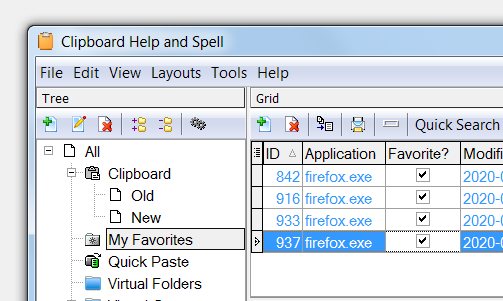
"W" then opens the main window -- there's a tick-box column to mark clips as favourites (see below)
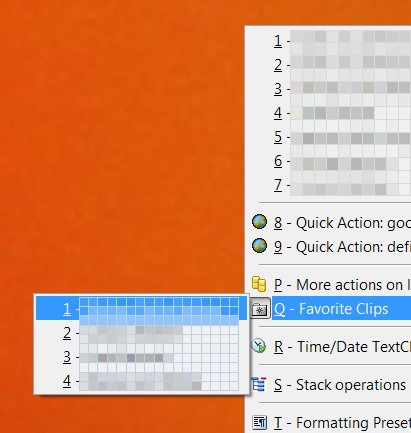
Back in the quick-paste menu: "Q" will open the favourites sub-menu

Screenshot - 2020-05-24 , 01_58_15.jpg

Screenshot - 2020-05-24 , 01_52_06.jpg
Tom

Original address: https://www.donationcoder.com/forum/index.php?topic=49955.0