DonationCoder.com forum
 
Read-only archive. This is a static copy of the DonationCoder.com forum. Reading and searching work as before; logging in, posting and private messages do not.
Archive of 2026-10-21 · About this archive · Main site

Author Topic: PC crashes After Enter 'Scanner Options'  (Read 6,005 times)

james48

  • Like it working computer
  • Supporting Member
  • Joined in 2017
  • **
  • Posts: 50
PC crashes After Enter 'Scanner Options'
« on: February 11, 2020, 04:15 PM »
Dear employee,

I've also sent a email, apologies fot this.

When I enter in Screenshot Captor Options on 'Scanner Options' my computer will crashes?

There is a solution for it, please?

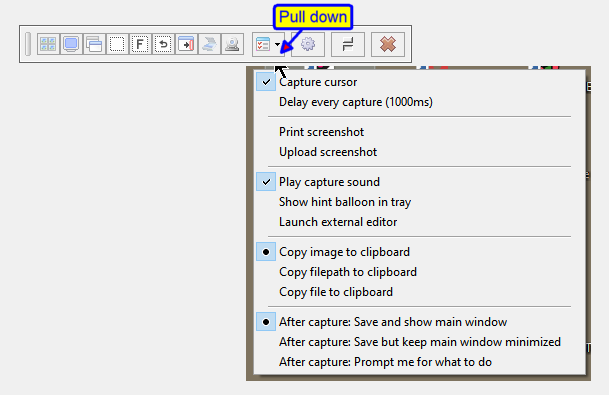
I send you some changed settings, maybe it has to do with it?

Kindly regards,
James48
Pulldown menu Screenshot Captor 11-feb-2020.PNG

Windows 10
ASUS ROG STRIX Z690-A GAMING
- Intel Core i9 13900KF - 3,0Ghz
- Corsair Vengeance 32GB(3600Mhz)
- Samsung 970 EVO Plus 1TB (M.2)
- DVD Brander (Extern)
- NVIDIA RTX 4070 Ti 12GB
- Onboard - 7.1 HD audio Realtek ALC4080  - NZXT Kraken X63
- Corsair AF120 2.0(Wit)
- Corsair RM1000x (1000Watt)
« Last Edit: February 11, 2020, 06:00 PM by james48 »

mouser

  • First Author
  • Administrator
  • Joined in 2005
  • *****
  • Posts: 40,931
    • Gathering Badge
    • Plugin Coding Medal
    • Participated in NANY Challenge Seventeen Times
    • Cody Award
    • Coding Snacks
    • Volunteers/Staff
Re: PC crashes After Enter 'Scanner Options'
« Reply #1 on: February 11, 2020, 06:15 PM »
The program is probably trying to connect to your physical scanner and ask windows about it.. Do you have a scanner connected and turned on?

Maybe worth trying to reboot your computer and/or update any driver for your scanner.

I'm assuming you've never used the scanner functions of SC before, correct? It's not that they were working before and now crash?

james48

  • Like it working computer
  • Supporting Member
  • Joined in 2017
  • **
  • Posts: 50
Re: PC crashes After Enter 'Scanner Options'
« Reply #2 on: February 11, 2020, 07:34 PM »
I'm assuming you've never used the scanner functions of SC before, correct? It's not that they were working before and now crash?

Yes that's right Mouser, now for the first time I've set the Printer/Scanner to:  HP CLJM377 Scan Driver Twain

It looks now after I've switched off the printer, I still can switch to different Tool Tabs without crashing anymore :-)

Thank you very much for helping me.  :Thmbsup:

Regards,
James48
Windows 10
ASUS ROG STRIX Z690-A GAMING
- Intel Core i9 13900KF - 3,0Ghz
- Corsair Vengeance 32GB(3600Mhz)
- Samsung 970 EVO Plus 1TB (M.2)
- DVD Brander (Extern)
- NVIDIA RTX 4070 Ti 12GB
- Onboard - 7.1 HD audio Realtek ALC4080  - NZXT Kraken X63
- Corsair AF120 2.0(Wit)
- Corsair RM1000x (1000Watt)

mouser

  • First Author
  • Administrator
  • Joined in 2005
  • *****
  • Posts: 40,931
    • Gathering Badge
    • Plugin Coding Medal
    • Participated in NANY Challenge Seventeen Times
    • Cody Award
    • Coding Snacks
    • Volunteers/Staff
Re: PC crashes After Enter 'Scanner Options'
« Reply #3 on: February 11, 2020, 11:02 PM »
It goes without saying that it should never crash the program going to the scanner tab, so I will look at the code and see what might be causing it..
It could be a bug in my code or it could be a scanner driver bug..

james48

  • Like it working computer
  • Supporting Member
  • Joined in 2017
  • **
  • Posts: 50
Re: PC crashes After Enter 'Scanner Options'
« Reply #4 on: February 13, 2020, 03:14 PM »
Thank you very much.  ;)
Windows 10
ASUS ROG STRIX Z690-A GAMING
- Intel Core i9 13900KF - 3,0Ghz
- Corsair Vengeance 32GB(3600Mhz)
- Samsung 970 EVO Plus 1TB (M.2)
- DVD Brander (Extern)
- NVIDIA RTX 4070 Ti 12GB
- Onboard - 7.1 HD audio Realtek ALC4080  - NZXT Kraken X63
- Corsair AF120 2.0(Wit)
- Corsair RM1000x (1000Watt)

Original address: https://www.donationcoder.com/forum/index.php?topic=49527.0