
I was using 7 stacks under windows 8.1.
But now don't go under windows 10 home.
A good alternative ?
Best Regards
But now don't go under windows 10 home.
A good alternative ?
Best Regards

 Topic: Alternatives 7stacks for w10home (Read 16,367 times)


Well, it's not exactly the same, but you could have a look at 7+ Taskbar Tweakerthanks Ath. I will take a good look now.
7 Stacks was last updated in 2011, so I have my doubts it will ever be updated again...


I use True Launch Bar (http://www.truelaunchbar.com/). ; It can just be a quick list, or can take the lists from folders (which mine does)Running to try wraith808
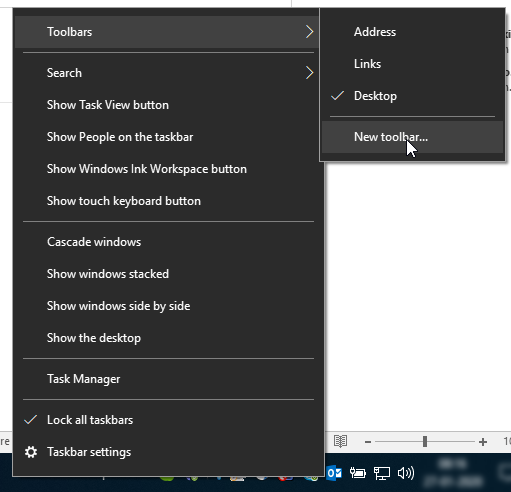
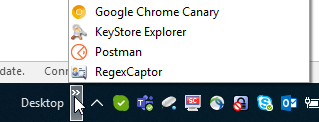


The advantage of TrueLaunchBar (shareware) is that the menu pops out on mouse-hover, where the Windows toolbars need a mouse-click to open.
I use Bins - http://www.1upindustries.com/Bins/
What about the standard Win10 toolbars?I am using toolbars . At the present moment IrA is the name. In the past I used three toolbars. 7stacks put the jump list in the place you select. The toolbar goes at the sides.
Right-click on the taskbar, open Toolbars and select Desktop (like I did), or add a new toolbar, pointing to a folder where you create links to your files/applications as desired. Multiple toolbars can be defined.
[attachment 1 not found]
Example of my (partial) Desktop toolbar:
[attachment 2 not found]
The advantage of TrueLaunchBar (shareware) is that the menu pops out on mouse-hover, where the Windows toolbars need a mouse-click to open.
I use True Launch Bar (http://www.truelaunchbar.com/). ; It can just be a quick list, or can take the lists from folders (which mine does)I have problems where I connect with the filter. Down sites. I will persist when I can.
I use Bins - http://www.1upindustries.com/Bins/It's a 14 days trial.
Running to try this is there is a download link with no problems with my filters.The advantage of TrueLaunchBar (shareware) is that the menu pops out on mouse-hover, where the Windows toolbars need a mouse-click to open.
There are other advantages to TrueLaunchBar other than that, but yes, you could just use the windows feature. If free is what you're looking for, they offer an older version of TrueLaunchBar as FreeLaunchBar for (predictably) Free! http://forum.tordex.com/thread-3321.html

 freelaunchbar.zip
(1.7 MB - downloaded 570 times.)
freelaunchbar.zip
(1.7 MB - downloaded 570 times.)I'll attach the download here so you can try it, it's rather old (2009, that's not a typo), but it's the latest available. Please run some AV across it before actually trying it, just to be sure.Thanks Ath. Now I am sure I can download.


I'll attach the download here so you can try it, it's rather old (2009, that's not a typo), but it's the latest available. Please run some AV across it before actually trying it, just to be sure.Thanks Ath. Now I am sure I can download.
If not tomorrow I will surf from another station ....
Note : Is downloaded
Note after installation : I am lost !
In the installation directory only a doc and a dll !.
How can I use it ?
I am more used to the icon in the desktop to launch the program.
From AlternativeTo:Yeap, thanks. It's an alternative.
MenuApp
Stacky
Running to try, but I think is not the same that 7stacks.....I'll attach the download here so you can try it, it's rather old (2009, that's not a typo), but it's the latest available. Please run some AV across it before actually trying it, just to be sure.Thanks Ath. Now I am sure I can download.
If not tomorrow I will surf from another station ....
Note : Is downloaded
Note after installation : I am lost !
In the installation directory only a doc and a dll !.
How can I use it ?
I am more used to the icon in the desktop to launch the program.
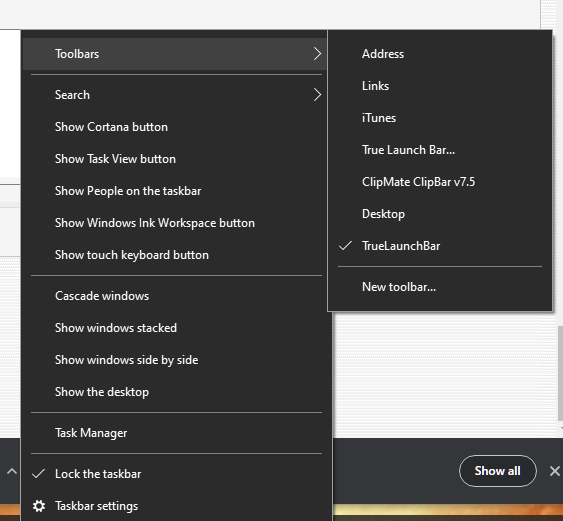
It's an extension of your taskbar. Right click your taskbar and select toolbars, then there should be an entry- not sure if it will say truelaunchbar or not. Show that bar, then right click on it to get to the options. For more than that, go to the TLB site.


Original address: https://www.donationcoder.com/forum/index.php?topic=49462.0