DonationCoder.com forum
 
Read-only archive. This is a static copy of the DonationCoder.com forum. Reading and searching work as before; logging in, posting and private messages do not.
Archive of 2026-10-21 · About this archive · Main site

Author Topic: NANY 2020 - 1 Key Browsing  (Read 11,275 times)

mat2016

  • Member
  • Joined in 2016
  • **
  • Posts: 36
    • Participated in NANY Challenge Three Times
NANY 2020 - 1 Key Browsing
« on: December 25, 2019, 12:30 AM »
NANY 2020 Entry Information

Application Name:1 Key Browsing
Version:0.79
Short Description:Adds single letter navigation to Firefox and Chromium browsers.
Web Page:http://s355751075.onlinehome.us/1-key-browsing/
Program Download Link:http://s355751075.onlinehome.us/wp-content/uploads/1KeyBrowsing.zip
Source Download Link:http://s355751075.onlinehome.us/wp-content/uploads/1KeyBrowsing-source.zip
System Requirements:Windows 7 and later plus Firefox or a Chromium based browser.
Source Language:Compiled AutoHotkey script
Author:mat2016

Description:

For users who sometimes spend much time just browsing articles, news, etc., these shortcut keys can come in handy. This app is inspired by qutebrowser and some of the vim add-ons for Chrome and Firefox. It is less complicated than those.

More information is available on the program's web page.

Screenshots:
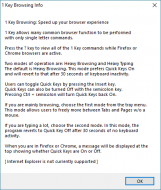
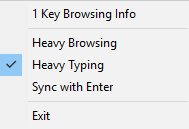
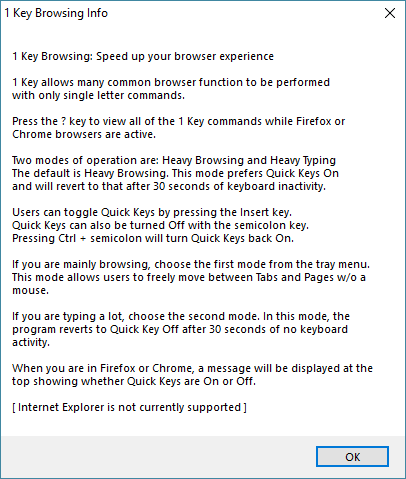
1KeyBrowsing-Info.png    1KeyBrowsing-Menu.png
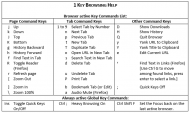
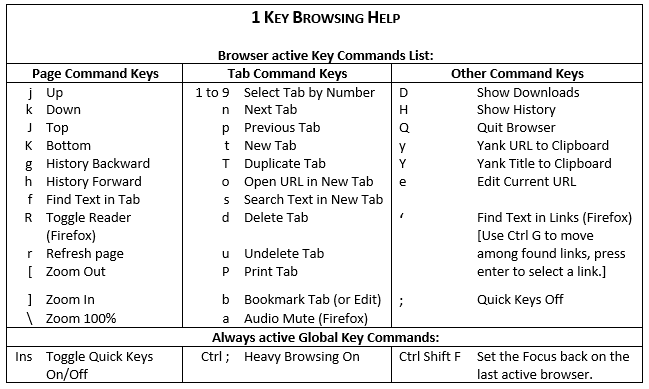
1KeyBrowsing-Cheatsheet.gif
« Last Edit: December 26, 2019, 08:09 PM by mat2016 »

tomos

  • Charter Member
  • Joined in 2006
  • ***
  • Posts: 11,970
    • Gathering Badge
    • Participated in NANY Challenge Once
Re: 1 Key Browsing
« Reply #1 on: December 25, 2019, 06:03 AM »
Very nice, will try later.
Tom

Ath

  • Supporting Member
  • Joined in 2006
  • **
  • Posts: 3,649
    • Participated in NANY Challenge Eleven Times
    • Coding Snacks
    • Linux User
    • Hardware Hacker
Re: 1 Key Browsing
« Reply #2 on: December 26, 2019, 09:06 AM »
Very nicely done :Thmbsup:

Question: can we have configurable Global Key configuration? (or the ahk source to customize it myself) I have a conflict with ctrl-shift-F for the TabSearch plugin, I've been using for 'ages' and I've become quite accustomed to :huh:
/Ton
Ath's software collection, Quote: "A problem well stated is a problem half-solved." (Charles Kettering)

mat2016

  • Member
  • Joined in 2016
  • **
  • Posts: 36
    • Participated in NANY Challenge Three Times
Re: 1 Key Browsing
« Reply #3 on: December 26, 2019, 03:00 PM »
Yes, at the bottom of the Blog page is a link to the source code.

tomos

  • Charter Member
  • Joined in 2006
  • ***
  • Posts: 11,970
    • Gathering Badge
    • Participated in NANY Challenge Once
Re: NANY 2020 - 1 Key Browsing
« Reply #4 on: December 26, 2019, 11:01 PM »
Hi, love this so far :up:
(I'll call it QK)
Using a German qwertz keyboard, so will probably have a go at changing ones involving the []\;

Problem:
QK has been disabled in the tray, presumably because of some key combo I pressed (I was testing the keys).
  • Insert key does not enable it [edit]Ins key now toggles QK -- not sure what happened there [/edit]
  • Ctrl; does not exist on my keyboard -- has to be CtrlShift;
  • Double click icon does not enable
  • There's no option on context menu to enable
Ahh, okay, I see I have to change it to Heavy Browsing again...

It seems to recognise when I'm in a text field and automatically turn off? Is that possible ?
Or is it that e.g. H (Shift+h) or 'e' do what is requested *and* turn QK off ? (which would be logical...)
Tom

Original address: https://www.donationcoder.com/forum/index.php?topic=49278.0