DonationCoder.com forum
 
Read-only archive. This is a static copy of the DonationCoder.com forum. Reading and searching work as before; logging in, posting and private messages do not.
Archive of 2026-10-21 · About this archive · Main site

Author Topic: wrt v1.55.02 discussion  (Read 7,216 times)

AbteriX

  • Member #520
  • Charter Honorary Member
  • Joined in 2005
  • ***
  • Posts: 1,150
wrt v1.55.02 discussion
« on: August 21, 2006, 05:46 AM »
Thank you for this new build.

1.)
> Better support for old fashioned folder nodes (click to open in file explorer)
How should this work? I didn't see any effect when i click on an folder from an menu?

2.)
With 1.55.02 the About dialog didn't appears anymore?
Starting the 1.54.02.exe i can access the About box.
Greetings, Stefan.

mouser

  • First Author
  • Administrator
  • Joined in 2005
  • *****
  • Posts: 40,931
    • Gathering Badge
    • Plugin Coding Medal
    • Participated in NANY Challenge Seventeen Times
    • Cody Award
    • Coding Snacks
    • Volunteers/Staff
Re: wrt v1.55.02 discussion
« Reply #1 on: August 21, 2006, 06:00 AM »
i messed up with 1.55.02 and the about box was disabled; it was fixed soon after with v 1.55.03.

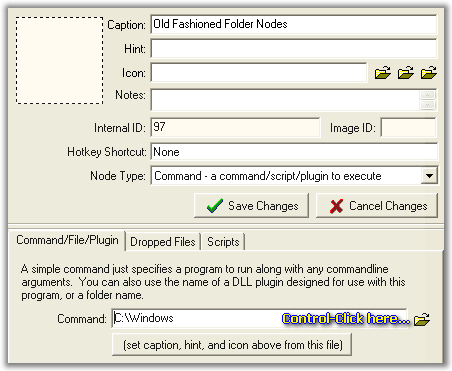
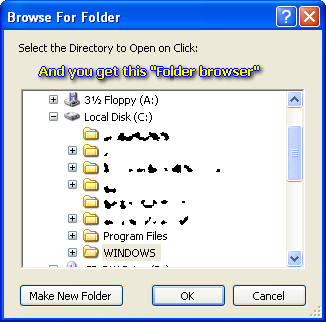
old fashioned folder nodes:
if you create a COMMAND node (not folder contents), but instead of specifying a command, specify a folder.
(you can hold control key and click on folder button to browse for folder),
it will more properly choose name, hint, icon for the folder,
and now will open that folder when you click on that button.

the purpose here is when you want to have a button to open a folder using your normal file explorer.

lanux128

  • Global Moderator
  • Joined in 2005
  • *****
  • Posts: 6,277
    • Coding Snacks
    • Volunteers/Staff
    • Gathering Badge
    • Participated in NANY Challenge Once
    • Linux User
Re: wrt v1.55.02 discussion
« Reply #2 on: August 21, 2006, 06:18 AM »
old fashioned folder nodes:
if you create a COMMAND node (not folder contents), but instead of specifying a command, specify a folder.
(you can hold control key and click on folder button to browse for folder)...
ok, i get it.. :up: see the attached pics...

scrnshot-1.png

scrnshot-2.png

Original address: https://www.donationcoder.com/forum/index.php?topic=4902.0