Cheap and nasty PowerShell alternative

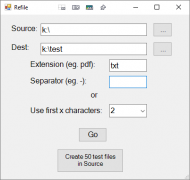
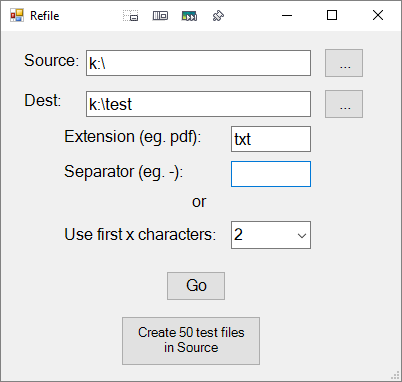
Run it from the shortcut or a PowerShell console.
Entering a value for
Separator overrides
Use first x characters.
Disclaimer: Works here

<# This form was created using POSHGUI.com  a free online gui designer for PowerShell
.NAME
    Refile.ps1
#>

Function FileBrowser {
  $objForm = New-Object System.Windows.Forms.FolderBrowserDialog
  $objForm.Description = "Select folder containing files"
  $objForm.SelectedPath = [System.Environment+SpecialFolder]'MyComputer'
  $objForm.ShowNewFolderButton = $false
  $result = $objForm.ShowDialog()
  if ($result -eq "OK") {
    return $objForm.SelectedPath
  } else {
    return ""
  }
}

#region begin GUI{

Add-Type -AssemblyName System.Windows.Forms
[System.Windows.Forms.Application]::EnableVisualStyles()

$Form                            = New-Object system.Windows.Forms.Form
$Form.ClientSize                 = '400,350'
$Form.text                       = "Refile"
$Form.TopMost                    = $false

$TextBox1                        = New-Object system.Windows.Forms.TextBox
$TextBox1.multiline              = $false
$TextBox1.width                  = 225
$TextBox1.height                 = 21
$TextBox1.location               = New-Object System.Drawing.Point(85,19)
$TextBox1.Font                   = 'Microsoft Sans Serif,12'

$TextBox2                        = New-Object system.Windows.Forms.TextBox
$TextBox2.multiline              = $false
$TextBox2.width                  = 225
$TextBox2.height                 = 21
$TextBox2.location               = New-Object System.Drawing.Point(85,60)
$TextBox2.Font                   = 'Microsoft Sans Serif,12'

$Button1                         = New-Object system.Windows.Forms.Button
$Button1.text                    = "..."
$Button1.width                   = 40
$Button1.height                  = 30
$Button1.location                = New-Object System.Drawing.Point(323,17)
$Button1.Font                    = 'Microsoft Sans Serif,12'

$Button2                         = New-Object system.Windows.Forms.Button
$Button2.text                    = "..."
$Button2.width                   = 40
$Button2.height                  = 30
$Button2.location                = New-Object System.Drawing.Point(323,58)
$Button2.Font                    = 'Microsoft Sans Serif,12'

$Label1                          = New-Object system.Windows.Forms.Label
$Label1.text                     = "Source:"
$Label1.AutoSize                 = $true
$Label1.width                    = 25
$Label1.height                   = 10
$Label1.location                 = New-Object System.Drawing.Point(20,19)
$Label1.Font                     = 'Microsoft Sans Serif,12'

$Label2                          = New-Object system.Windows.Forms.Label
$Label2.text                     = "Dest:"
$Label2.AutoSize                 = $true
$Label2.width                    = 25
$Label2.height                   = 10
$Label2.location                 = New-Object System.Drawing.Point(20,59)
$Label2.Font                     = 'Microsoft Sans Serif,12'

$ComboBox1                       = New-Object system.Windows.Forms.ComboBox
$ComboBox1.width                 = 80
$ComboBox1.height                = 20
@('1','2','3','4','5') | ForEach-Object {[void] $ComboBox1.Items.Add($_)}
$ComboBox1.location              = New-Object System.Drawing.Point(230,190)
$ComboBox1.Font                  = 'Microsoft Sans Serif,12'

$Label3                          = New-Object system.Windows.Forms.Label
$Label3.text                     = "Use first x characters:"
$Label3.AutoSize                 = $true
$Label3.width                    = 25
$Label3.height                   = 10
$Label3.location                 = New-Object System.Drawing.Point(60,193)
$Label3.Font                     = 'Microsoft Sans Serif,12'

$Label4                          = New-Object system.Windows.Forms.Label
$Label4.text                     = "or"
$Label4.AutoSize                 = $true
$Label4.width                    = 25
$Label4.height                   = 10
$Label4.location                 = New-Object System.Drawing.Point(188,160)
$Label4.Font                     = 'Microsoft Sans Serif,12'

$TextBox3                        = New-Object system.Windows.Forms.TextBox
$TextBox3.multiline              = $false
$TextBox3.width                  = 80
$TextBox3.height                 = 20
$TextBox3.Text                   = ''
$TextBox3.location               = New-Object System.Drawing.Point(230,130)
$TextBox3.Font                   = 'Microsoft Sans Serif,12'

$TextBox4                        = New-Object system.Windows.Forms.TextBox
$TextBox4.multiline              = $false
$TextBox4.width                  = 80
$TextBox4.height                 = 20
$TextBox4.Text                   = 'txt'
$TextBox4.location               = New-Object System.Drawing.Point(230,95)
$TextBox4.Font                   = 'Microsoft Sans Serif,12'

$Label5                          = New-Object system.Windows.Forms.Label
$Label5.text                     = "Separator (eg. -):"
$Label5.AutoSize                 = $true
$Label5.width                    = 25
$Label5.height                   = 10
$Label5.location                 = New-Object System.Drawing.Point(60,130)
$Label5.Font                     = 'Microsoft Sans Serif,12'

$Label6                          = New-Object system.Windows.Forms.Label
$Label6.text                     = "Extension (eg. pdf):"
$Label6.AutoSize                 = $true
$Label6.width                    = 25
$Label6.height                   = 10
$Label6.location                 = New-Object System.Drawing.Point(60,95)
$Label6.Font                     = 'Microsoft Sans Serif,12'

$Button3                         = New-Object system.Windows.Forms.Button
$Button3.text                    = "Go"
$Button3.width                   = 60
$Button3.height                  = 30
$Button3.location                = New-Object System.Drawing.Point(165,240)
$Button3.Font                    = 'Microsoft Sans Serif,12'

$Button4                         = New-Object system.Windows.Forms.Button
$Button4.text                    = "Create 50 test files in Source"
$Button4.width                   = 140
$Button4.height                  = 50
$Button4.location                = New-Object System.Drawing.Point(120,285)
$Button4.Font                    = 'Microsoft Sans Serif,10'
$Form.controls.AddRange(@($TextBox1,$TextBox2,$Button1,$Button2,$Label1,$Label2,$ComboBox1,$Label3,$Label4,$TextBox3,$Label5,$Button3,$Button4,$TextBox4,$Label6))

$Button1.Add_Click({
  $TextBox1.Text = (FileBrowser)
})

$Button2.Add_Click({
  $TextBox2.Text = (FileBrowser)
})

$Button3.Add_Click({
  if (!(($TextBox1.Text -eq '') -and ($TextBox2.Text -eq ''))) {
    $dest = $TextBox2.Text
    $files = Get-ChildItem "$($TextBox1.Text)\*.$($TextBox4.Text)" -File

    for ($i = 0; $i -lt $files.Count; $i++) {
      $folder = $null
      if ($TextBox3.Text -eq '') {
        $folder = (Split-Path -Leaf $files[$i]).Substring(0, $ComboBox1.SelectedItem).Trim()
      } else {
        $sep = (Split-Path -Leaf $files[$i]).IndexOf($TextBox3.Text)
          switch ($sep) {
            -1 {continue}
            0  {$folder = (Split-Path -Leaf $files[$i]).Substring(0, 1).Trim()
              break
             }
          default {$folder = (Split-Path -Leaf $files[$i]).Substring(0, $sep).Trim()}
        }
      }
      if ($folder -ne $null) {
        if (!(Test-Path "$($dest)\$($folder)")) {
          New-Item -ItemType Directory "$($dest)\$($folder)"
        }
        Move-Item $files[$i] "$($dest)\$($folder)\$((Split-Path -Leaf $files[$i]))"
      }
    }
  }
})

$Button4.Add_Click({
  if (!($TextBox1.Text -eq '')) {
# Set the initial value to control the do loop
    $seed = 0
# How many files should be generated
    $random = 50
# File size in bytes
    $ranSize = 4096
# Path where the file will be created
    $ranPath = "$($TextBox1.Text)\"
    do {
      $netFn = [System.IO.Path]::GetRandomFileName()
      $netfn = [System.IO.Path]::ChangeExtension($netFn, $TextBox4.Text)
      fsutil file createnew $ranPath$netFn $ranSize
      $seed++
    } until ($seed -eq $random)
  }
})

#endregion events }

#endregion GUI }

#Write your logic code here

[void]$Form.ShowDialog()


 Refile.7z