DonationCoder.com forum
 
Read-only archive. This is a static copy of the DonationCoder.com forum. Reading and searching work as before; logging in, posting and private messages do not.
Archive of 2026-10-21 · About this archive · Main site

Author Topic: portable version keeps making a folder in mydocuments and storing settings there  (Read 13,927 times)

delwoode

  • Supporting Member
  • Joined in 2008
  • **
  • Posts: 146
I donloaded the latest version, portable, put it in a folder called Portables in my program files folder
I uncommented the lines
PORTABLE=TRUE
CONFIGDIR = .
in the Confi_Dir_Default.ini
but it still stores it's setting in mydocuments folder not in the portable dir
I also tried making a copy of the Config_Dir_Default.ini file and calling it Config.ini but still no luck
Suggestions?

mouser

  • First Author
  • Administrator
  • Joined in 2005
  • *****
  • Posts: 40,931
    • Gathering Badge
    • Plugin Coding Medal
    • Participated in NANY Challenge Seventeen Times
    • Cody Award
    • Coding Snacks
    • Volunteers/Staff
i think the file should be called ConfigDir.ini
exit and restart with that filename and see how it behaves.

by default the portable one should be storing settings in the same directory it runs from.

but if you copied over a ConfigDir.ini from a previous installed version it might override it, so try using ConfigDir.ini.

lanux128

  • Global Moderator
  • Joined in 2005
  • *****
  • Posts: 6,277
    • Coding Snacks
    • Volunteers/Staff
    • Gathering Badge
    • Participated in NANY Challenge Once
    • Linux User
I donloaded the latest version, portable, put it in a folder called Portables in my program files folder
If Farr is in your "program files" folder then Farr must be run in admin mode because if not Windows won't allow any programs to have write access.

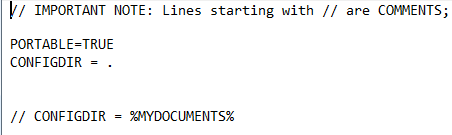
For comparison, here's how my configdir ini looks like:
DonationCoder_Farr_ConfigDir_ini_2019_10_04_001.png

tomos

  • Charter Member
  • Joined in 2006
  • ***
  • Posts: 11,970
    • Gathering Badge
    • Participated in NANY Challenge Once
Portable Software better *not* kept in either of the program folders. It doesn't have write permission there so acts like an installed app, creating ini files etc elsewhere.
Tom

delwoode

  • Supporting Member
  • Joined in 2008
  • **
  • Posts: 146
Sorry Mouser, ConfigDir.ini is what I had renamed it too.
I moved the folder to the root of the C: drive and now it works as portable
Perhaps adding advice to the Note_for_Portable-Use.txt about not putitng it in Programs dir would be an idea.

mouser

  • First Author
  • Administrator
  • Joined in 2005
  • *****
  • Posts: 40,931
    • Gathering Badge
    • Plugin Coding Medal
    • Participated in NANY Challenge Seventeen Times
    • Cody Award
    • Coding Snacks
    • Volunteers/Staff
Sounds like I should add some code to my programs to check if the ConfigDir.ini file is telling them to save to a directory that is disallowed, and complain if so.

Original address: https://www.donationcoder.com/forum/index.php?topic=48829.0