DonationCoder.com forum
 
Read-only archive. This is a static copy of the DonationCoder.com forum. Reading and searching work as before; logging in, posting and private messages do not.
Archive of 2026-10-21 · About this archive · Main site

Author Topic: Artists: What digital hardware+software do you use for digital sketchin/painting  (Read 12,913 times)

mouser

  • First Author
  • Administrator
  • Joined in 2005
  • *****
  • Posts: 40,931
    • Gathering Badge
    • Plugin Coding Medal
    • Participated in NANY Challenge Seventeen Times
    • Cody Award
    • Coding Snacks
    • Volunteers/Staff
For those of you who spend time sketching/painting in digital medium, I'm curious what tools, both hardware and software, you find the most enjoyable to use?
Anyone use a drawing tablet? A fancy screen with pressure sensitive pen etc?

I ask because I inherited an older cintiq21 21 inch monitor tablet from my father -- you draw on the screen with a pressure sensitive pen.  It's old but very cool.. However it's a beast to move around and requires a computer to make it work.  I'm thinking a smaller standalone touch screen tablet with pressure pen support would be so much more convenient, if not quite as good an experience when actually sketching.

cranioscopical

  • Friend of the Site
  • Supporting Member
  • Joined in 2006
  • **
  • Posts: 4,776
    • Cody Award
    • Official Forum Clown
    • rotten turkey sandwich - Rotten Turkey Sandwich
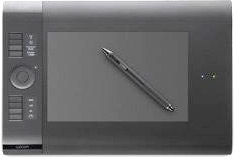
FWIW, I use a wireles Wacom Intuos PTK-540WL with a drawing area of approx 8.75" x 5", 2048 levels of pressure.
Tablet.jpg

and the screen of my Surface Book.

Software is usually (Adobe) Photoshop and Illustrator but now I also use some very good-value graphics software from Serif (Affinity Designer, and Affinity Photo). Sometimes GIMP.
Chris

oblivion

  • Supporting Member
  • Joined in 2010
  • **
  • Posts: 499
    • Participated in NANY Challenge Once
For those of you who spend time sketching/painting in digital medium, I'm curious what tools, both hardware and software, you find the most enjoyable to use?
Anyone use a drawing tablet? A fancy screen with pressure sensitive pen etc?
A bit late to this party...

I'm not much of a digital artist (as my previous efforts with NANY mug designs will clearly show) but my tools of choice are Serif's DrawPlus for vector graphics, Sagelight for photos and the like if I'm doing image enhancements or a combination of the two if I want to draw or write on photos. And I have several graphics tablets: two Wacom Bamboos (one 10x6, the other 6x4) and a 10 inch Ugee (because I got a tracing overlay with it.)

The Ugee stylus is a little heavier than the Wacom (as it includes a power source -- I have a rechargeable one now but the original took a AAA battery) but both are nicely pressure sensitive for the software that understands such things. Oh, and the Ugee will only drive one screen, whereas the Wacoms do two comfortably.

But I primarily use the tablets for all my computer interactions. The stylus doesn't give me RSI, and a mouse does. Once you're used to the absolute (rather than relative) mode for cursor movement, you'll probably never want to go back.

(I have just bought a Udemy course at a bargain price to improve my digital art skills, and the tablet was a prerequisite.)
-- bests, Tim

...this space unintentionally left blank.

rjbull

  • Charter Member
  • Joined in 2005
  • ***
  • Posts: 3,217
my tools of choice are Serif's DrawPlus for vector graphics
That's their pre-Affinity one, yes?  Are you still happy with it on Win10?

I have several graphics tablets: [...]10 inch Ugee
I've heard of Wacom, but never of Ugee.

oblivion

  • Supporting Member
  • Joined in 2010
  • **
  • Posts: 499
    • Participated in NANY Challenge Once
my tools of choice are Serif's DrawPlus for vector graphics
That's their pre-Affinity one, yes?  Are you still happy with it on Win10?
Yes, but only the 32-bit version seems okay. The 64-bit version has a nasty habit of hanging during the loading process.

Not that it's relevant, but I never went with Affinity because, having been a Serif user since about 1993, when they ditched their old codebase for a completely new start, making a conscious decision to abandon support for the previous product line, I felt a little aggrieved. So I'm wringing all the value I can get from the Serif products I have licences for -- DrawPlus, PagePlus, PhotoPlus -- and I don't much care how good Affinity is, I'm not going there.

I have several graphics tablets: [...]10 inch Ugee
I've heard of Wacom, but never of Ugee.
Cheaper alternative. It was a 10" tablet for about £40. Has sixteen configurable buttons at the top of the tablet and eight programmable function keys down the side, the stylus came with a collection of spare tips and a stand and, as long as you don't want to use it on an extended desktop across more than one monitor, it's a decent enough choice. Mine is the M1000L -- although I've had it a while and it's probably been superseded by now. As I said, it comes in handy for tracing stuff -- although, now I think of it, I think I bought the transparent layer separately.
-- bests, Tim

...this space unintentionally left blank.

huaidan

  • Participant
  • Joined in 2020
  • *
  • Posts: 1
I'm a fan of Paint Tool SAI... a bit different from the photoshop CC I use in class but it's convenient, simple and refreshing to use once you get the basics down. It's a great piece of intermediate level software that hammers down the essentials. Not too many fancy photo manipulations but all the brushes are there + accessible online.

As for hardware, I'm at a loss. My Macbook Pro laptop  + pen tablet is nice . I use a XP-Pen Deco 03 Graphics Tablet with SAI . The tablet is ok, but it's really hard for me to match where the pen is on the tablet with where it is on the screen.  Now I've moved to my XP-Pen Artist 24 Pro drawing display with SAI installed and it's like a whole new world.

tobi.codes

  • Participant
  • Joined in 2020
  • *
  • Posts: 11
Hi.. I'm using my graphics tablet and a pen to draw things... it's more like drawing on a paper or something... but you can convert it to the adobe creative cloud and edit it or use it there... it's so cool!
Here is an german article about graphics tablets and some buy recommandations if you fancy...
https://www.technikhiwi.de/grafiktablett-test/

kunkel321

  • Supporting Member
  • Joined in 2009
  • **
  • Posts: 626
    • Participated in NANY Challenge Once
my tools of choice are Serif's DrawPlus for vector graphics
That's their pre-Affinity one, yes?  Are you still happy with it on Win10?
Yes, but only the 32-bit version seems okay. The 64-bit version has a nasty habit of hanging during the loading process.

Not that it's relevant, but I never went with Affinity because, having been a Serif user since about 1993, when they ditched their old codebase for a completely new start, making a conscious decision to abandon support for the previous product line, I felt a little aggrieved. So I'm wringing all the value I can get from the Serif products I have licences for -- DrawPlus, PagePlus, PhotoPlus -- and I don't much care how good Affinity is, I'm not going there.

I was also pretty annoyed when Serif abandoned the DrawPlus line.  I do have Afinity now.  I still haven't desided if I like it or not.  I think the idea of pixel-level editing has promise for drawing icons.  The user interface is really different from other programs though, and I haven't had a lot of time to relearn something from scratch. 

Original address: https://www.donationcoder.com/forum/index.php?topic=48692.0