DonationCoder.com forum
 
Read-only archive. This is a static copy of the DonationCoder.com forum. Reading and searching work as before; logging in, posting and private messages do not.
Archive of 2026-10-21 · About this archive · Main site

Author Topic: Standalone screenshot window  (Read 24,781 times)

spacedad

  • full of poison
  • Supporting Member
  • Joined in 2008
  • **
  • Posts: 36
Standalone screenshot window
« on: August 19, 2019, 12:33 AM »
hi,
i'm not sure if screenshot captor can do this,
i'd like to start with hiding all windows, then using shortcut to select a region then for that capture to pop up in the standalone screenshot window, with the window adjusting to the size of the image. then if i click outside it is hidden until the shortcut is selected again.

i can almost do it, but it doesn't hide after clicking away, or standalone screenshot window doesn't resize to fit capture.

i hope i've explained things properly. i hope someone can help, thanks!

Ath

  • Supporting Member
  • Joined in 2006
  • **
  • Posts: 3,649
    • Participated in NANY Challenge Eleven Times
    • Coding Snacks
    • Linux User
    • Hardware Hacker
Re: Standalone screenshot window
« Reply #1 on: August 19, 2019, 07:28 PM »
Wouldn't it be much easier to use the hotkey for grabbing the active Window? Because that's what it sounds to me what you want to achieve... :huh:
/Ton
Ath's software collection, Quote: "A problem well stated is a problem half-solved." (Charles Kettering)

spacedad

  • full of poison
  • Supporting Member
  • Joined in 2008
  • **
  • Posts: 36
Re: Standalone screenshot window
« Reply #2 on: August 19, 2019, 09:48 PM »
hi,
thanks for replying. i don't think it's the active window i'm after, it's the 'toggle standalone screenshot window' but i can't find a shortcut for it, i need it to be 'on' by default, so it pops up automatically. and if it could auto resize to fit the image, that would be even better.

(what i'm trying to do is screengrab a chat box from  a game, then type the text into a translator so i can speak in other languages. i don't even need to save the images.)

mouser

  • First Author
  • Administrator
  • Joined in 2005
  • *****
  • Posts: 40,931
    • Gathering Badge
    • Plugin Coding Medal
    • Participated in NANY Challenge Seventeen Times
    • Cody Award
    • Coding Snacks
    • Volunteers/Staff
Re: Standalone screenshot window
« Reply #3 on: August 19, 2019, 10:24 PM »
This doesn't really answer your question directly, but what you could do is have SC stay minimized after a capture, and have it launch a 3rd party standalone tool after each screenshot, passing it the screenshot file name.
So that standalone could do what you want, and you might find an image viewer that behaves as you want.
In fact a while ago someone made one for dc folks that was all about showing an image in an overlay (semi-transparent?) fashion..

spacedad

  • full of poison
  • Supporting Member
  • Joined in 2008
  • **
  • Posts: 36
Re: Standalone screenshot window
« Reply #4 on: August 19, 2019, 10:33 PM »
hi, thanks for the reply,
oh, ok maybe, i'll have a look. i tried windows picture viewer but it seems too slow, and missed my 'chat box's'
is there a reason why the capture window can't 'pop up' by default?

mouser

  • First Author
  • Administrator
  • Joined in 2005
  • *****
  • Posts: 40,931
    • Gathering Badge
    • Plugin Coding Medal
    • Participated in NANY Challenge Seventeen Times
    • Cody Award
    • Coding Snacks
    • Volunteers/Staff
Re: Standalone screenshot window
« Reply #5 on: August 19, 2019, 10:36 PM »
Quote
is there a reason why the capture window can't 'pop up' by default?

I'm not sure what you mean by the capture window..  SC has 3 basic options for what to do after a screenshot.  It can pop up a small post-capture dialog to show you a mini version of the screenshot and give you some choices.  Or it can restore it's main window to let you edit the screenshot, etc.  Or it can stay minimized.

The difficulty in what you are requesting is simply that it is basically asking for a 4th option -- you want to pop-up the capture, but in a way that closes if you click outside of it, and you want it to be sized for the capture (at least when feasible).  I'm thinking it would be easier to write/use a standalone viewer for that and just tell SC to launch it after each capture and keep itself minimized.

spacedad

  • full of poison
  • Supporting Member
  • Joined in 2008
  • **
  • Posts: 36
Re: Standalone screenshot window
« Reply #6 on: August 19, 2019, 10:43 PM »
when you say 'mini version of the screenshot' is that the 'toggle standalone screenshot window' option?
if so, then that's the one i like. resizing to image - i could live without. but maybe an 'always on top' choice would be good, or when you click on the browser/game i could gain focus with the screenshot window still open but 'behind' the browser.
is that possible?

mouser

  • First Author
  • Administrator
  • Joined in 2005
  • *****
  • Posts: 40,931
    • Gathering Badge
    • Plugin Coding Medal
    • Participated in NANY Challenge Seventeen Times
    • Cody Award
    • Coding Snacks
    • Volunteers/Staff
Re: Standalone screenshot window
« Reply #7 on: August 19, 2019, 10:51 PM »
Quote
when you say 'mini version of the screenshot' is that the 'toggle standalone screenshot window' option?

no, it's quite different.  it's what you get what you choose "after capture show: post-capture pop-up dialog"

spacedad

  • full of poison
  • Supporting Member
  • Joined in 2008
  • **
  • Posts: 36
Re: Standalone screenshot window
« Reply #8 on: August 19, 2019, 10:58 PM »
oh, so when you say it has 3 options, which one is the 'toggle standalone screenshot window' option?

mouser

  • First Author
  • Administrator
  • Joined in 2005
  • *****
  • Posts: 40,931
    • Gathering Badge
    • Plugin Coding Medal
    • Participated in NANY Challenge Seventeen Times
    • Cody Award
    • Coding Snacks
    • Volunteers/Staff
Re: Standalone screenshot window
« Reply #9 on: August 19, 2019, 11:11 PM »
that's something different, a crazy feature I added a while ago that I barely remember how it works :)

spacedad

  • full of poison
  • Supporting Member
  • Joined in 2008
  • **
  • Posts: 36
Re: Standalone screenshot window
« Reply #10 on: August 20, 2019, 12:13 AM »
ah, well that's my baby.  :)

mouser

  • First Author
  • Administrator
  • Joined in 2005
  • *****
  • Posts: 40,931
    • Gathering Badge
    • Plugin Coding Medal
    • Participated in NANY Challenge Seventeen Times
    • Cody Award
    • Coding Snacks
    • Volunteers/Staff
Re: Standalone screenshot window
« Reply #11 on: August 20, 2019, 01:42 AM »
Ok well I am open to hearing requests to modify that functionality.  My memory is it was implemented mainly so people could view captures at FULL screen size, without the normal SC interface getting in the way.. Most useful for people with multiple monitors, so one monitor can be only the screenshot and another is SC with large thumbnail browser functionality.

tomos

  • Charter Member
  • Joined in 2006
  • ***
  • Posts: 11,970
    • Gathering Badge
    • Participated in NANY Challenge Once
Re: Standalone screenshot window
« Reply #12 on: August 20, 2019, 05:25 AM »
i can almost do it, but it doesn't hide after clicking away, or standalone screenshot window doesn't resize to fit capture.
what do you mean by clicking away?

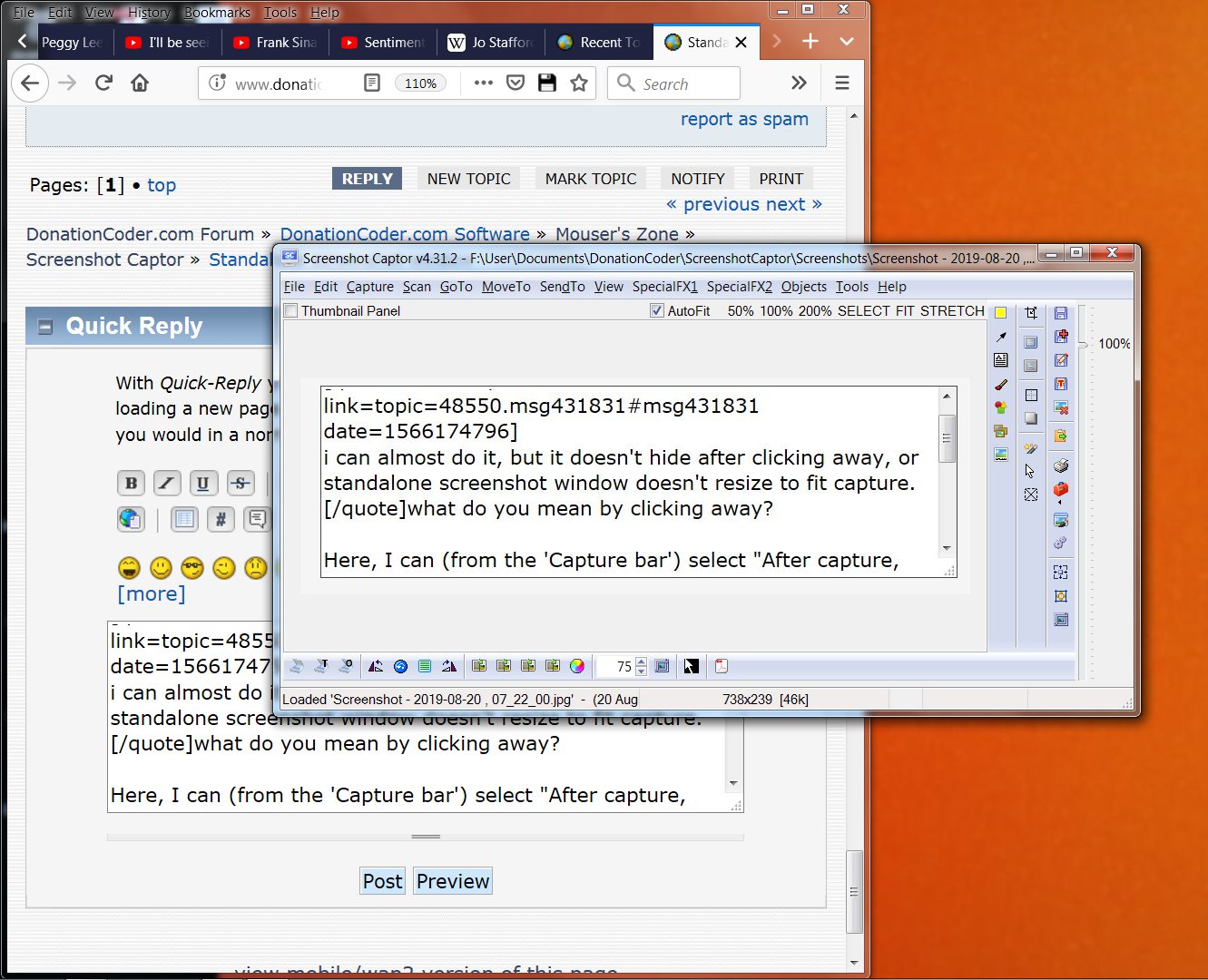
Here, I can select "After capture, save and show main window" (from the 'Capture bar' - presumably in options somewhere as well)
You can resize this window to roughly same size proportion of your fixed image size -- this will be remembered. Thumbnail panel and naming etc panel at the bottom can be hidden.

If I click on another window, the SC window will go to the back.
Is that any help? (or have I misunderstood?)

Screenshot - 2019-08-20 , 07_24_04.jpg
Tom

spacedad

  • full of poison
  • Supporting Member
  • Joined in 2008
  • **
  • Posts: 36
Re: Standalone screenshot window
« Reply #13 on: August 20, 2019, 11:32 AM »
Here, I can select "After capture, save and show main window"
You can resize this window to roughly same size proportion of your fixed image size -- this will be remembered. Thumbnail panel and naming etc panel at the bottom can be hidden.

If I click on another window, the SC window will go to the back.
Is that any help? (or have I misunderstood?)
hi, i did try that, but i didn't managed to remove all the buttons, i'll keep trying!
the temp standalone screenshot window was more stripped down.
and yes, clicking on another window sending screenshot to the back, was what i meant.
do you think i need a much smaller program ('tempcap' or something), that can just select a region then display a floating image?
SC is a great program but is it too complex for my intended use?

spacedad

  • full of poison
  • Supporting Member
  • Joined in 2008
  • **
  • Posts: 36
Re: Standalone screenshot window
« Reply #14 on: August 20, 2019, 02:21 PM »
Ok well I am open to hearing requests to modify that functionality.  My memory is it was implemented mainly so people could view captures at FULL screen size, without the normal SC interface getting in the way.. Most useful for people with multiple monitors, so one monitor can be only the screenshot and another is SC with large thumbnail browser functionality.

i see, it's a great program for lots of things, but i need something simple and quick.
even if the 'toggle standalone screenshot window' could be set to work as default, would be good, so i don't have to go into settings to turn it on. time is of the essence in my situation, as the language chat box only stays on screen for a few seconds.
the auto-resizing, i could live without, and even the 'hide' once another window is clicked, i could live with, really.

spacedad

  • full of poison
  • Supporting Member
  • Joined in 2008
  • **
  • Posts: 36
Re: Standalone screenshot window
« Reply #15 on: August 23, 2019, 08:59 PM »
ok , maybe i just need to strip the main window down a bit more.
how do you hide the zoom and name boxes?

lanux128

  • Global Moderator
  • Joined in 2005
  • *****
  • Posts: 6,277
    • Coding Snacks
    • Volunteers/Staff
    • Gathering Badge
    • Participated in NANY Challenge Once
    • Linux User
Re: Standalone screenshot window
« Reply #16 on: August 24, 2019, 04:10 AM »
ok , maybe i just need to strip the main window down a bit more.
how do you hide the zoom and name boxes?

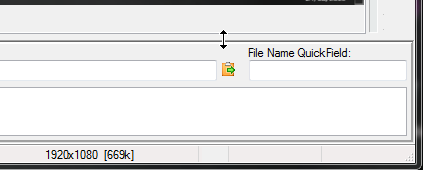
Move your cursor to the border until you get the resizing arrow (refer image).

[attachimg=#]

spacedad

  • full of poison
  • Supporting Member
  • Joined in 2008
  • **
  • Posts: 36
Re: Standalone screenshot window
« Reply #17 on: August 26, 2019, 09:48 AM »
hi, thanks, i didn't see that. that's good, but when i grab the bottom corner, it won't resize any smaller.
am i doing something wrong? does the image window have a minimum size?

spacedad

  • full of poison
  • Supporting Member
  • Joined in 2008
  • **
  • Posts: 36
Re: Standalone screenshot window
« Reply #18 on: September 04, 2019, 01:46 PM »
what i mean, is i grabbed and resized/removed the zoom and naming boxes, but that just makes the main window larger.
and if i try to resize the main window by grabbing the bottom right corner, it won't resize small enough. (still about a quarter of my screen) is there a size restriction?

spacedad

  • full of poison
  • Supporting Member
  • Joined in 2008
  • **
  • Posts: 36
Re: Standalone screenshot window
« Reply #19 on: September 04, 2019, 01:58 PM »
[attachthumb=#]

mouser

  • First Author
  • Administrator
  • Joined in 2005
  • *****
  • Posts: 40,931
    • Gathering Badge
    • Plugin Coding Medal
    • Participated in NANY Challenge Seventeen Times
    • Cody Award
    • Coding Snacks
    • Volunteers/Staff
Re: Standalone screenshot window
« Reply #20 on: October 05, 2019, 02:22 AM »
Yeah probably a limit to how small the main screen will allow itself to get... but why would you want it smaller? If you don't want to see it why not minimize it to tray?

tomos

  • Charter Member
  • Joined in 2006
  • ***
  • Posts: 11,970
    • Gathering Badge
    • Participated in NANY Challenge Once
Re: Standalone screenshot window
« Reply #21 on: October 05, 2019, 08:37 AM »
^ request was screenshot would open in viewer after capture. Viewer would resize to image size.
Tom

spacedad

  • full of poison
  • Supporting Member
  • Joined in 2008
  • **
  • Posts: 36
Re: Standalone screenshot window
« Reply #22 on: October 05, 2019, 10:33 AM »
I need it to just be the same size as the image, eg one sentence of text.

Original address: https://www.donationcoder.com/forum/index.php?topic=48550.0