DonationCoder.com forum
 
Read-only archive. This is a static copy of the DonationCoder.com forum. Reading and searching work as before; logging in, posting and private messages do not.
Archive of 2026-10-21 · About this archive · Main site

Author Topic: SCREENSHOT CAPTOR VERSION 4  (Read 3,778 times)

SamR

  • Supporting Member
  • Joined in 2017
  • **
  • Posts: 1
SCREENSHOT CAPTOR VERSION 4
« on: July 25, 2019, 04:45 PM »
I have just down loaded SCREENSHOT CAPTOR VERSION 4. When I 'grab a selected region' and paste the selection onto a Word Document and then repeat with a new selection it keeps pasting the first 'grab region'  I selected. What is the setting so that each new region selected is pasted?

Thank you
SamR

Ath

  • Supporting Member
  • Joined in 2006
  • **
  • Posts: 3,649
    • Participated in NANY Challenge Eleven Times
    • Coding Snacks
    • Linux User
    • Hardware Hacker
Re: SCREENSHOT CAPTOR VERSION 4
« Reply #1 on: July 25, 2019, 06:38 PM »
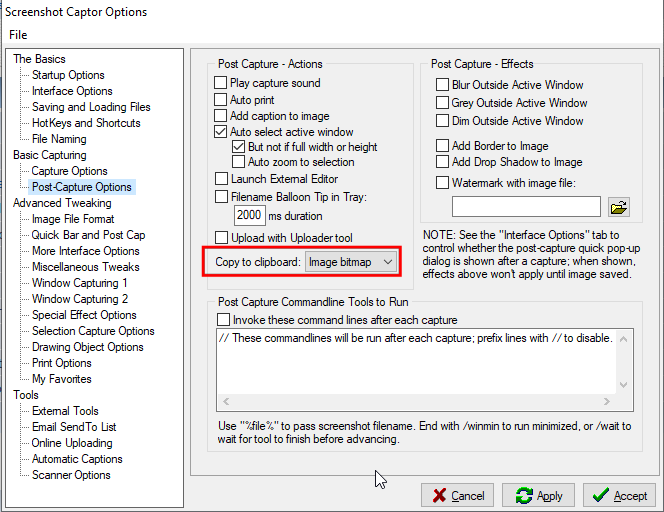
Well, you might want to check the Preferences page 'Post Capture Options' to have the Copy to clipboard option set to 'Image bitmap' (not sure what the default is, I set it longtime ago)

Screenshot - 25-07-2019 , 20_33_30.png

(Other settings are probably changed by me too, so don't take them as advice :))
/Ton
Ath's software collection, Quote: "A problem well stated is a problem half-solved." (Charles Kettering)

Original address: https://www.donationcoder.com/forum/index.php?topic=48172.0