DonationCoder.com forum
 
Read-only archive. This is a static copy of the DonationCoder.com forum. Reading and searching work as before; logging in, posting and private messages do not.
Archive of 2026-10-21 · About this archive · Main site

Author Topic: Listing the unused  (Read 7,506 times)

Contro

  • Supporting Member
  • Joined in 2007
  • **
  • Posts: 3,947
Listing the unused
« on: March 29, 2019, 04:14 PM »
I have to do some space in my laptop so I would like to know those files I don't open for a long time, exe's i don't execute, etc. Those files I haven't move or copy for a long time.

A software able to categorize this in folders without use for a long period or from a date.

Able to locate folders without movements and without execution of any of the files contained.

Free, portable and fast ?

Best Regards
:-*

Curt

  • Supporting Member
  • Joined in 2006
  • **
  • Posts: 7,565
Re: Listing the unused
« Reply #1 on: March 30, 2019, 07:17 AM »
http://www.nirsoft.net/utils/executed_programs_list.html > scroll (horizontally) to Last Executed On

no, the data is not reliable.  :(
« Last Edit: March 30, 2019, 07:23 AM by Curt »

4wd

  • Pedantic Old Bastard
  • Supporting Member
  • Joined in 2006
  • **
  • Posts: 5,652
    • Coding Snacks
Re: Listing the unused
« Reply #2 on: March 30, 2019, 11:57 AM »
List files sorted by Last Access time:

Code: (text)
dir <file spec> /s /od /ta

eg. List all MP3 files on D:\

Code: ( text)
d:
cd \
dir *.mp3 /s /od /ta
"I will not follow where the path may lead, but I will go where there is no path, and I will leave a trail." - Muriel Strode, 1903

Contro

  • Supporting Member
  • Joined in 2007
  • **
  • Posts: 3,947
Re: Listing the unused
« Reply #3 on: March 30, 2019, 02:13 PM »
List files sorted by Last Access time:

Code: (text)
dir <file spec> /s /od /ta

eg. List all MP3 files on D:\

Code: ( text)
d:
cd \
dir *.mp3 /s /od /ta
Something from a software , not from the console, and more interactive and flexible ?

:-*

Shades

  • Member
  • Joined in 2006
  • **
  • Posts: 2,954
Re: Listing the unused
« Reply #4 on: March 30, 2019, 06:55 PM »
As a general rule:
Nothing beats the flexibility of the command line.

Also, for menial tasks like this, user interaction is what you don't want. Better do that by script, so you don't have to waste time clicking on things that a script would do much faster and more precise. And you could see this as the beginning of a script that helps you keeping your laptop neat and tidy automatically, so you don't have to worry too much about it.

Piece of mind or having yet another maintenance task where you must click away at lists and lists of files to keep, to store on different media or throw away.

The easy path is usually downhill...

anandcoral

  • Honorary Member
  • Joined in 2009
  • **
  • Posts: 802
    • Participated in NANY Challenge Thirteen Times
Re: Listing the unused
« Reply #5 on: March 31, 2019, 08:24 AM »
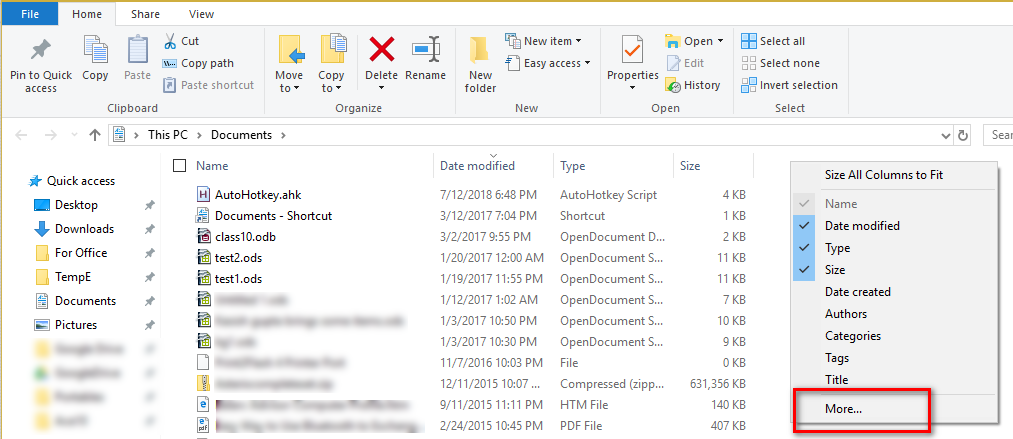
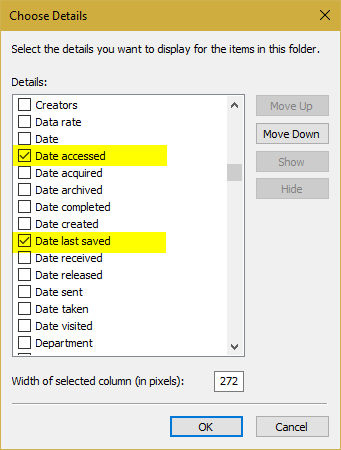
Also right-click in file explorer and choose column,

2019-03-31_134903.png

2019-03-31_135124.png

Regards,

Anand

Contro

  • Supporting Member
  • Joined in 2007
  • **
  • Posts: 3,947
Re: Listing the unused
« Reply #6 on: April 01, 2019, 12:49 PM »
;D
Thanks everyone.
I know the console is the simplest and the very best.

I would like a consolidated software for this. I see is difficult, but not impossible. When I find I will put here.
Best Regards
:-[

Curt

  • Supporting Member
  • Joined in 2006
  • **
  • Posts: 7,565
Re: Listing the unused
« Reply #7 on: April 01, 2019, 01:05 PM »
no, it really is impossible. The Last Used data includes when every app was last "touched" by the indexer or by the anti malware-tester, or something. So the only way that I know of is the opposite way: There are several apps that can tell you what programs you use most often. The ones you don't use so often..., well, you figure out the rest.
« Last Edit: April 01, 2019, 01:48 PM by Curt »

Contro

  • Supporting Member
  • Joined in 2007
  • **
  • Posts: 3,947
Re: Listing the unused
« Reply #8 on: April 01, 2019, 02:23 PM »
no, it really is impossible. The Last Used data includes when every app was last "touched" by the indexer or by the anti malware-tester, or something. So the only way that I know of is the opposite way: There are several apps that can tell you what programs you use most often. The ones you don't use so often..., well, you figure out the rest.
Understood Curt.
I gonna try now with the most known software about windows explorer substitution and comment.
I assume the difficulty of the question and ready to return to the console in black.
:-*

Original address: https://www.donationcoder.com/forum/index.php?topic=47397.0