
What gives?
I don't know. Try pwnyoutube or hooktube or something.


 Topic: youtube downloader? (Read 99,902 times)


What gives?


Re: 1hr Delta Binaural Beat Session (0.9hz) ~ Pure
Using Brave browser and 4K Video Downloader set to 480 quality...
If I play direct from Youtube online, I get a nice throbbing effect, as; wooOOOoooOOOoooOOOooo
But if I download it and play it back in VLC, it loses the throb, as; woooooooooooooooooooooo.
What gives?
Yes, MPC-BE plays individual brainwave vids with throb. Tnx 4wd.Re: 1hr Delta Binaural Beat Session (0.9hz) ~ Pure
Using Brave browser and 4K Video Downloader set to 480 quality...
If I play direct from Youtube online, I get a nice throbbing effect, as; wooOOOoooOOOoooOOOooo
But if I download it and play it back in VLC, it loses the throb, as; woooooooooooooooooooooo.
What gives?
Downloaded and played back fine using SlimJet and MPC-BE.


Yes, MPC-BE plays individual brainwave vids with throb. Tnx 4wd.
edit; I don't see a way to loop playback or change playback speed, in MPC-BE.
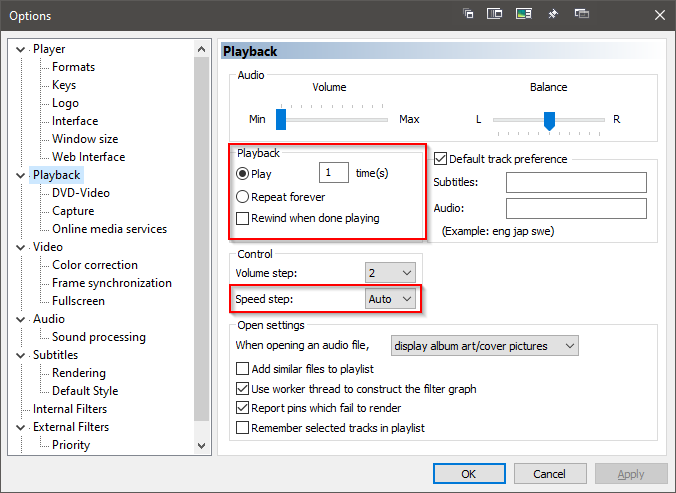
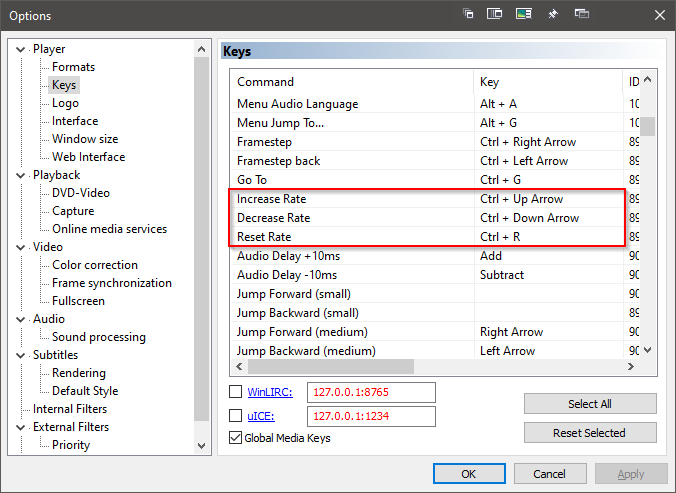
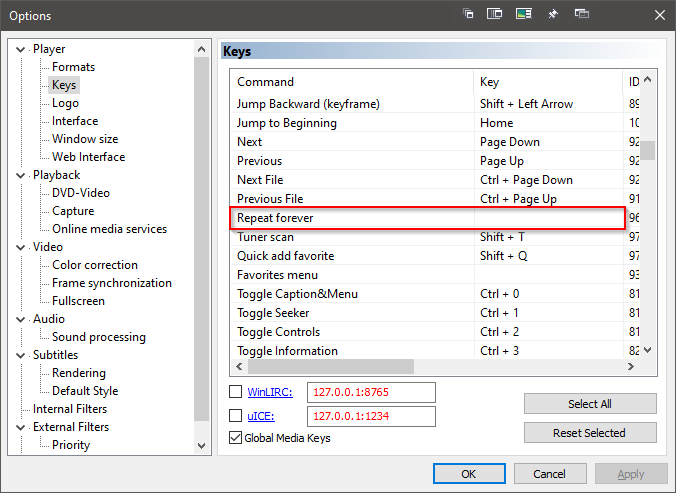

MPC-BEI see; and for bookmarks, just use the Favorites in the menu bar.


youtube-dl and no browser window.Best an very ease to handle.
Re: 'repeat forever'; Okay, now that I know how to 'find' this option, how do I 'select' it? When I click on that 'option', the 'Apply' word does not highlight itself to confirm the choice.Yes, MPC-BE plays individual brainwave vids with throb. Tnx 4wd.
edit; I don't see a way to loop playback or change playback speed, in MPC-BE.
[attachthumb=3,msg434259] [attachthumb=1,msg434259] [attachthumb=2,msg434259]
Pictures, thousand words, and all that
Re: 'repeat forever'; Okay, now that I know how to 'find' this option, how do I 'select' it? When I click on that 'option', the 'Apply' word does not highlight itself to confirm the choice.
How do I add MPC-BE to my 'Open with' drop-down menu; all I show is VLC as an option.
Re: 'repeat forever'; Okay, now that I know how to 'find' this option, how do I 'select' it? When I click on that 'option', the 'Apply' word does not highlight itself to confirm the choice.
Third image is where you can set a key shortcut for it, it's unassigned by default.How do I add MPC-BE to my 'Open with' drop-down menu; all I show is VLC as an option.
Same way you add any program you want to the Open With... menu:
- Right click the relevant file
- Choose Open With...
- If you don't see MPC-BE, click More apps
- If you don't see MPC-BE, scroll down to Look for another app on this PC
- Locate MPC-BE

although it is a full application, jdownloader has been fantastic downloading from youtube among other places. http://www.jdownloader.org/changes/index
I found this 'rotating galaxy' video,Re: 'repeat forever'; Okay, now that I know how to 'find' this option, how do I 'select' it? When I click on that 'option', the 'Apply' word does not highlight itself to confirm the choice.
Third image is where you can set a key shortcut for it, it's unassigned by default.How do I add MPC-BE to my 'Open with' drop-down menu; all I show is VLC as an option.
Same way you add any program you want to the Open With... menu:
- Right click the relevant file
- Choose Open With...
- If you don't see MPC-BE, click More apps
- If you don't see MPC-BE, scroll down to Look for another app on this PC
- Locate MPC-BE
I use 4K Video Downloader for YouTube. Also https://okvid.download/ which is slower but reliable to download videos exclusively from https://ok.ru/video/c1358478, but I also have Norton 360, Malwarebytes, and the paid version of CryptoPrevent, at https://www.d7xtech.com/cryptoprevent-anti-malware/. I've tried various other video web sources but quit using just about all of them because of persistent malware pop-up warnings from both Norton 360 and MWB.
I've purchased my own copies of various classic movies in the past, but my current laptop has no disc player, and some of my fav vids I bought did not include omitted scenes included in later remastered versions, so it is nice to find a remastered version with omitted scenes at https://ok.ru/video/c1358478. i don't recall ever getting a malware pop-up warning from ok.ru, but neither would I ever visit it or any other vid domain without the above-mentioned paid anti-V services. Most of ok.ru's videos are redubbed in Russian, which I don't speak. But careful searching has often brought up a few classics posted in the original English.
I found this 'rotating galaxy' video,
4K Galaxy, Nebula Motion Background ,Milky Way, Free Video Background,
but it's rotating the wrong way (as countless comments point out). I searched duckduckgo on how to do it in avidemux; all I can find out is that -apparently- my later avidemux v.2.7.5 no longer has a 'reverse video' filter function/option, whereas earlier versions do.
I found this 'rotating galaxy' video,
4K Galaxy, Nebula Motion Background ,Milky Way, Free Video Background,
but it's rotating the wrong way (as countless comments point out). I searched duckduckgo on how to do it in avidemux; all I can find out is that -apparently- my later avidemux v.2.7.5 no longer has a 'reverse video' filter function/option, whereas earlier versions do.
ffmpeg -i input.mp4 -vf reverse reversed.mp4This filter buffers the entire clip. For larger files, segment the file, reverse each segment and then concat the reversed segments.
Time to get on the ol' learning curve. 


As of today, 04-10-21, my registered and paid version of 4K Video Downloader gives me an 'error' message now and won't download anything.
What's a good youtube video downloader?
That's what I keep thinking. So far, it's been an increasingly long hiatus.As of today, 04-10-21, my registered and paid version of 4K Video Downloader gives me an 'error' message now and won't download anything.
What's a good youtube video downloader?
YouTube constantly changes (breaks) things. 4K will surely have an update soon that makes things work again.
Original address: https://www.donationcoder.com/forum/index.php?topic=47314.0