PowerShell script: ArcDirMatcher.ps1
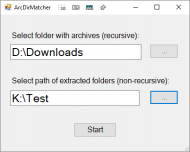
As you can see, rather simple.
It outputs to a text file in the archive folder, (ArcDirMatcher.txt), that can be easily edited to a command file and then run to remove the folders.
Sample Output
Rem -- Replace 'Matches:' with 'rmdir /s /q' in a text editor,
Rem -- then rename the extension from '.txt' to '.cmd'
Rem -- and run it to remove folders.
Rem Match 1: D:\Downloads\Books\9781783551712-LEARNING_PYTHON_Code.zip
Matches: "K:\Test\9781783551712-LEARNING_PYTHON_Code"
Rem Match 2: D:\Downloads\Books\9781783552016-MASTERING_SOCIAL_MEDIA_MINING_WITH_PYTHON_Code.zip
Matches: "K:\Test\9781783552016-MASTERING_SOCIAL_MEDIA_MINING_WITH_PYTHON_Code"
Rem Match 3: D:\Downloads\Books\9781783555130-PYTHON_MACHINE_LEARNING_code.zip
Matches: "K:\Test\9781783555130-PYTHON_MACHINE_LEARNING_code"
Rem Match 4: D:\Downloads\Books\9781783980420-PYTHON_FOR_SECRET_AGENTS_code.zip
Matches: "K:\Test\9781783980420-PYTHON_FOR_SECRET_AGENTS_code"
Rem Match 5: D:\Downloads\Books\9781784393878-PANDAS_COOKBOOK_Code.zip
Matches: "K:\Test\9781784393878-PANDAS_COOKBOOK_Code"
Rem Match 6: D:\Downloads\Books\9781785280009-LINUX_DEVICE_DRIVERS_DEVELOPMENT_Code.zip
Matches: "K:\Test\9781785280009-LINUX_DEVICE_DRIVERS_DEVELOPMENT_Code"
Rem Match 7: D:\Downloads\Books\9781785281655-DOCKER_ON_WINDOWS_Code.zip
Matches: "K:\Test\9781785281655-DOCKER_ON_WINDOWS_Code"
Rem Match 8: D:\Downloads\Books\9781785289729-MASTERING_PYTHON_Code.zip
Matches: "K:\Test\9781785289729-MASTERING_PYTHON_Code"
Rem Match 9: D:\Downloads\Books\9781785883804-BAYESIAN_ANALYSIS_WITH_PYTHON_Code.zip
Matches: "K:\Test\9781785883804-BAYESIAN_ANALYSIS_WITH_PYTHON_Code"
Rem Match 10: D:\Downloads\Books\9781785885587-NODEJS_DESIGN_PATTERNS_SECOND_EDITION_Code.zip
Matches: "K:\Test\9781785885587-NODEJS_DESIGN_PATTERNS_SECOND_EDITION_Code"
Rem Match 11: D:\Downloads\Books\9781785889622-MACHINE_LEARNING_ALGORITHMS_Code.zip
Matches: "K:\Test\9781785889622-MACHINE_LEARNING_ALGORITHMS_Code"
Rem Match 12: D:\Downloads\Books\9781786462169-TENSORFLOW_MACHINE_LEARNING_COOKBOOK_Code.zip
Matches: "K:\Test\9781786462169-TENSORFLOW_MACHINE_LEARNING_COOKBOOK_Code"
Rem Match 13: D:\Downloads\Books\9781786466204-GO_DESIGN_PATTERNS_Code.zip
Matches: "K:\Test\9781786466204-GO_DESIGN_PATTERNS_Code"
Rem Match 14: D:\Downloads\Books\9781786467171-MASTERING_OPENCV_3_SECOND_EDITION_Code.zip
Matches: "K:\Test\9781786467171-MASTERING_OPENCV_3_SECOND_EDITION_Code"
Rem Match 15: D:\Downloads\Books\9781787121706-MASTERING_C_MULTITHREADING_Code.zip
Matches: "K:\Test\9781787121706-MASTERING_C_MULTITHREADING_Code"
Rem Match 16: D:\Downloads\Books\9781787125445-MASTERING_BLOCKCHAIN_Code.zip
Matches: "K:\Test\9781787125445-MASTERING_BLOCKCHAIN_Code"
Rem Match 17: D:\Downloads\Books\9781787125643-GO_SYSTEMS_PROGRAMMING_Code.zip
Matches: "K:\Test\9781787125643-GO_SYSTEMS_PROGRAMMING_Code"
Rem Match 18: D:\Downloads\Books\9781787282049-PERL_6_DEEP_DIVE_Code.zip
Matches: "K:\Test\9781787282049-PERL_6_DEEP_DIVE_Code"
Rem Match 19: D:\Downloads\Books\9781788290142-MICROSOFT_POWER_BI_COOKBOOK_Code.zip
Matches: "K:\Test\9781788290142-MICROSOFT_POWER_BI_COOKBOOK_Code"
Rem Match 20: D:\Downloads\Books\9781788393850-ARCHITECTING_MODERN_JAVA_EE_APPLICATIONS_Code.zip
Matches: "K:\Test\9781788393850-ARCHITECTING_MODERN_JAVA_EE_APPLICATIONS_Code"
Rem Match 21: D:\Downloads\Books\9781788396646-DEVOPS_WITH_KUBERNETES_Code.zip
Matches: "K:\Test\9781788396646-DEVOPS_WITH_KUBERNETES_Code"
Rem Match 22: D:\Downloads\Books\Mastering Docker 2nd Edition_Code.zip
Matches: "K:\Test\Mastering Docker 2nd Edition_Code"
Rem Match 23: D:\Downloads\Books\Raspberry Pi Cookbook for Python Programmers - Code.zip
Matches: "K:\Test\Raspberry Pi Cookbook for Python Programmers - Code"
ArcDirMatcher.cmd after editing above output
Rem -- Replace 'Matches:' with 'rmdir /s /q' in a text editor,
Rem -- then rename the extension from '.txt' to '.cmd'
Rem -- and run it to remove folders.
Rem Match 1: D:\Downloads\Books\9781783551712-LEARNING_PYTHON_Code.zip
rmdir /s /q "K:\Test\9781783551712-LEARNING_PYTHON_Code"
Rem Match 2: D:\Downloads\Books\9781783552016-MASTERING_SOCIAL_MEDIA_MINING_WITH_PYTHON_Code.zip
rmdir /s /q "K:\Test\9781783552016-MASTERING_SOCIAL_MEDIA_MINING_WITH_PYTHON_Code"
Rem Match 3: D:\Downloads\Books\9781783555130-PYTHON_MACHINE_LEARNING_code.zip
rmdir /s /q "K:\Test\9781783555130-PYTHON_MACHINE_LEARNING_code"
Rem Match 4: D:\Downloads\Books\9781783980420-PYTHON_FOR_SECRET_AGENTS_code.zip
rmdir /s /q "K:\Test\9781783980420-PYTHON_FOR_SECRET_AGENTS_code"
Rem Match 5: D:\Downloads\Books\9781784393878-PANDAS_COOKBOOK_Code.zip
rmdir /s /q "K:\Test\9781784393878-PANDAS_COOKBOOK_Code"
Rem Match 6: D:\Downloads\Books\9781785280009-LINUX_DEVICE_DRIVERS_DEVELOPMENT_Code.zip
rmdir /s /q "K:\Test\9781785280009-LINUX_DEVICE_DRIVERS_DEVELOPMENT_Code"
Rem Match 7: D:\Downloads\Books\9781785281655-DOCKER_ON_WINDOWS_Code.zip
rmdir /s /q "K:\Test\9781785281655-DOCKER_ON_WINDOWS_Code"
Rem Match 8: D:\Downloads\Books\9781785289729-MASTERING_PYTHON_Code.zip
rmdir /s /q "K:\Test\9781785289729-MASTERING_PYTHON_Code"
Rem Match 9: D:\Downloads\Books\9781785883804-BAYESIAN_ANALYSIS_WITH_PYTHON_Code.zip
rmdir /s /q "K:\Test\9781785883804-BAYESIAN_ANALYSIS_WITH_PYTHON_Code"
Rem Match 10: D:\Downloads\Books\9781785885587-NODEJS_DESIGN_PATTERNS_SECOND_EDITION_Code.zip
rmdir /s /q "K:\Test\9781785885587-NODEJS_DESIGN_PATTERNS_SECOND_EDITION_Code"
Rem Match 11: D:\Downloads\Books\9781785889622-MACHINE_LEARNING_ALGORITHMS_Code.zip
rmdir /s /q "K:\Test\9781785889622-MACHINE_LEARNING_ALGORITHMS_Code"
Rem Match 12: D:\Downloads\Books\9781786462169-TENSORFLOW_MACHINE_LEARNING_COOKBOOK_Code.zip
rmdir /s /q "K:\Test\9781786462169-TENSORFLOW_MACHINE_LEARNING_COOKBOOK_Code"
Rem Match 13: D:\Downloads\Books\9781786466204-GO_DESIGN_PATTERNS_Code.zip
rmdir /s /q "K:\Test\9781786466204-GO_DESIGN_PATTERNS_Code"
Rem Match 14: D:\Downloads\Books\9781786467171-MASTERING_OPENCV_3_SECOND_EDITION_Code.zip
rmdir /s /q "K:\Test\9781786467171-MASTERING_OPENCV_3_SECOND_EDITION_Code"
Rem Match 15: D:\Downloads\Books\9781787121706-MASTERING_C_MULTITHREADING_Code.zip
rmdir /s /q "K:\Test\9781787121706-MASTERING_C_MULTITHREADING_Code"
Rem Match 16: D:\Downloads\Books\9781787125445-MASTERING_BLOCKCHAIN_Code.zip
rmdir /s /q "K:\Test\9781787125445-MASTERING_BLOCKCHAIN_Code"
Rem Match 17: D:\Downloads\Books\9781787125643-GO_SYSTEMS_PROGRAMMING_Code.zip
rmdir /s /q "K:\Test\9781787125643-GO_SYSTEMS_PROGRAMMING_Code"
Rem Match 18: D:\Downloads\Books\9781787282049-PERL_6_DEEP_DIVE_Code.zip
rmdir /s /q "K:\Test\9781787282049-PERL_6_DEEP_DIVE_Code"
Rem Match 19: D:\Downloads\Books\9781788290142-MICROSOFT_POWER_BI_COOKBOOK_Code.zip
rmdir /s /q "K:\Test\9781788290142-MICROSOFT_POWER_BI_COOKBOOK_Code"
Rem Match 20: D:\Downloads\Books\9781788393850-ARCHITECTING_MODERN_JAVA_EE_APPLICATIONS_Code.zip
rmdir /s /q "K:\Test\9781788393850-ARCHITECTING_MODERN_JAVA_EE_APPLICATIONS_Code"
Rem Match 21: D:\Downloads\Books\9781788396646-DEVOPS_WITH_KUBERNETES_Code.zip
rmdir /s /q "K:\Test\9781788396646-DEVOPS_WITH_KUBERNETES_Code"
Rem Match 22: D:\Downloads\Books\Mastering Docker 2nd Edition_Code.zip
rmdir /s /q "K:\Test\Mastering Docker 2nd Edition_Code"
Rem Match 23: D:\Downloads\Books\Raspberry Pi Cookbook for Python Programmers - Code.zip
rmdir /s /q "K:\Test\Raspberry Pi Cookbook for Python Programmers - Code"
Source,
note the comments at line 113 and 114 if you want to expand the filetypes or make it recurse through the extracted folder tree:
<# This form was created using POSHGUI.com  a free online gui designer for PowerShell
.NAME
    ArcDirMatcher.ps1
#>

#region begin GUI{

Add-Type -AssemblyName System.Windows.Forms
[System.Windows.Forms.Application]::EnableVisualStyles()

$Form                            = New-Object system.Windows.Forms.Form
$Form.ClientSize                 = '400,291'
$Form.text                       = "ArcDirMatcher"
$Form.TopMost                    = $false

$TextBox1                        = New-Object system.Windows.Forms.TextBox
$TextBox1.multiline              = $false
$TextBox1.width                  = 277
$TextBox1.height                 = 20
$TextBox1.location               = New-Object System.Drawing.Point(21,63)
$TextBox1.Font                   = 'Microsoft Sans Serif,17'

$Button1                         = New-Object system.Windows.Forms.Button
$Button1.text                    = "..."
$Button1.width                   = 60
$Button1.height                  = 30
$Button1.location                = New-Object System.Drawing.Point(316,63)
$Button1.Font                    = 'Microsoft Sans Serif,10'

$Label1                          = New-Object system.Windows.Forms.Label
$Label1.text                     = "Select folder with archives (recursive):"
$Label1.AutoSize                 = $true
$Label1.width                    = 25
$Label1.height                   = 10
$Label1.location                 = New-Object System.Drawing.Point(21,34)
$Label1.Font                     = 'Microsoft Sans Serif,12'

$Label2                          = New-Object system.Windows.Forms.Label
$Label2.text                     = "Select path of extracted folders (non-recursive):"
$Label2.AutoSize                 = $true
$Label2.width                    = 25
$Label2.height                   = 10
$Label2.location                 = New-Object System.Drawing.Point(21,130)
$Label2.Font                     = 'Microsoft Sans Serif,12'

$TextBox2                        = New-Object system.Windows.Forms.TextBox
$TextBox2.multiline              = $false
$TextBox2.width                  = 273
$TextBox2.height                 = 20
$TextBox2.location               = New-Object System.Drawing.Point(21,161)
$TextBox2.Font                   = 'Microsoft Sans Serif,17'

$Button2                         = New-Object system.Windows.Forms.Button
$Button2.text                    = "..."
$Button2.width                   = 60
$Button2.height                  = 30
$Button2.location                = New-Object System.Drawing.Point(316,161)
$Button2.Font                    = 'Microsoft Sans Serif,10'

$Button3                         = New-Object system.Windows.Forms.Button
$Button3.text                    = "Start"
$Button3.width                   = 90
$Button3.height                  = 30
$Button3.location                = New-Object System.Drawing.Point(155,230)
$Button3.Font                    = 'Microsoft Sans Serif,12'

$Form.controls.AddRange(@($TextBox1,$Button1,$Label1,$Label2,$TextBox2,$Button2,$Button3))

$Button1.Add_Click({
  $objForm = New-Object System.Windows.Forms.FolderBrowserDialog
  $objForm.Description = "Select folder containing archives"
  $objForm.SelectedPath = [System.Environment+SpecialFolder]'MyComputer'
  $objForm.ShowNewFolderButton = $false
  $result = $objForm.ShowDialog()
  if ($result -eq "OK") {
    $TextBox1.Text = $objForm.SelectedPath
  } else {
    $TextBox1.Text = ""
  }
})

$Button2.Add_Click({
  $objForm = New-Object System.Windows.Forms.FolderBrowserDialog
  $objForm.Description = "Select folder containing extracted archives"
  $objForm.SelectedPath = [System.Environment+SpecialFolder]'MyComputer'
  $objForm.ShowNewFolderButton = $false
  $result = $objForm.ShowDialog()
  if ($result -eq "OK") {
    $TextBox2.Text = $objForm.SelectedPath
  } else {
    $TextBox2.Text = ""
  }
})

$Button3.Add_Click({
  if (($TextBox2.Text -ne "") -and ($TextBox1.Text -ne "")) {
    Collect-Archives $TextBox2.Text $TextBox1.Text
  }
})

#endregion events }

#endregion GUI }

#Write your logic code here

Function Collect-Archives {
  param (
    [string]$path,
    [string]$drive
  )
  $Button3.Text = 'Working'
  $archives = Get-ChildItem -Path "$($drive)\*" -Recurse -Include *.arc,*.arj,*.zip,*.rar,*.7z # add more extensions if necessary
  $folders = Get-ChildItem -Path $path -Directory # add -Recurse if you want to recurse through the folders also
  $total = 0
  Out-File -FilePath ($drive + '\ArcDirMatcher.txt') -InputObject "Rem -- Replace 'Matches:' with 'rmdir /s /q' in a text editor,`r`nRem -- then rename the extension from '.txt' to '.cmd'`r`nRem -- and run it to remove folders.`r`n" -Encoding utf8
  for ($i = 0; $i -lt $archives.Count; $i++) {
    $folderName = ([io.path]::GetFileNameWithoutExtension($archives[$i]))
    for ($j = 0; $j -lt $folders.Count; $j++) {
      if ((Split-Path $folders[$j] -Leaf) -eq $folderName) {
        $total += 1
        $text = "Rem Match $($total): $($archives[$i])`r`nMatches: `"$($folders[$j].FullName)`"`r`n"
        Out-File -FilePath ($drive + '\ArcDirMatcher.txt') -InputObject $text -Append -Encoding utf8
      }
    }
  }
  $Button3.Text = 'Start'
  if ($total -ne 0) {
    Invoke-Item ($drive + '\ArcDirMatcher.txt')
  }
}

[void]$Form.ShowDialog()
Run it from the shortcut, edit the shortcut Target if it's not in the same folder as the script.
%SystemRoot%\system32\WindowsPowerShell\v1.0\powershell.exe -sta -noprofile -executionpolicy bypass -File "ArcDirMatcher.ps1"


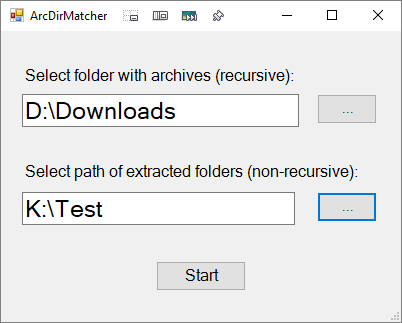
 ArcDirMatcher.7z